


Update (02/2024): Performance has improved even more! Check our updated benchmarks.
In a previous post on the Hugging Face blog, we introduced AWS Inferentia2, the second-generation AWS Inferentia accelerator, and explained how you could use optimum-neuron to quickly deploy Hugging Face models for standard text and vision tasks on AWS Inferencia 2 instances.
In a further step of integration with the AWS Neuron SDK, it is now possible to use 🤗 optimum-neuron to deploy LLM models for text generation on AWS Inferentia2.
And what better model could we choose for that demonstration than Llama 2, one of the most popular models on the Hugging Face hub.
Setup 🤗 optimum-neuron on your Inferentia2 instance
Our recommendation is to use the Hugging Face Neuron Deep Learning AMI (DLAMI). The DLAMI comes with all required libraries pre-packaged for you, including the Optimum Neuron, Neuron Drivers, Transformers, Datasets, and Accelerate.
Alternatively, you can use the Hugging Face Neuron SDK DLC to deploy on Amazon SageMaker.
Note: stay tuned for an upcoming post dedicated to SageMaker deployment.
Finally, these components can also be installed manually on a fresh Inferentia2 instance following the optimum-neuron installation instructions.
Export the Llama 2 model to Neuron
As explained in the optimum-neuron documentation, models need to be compiled and exported to a serialized format before running them on Neuron devices.
Fortunately, 🤗 optimum-neuron offers a very simple API to export standard 🤗 transformers models to the Neuron format.
>>> from optimum.neuron import NeuronModelForCausalLM

>>> compiler_args = {"num_cores": 24, "auto_cast_type": 'fp16'}
>>> input_shapes = {"batch_size": 1, "sequence_length": 2048}
>>> model = NeuronModelForCausalLM.from_pretrained(
        "meta-llama/Llama-2-7b-hf",
        export=True,
        **compiler_args,
        **input_shapes)
This deserves a little explanation:
- using
compiler_args, we specify on how many cores we want the model to be deployed (each neuron device has two cores), and with which precision (herefloat16), - using
input_shape, we set the static input and output dimensions of the model. All model compilers require static shapes, and neuron makes no exception. Note that the
sequence_lengthnot only constrains the length of the input context, but also the length of the KV cache, and thus, the output length.
Depending on your choice of parameters and inferentia host, this may take from a few minutes to more than an hour.
Fortunately, you will need to do this only once because you can save your model and reload it later.
>>> model.save_pretrained("a_local_path_for_compiled_neuron_model")
Even better, you can push it to the Hugging Face hub.
>>> model.push_to_hub(
        "a_local_path_for_compiled_neuron_model",
        repository_id="aws-neuron/Llama-2-7b-hf-neuron-latency")
Generate Text using Llama 2 on AWS Inferentia2
Once your model has been exported, you can generate text using the transformers library, as it has been described in detail in this previous post.
>>> from optimum.neuron import NeuronModelForCausalLM
>>> from transformers import AutoTokenizer

>>> model = NeuronModelForCausalLM.from_pretrained('aws-neuron/Llama-2-7b-hf-neuron-latency')
>>> tokenizer = AutoTokenizer.from_pretrained("aws-neuron/Llama-2-7b-hf-neuron-latency")

>>> inputs = tokenizer("What is deep-learning ?", return_tensors="pt")
>>> outputs = model.generate(**inputs,
                             max_new_tokens=128,
                             do_sample=True,
                             temperature=0.9,
                             top_k=50,
                             top_p=0.9)
>>> tokenizer.batch_decode(outputs, skip_special_tokens=True)
['What is deep-learning ?\nThe term “deep-learning” refers to a type of machine-learning
that aims to model high-level abstractions of the data in the form of a hierarchy of multiple
layers of increasingly complex processing nodes.']
Note: when passing multiple input prompts to a model, the resulting token sequences must be padded to the left with an end-of-stream token.
The tokenizers saved with the exported models are configured accordingly.
The following generation strategies are supported:
- greedy search,
- multinomial sampling with top-k and top-p (with temperature).
Most logits pre-processing/filters (such as repetition penalty) are supported.
All-in-one with optimum-neuron pipelines
For those who like to keep it simple, there is an even simpler way to use an LLM model on AWS inferentia 2 using optimum-neuron pipelines.
Using them is as simple as:
>>> from optimum.neuron import pipeline

>>> p = pipeline('text-generation', 'aws-neuron/Llama-2-7b-hf-neuron-budget')
>>> p("My favorite place on earth is", max_new_tokens=64, do_sample=True, top_k=50)
[{'generated_text': 'My favorite place on earth is the ocean. It is where I feel most
at peace. I love to travel and see new places. I have a'}]
Benchmarks
But how much efficient is text-generation on Inferentia2? Let’s figure out!
We have uploaded on the hub pre-compiled versions of the LLama 2 7B and 13B models with different configurations:
Note: all models are compiled with a maximum sequence length of 2048.
The llama2 7B “budget” model is meant to be deployed on inf2.xlarge instance that has only one neuron device, and enough cpu memory to load the model.
All other models are compiled to use the full extent of cores available on the inf2.48xlarge instance.
Note: please refer to the inferentia2 product page for details on the available instances.
We created two “latency” oriented configurations for the llama2 7B and llama2 13B models that can serve only one request at a time, but at full speed.
We also created two “throughput” oriented configurations to serve up to four requests in parallel.
To evaluate the models, we generate tokens up to a total sequence length of 1024, starting from
256 input tokens (i.e. we generate 256, 512 and 768 tokens).
Note: the “budget” model numbers are reported but not included in the graphs for better readability.
Encoding time
The encoding time is the time required to process the input tokens and generate the first output token.
It is a very important metric, as it corresponds to the latency directly perceived by the user when streaming generated tokens.
We test the encoding time for increasing context sizes, 256 input tokens corresponding roughly to a typical Q/A usage,
while 768 is more typical of a Retrieval Augmented Generation (RAG) use-case.
The “budget” model (Llama2 7B-B) is deployed on an inf2.xlarge instance while other models are deployed on an inf2.48xlarge instance.
Encoding time is expressed in seconds.
| input tokens | Llama2 7B-L | Llama2 7B-T | Llama2 13B-L | Llama2 13B-T | Llama2 7B-B |
|---|---|---|---|---|---|
| 256 | 0.5 | 0.9 | 0.6 | 1.8 | 0.3 |
| 512 | 0.7 | 1.6 | 1.1 | 3.0 | 0.4 |
| 768 | 1.1 | 3.3 | 1.7 | 5.2 | 0.5 |

We can see that all deployed models exhibit excellent response times, even for long contexts.
End-to-end Latency
The end-to-end latency corresponds to the total time to reach a sequence length of 1024 tokens.
It therefore includes the encoding and generation time.
The “budget” model (Llama2 7B-B) is deployed on an inf2.xlarge instance while other models are deployed on an inf2.48xlarge instance.
Latency is expressed in seconds.
| new tokens | Llama2 7B-L | Llama2 7B-T | Llama2 13B-L | Llama2 13B-T | Llama2 7B-B |
|---|---|---|---|---|---|
| 256 | 2.3 | 2.7 | 3.5 | 4.1 | 15.9 |
| 512 | 4.4 | 5.3 | 6.9 | 7.8 | 31.7 |
| 768 | 6.2 | 7.7 | 10.2 | 11.1 | 47.3 |

All models deployed on the high-end instance exhibit a good latency, even those actually configured to optimize throughput.
The “budget” deployed model latency is significantly higher, but still ok.
Throughput
We adopt the same convention as other benchmarks to evaluate the throughput, by dividing the end-to-end
latency by the sum of both input and output tokens.
In other words, we divide the end-to-end latency by batch_size * sequence_length to obtain the number of generated tokens per second.
The “budget” model (Llama2 7B-B) is deployed on an inf2.xlarge instance while other models are deployed on an inf2.48xlarge instance.
Throughput is expressed in tokens/second.
| new tokens | Llama2 7B-L | Llama2 7B-T | Llama2 13B-L | Llama2 13B-T | Llama2 7B-B |
|---|---|---|---|---|---|
| 256 | 227 | 750 | 145 | 504 | 32 |
| 512 | 177 | 579 | 111 | 394 | 24 |
| 768 | 164 | 529 | 101 | 370 | 22 |
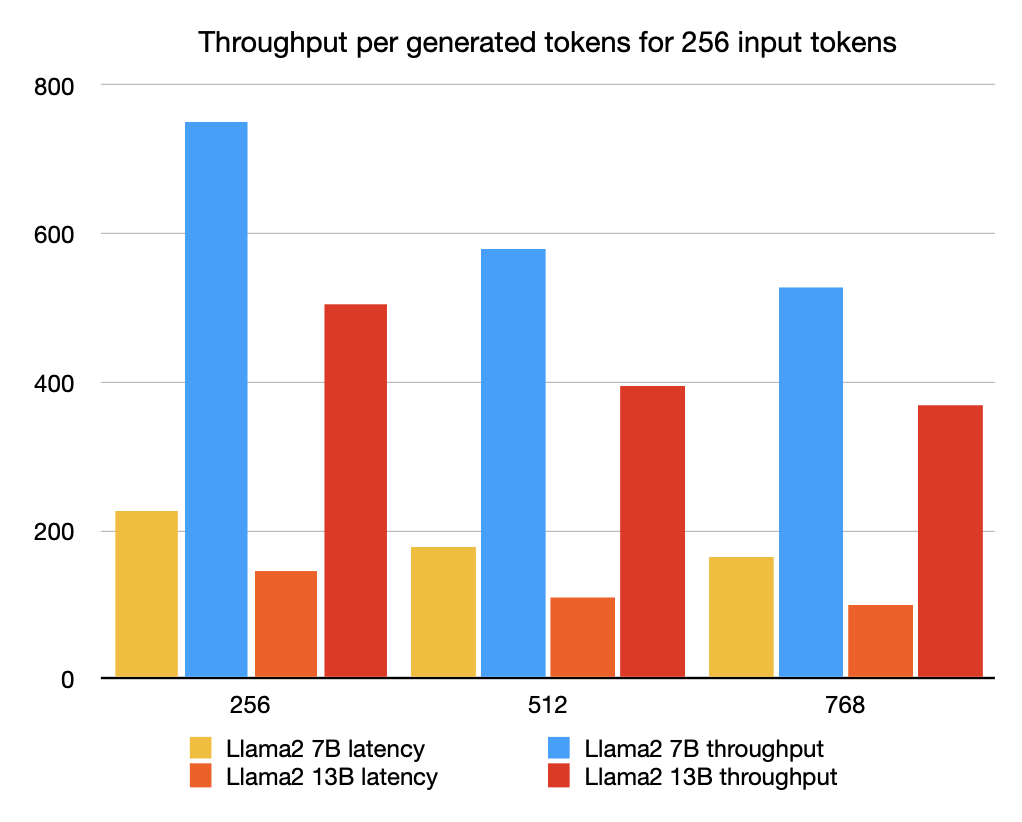
Again, the models deployed on the high-end instance have a very good throughput, even those optimized for latency.
The “budget” model has a much lower throughput, but still ok for a streaming use-case, considering that an average reader reads around 5 words per-second.
Conclusion
We have illustrated how easy it is to deploy llama2 models from the Hugging Face hub on
AWS Inferentia2 using 🤗 optimum-neuron.
The deployed models demonstrate very good performance in terms of encoding time, latency and throughput.
Interestingly, the deployed models latency is not too sensitive to the batch size, which opens the way for their deployment on inference endpoints
serving multiple requests in parallel.
There is still plenty of room for improvement though:
- in the current implementation, the only way to augment the throughput is to increase the batch size, but it is currently limited by the device memory.
Alternative options such as pipelining are currently integrated, - the static sequence length limits the model ability to encode long contexts. It would be interesting to see if attention sinks might be a valid option to address this.
