


Introduction
🤗 Datasets is an open-source library for downloading and preparing datasets from all domains. Its minimalistic API
allows users to download and prepare datasets in just one line of Python code, with a suite of functions that
enable efficient pre-processing. The number of datasets available is unparalleled, with all the most popular
machine learning datasets available to download.
Not only this, but 🤗 Datasets comes prepared with multiple audio-specific features that make working
with audio datasets easy for researchers and practitioners alike. In this blog, we’ll demonstrate these features, showcasing
why 🤗 Datasets is the go-to place for downloading and preparing audio datasets.
Contents
- The Hub
- Load an Audio Dataset
- Easy to Load, Easy to Process
- Streaming Mode: The Silver Bullet
- A Tour of Audio Datasets on the Hub
- Closing Remarks
The Hub
The Hugging Face Hub is a platform for hosting models, datasets and demos, all open source and publicly available.
It is home to a growing collection of audio datasets that span a variety of domains, tasks and languages. Through
tight integrations with 🤗 Datasets, all the datasets on the Hub can be downloaded in one line of code.
Let’s head to the Hub and filter the datasets by task:
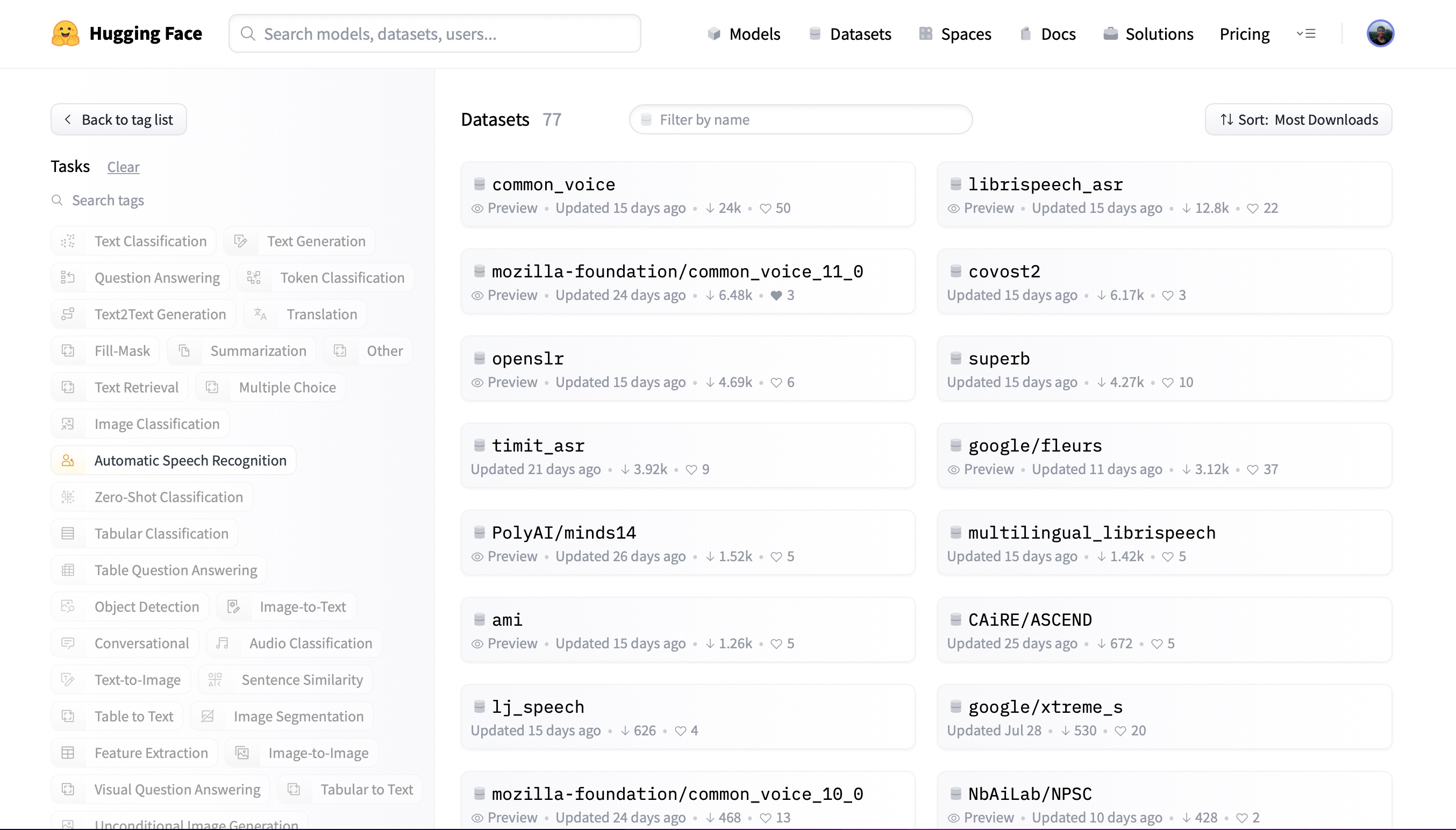
At the time of writing, there are 77 speech recognition datasets and 28 audio classification datasets on the Hub,
with these numbers ever-increasing. You can select any one of these datasets to suit your needs. Let’s check out the first
speech recognition result. Clicking on common_voice
brings up the dataset card:
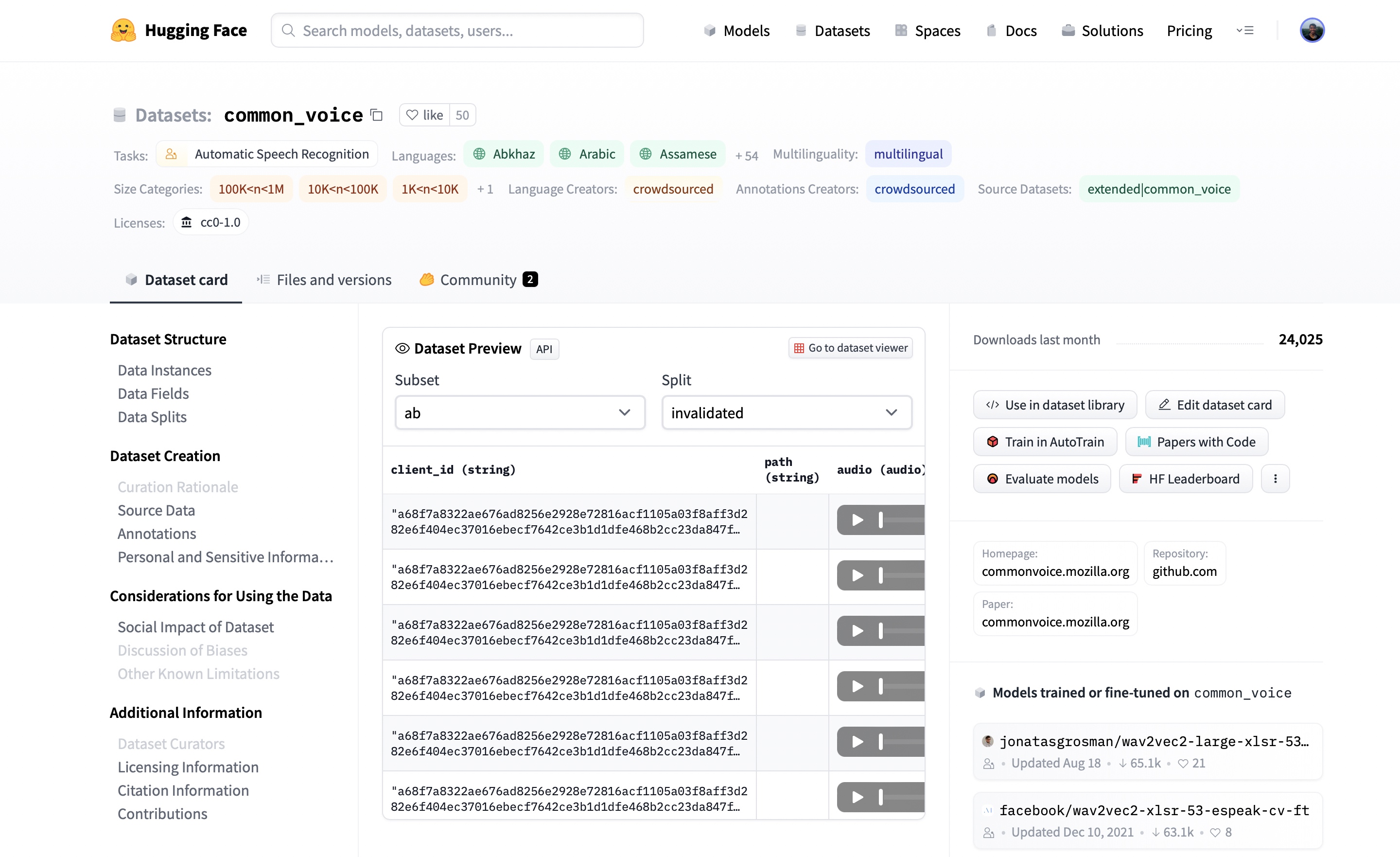
Here, we can find additional information about the dataset, see what models are trained on the dataset and, most
excitingly, listen to actual audio samples. The Dataset Preview is presented in the middle of the dataset card.
It shows us the first 100 samples for each subset and split. What’s more, it’s loaded up the audio samples ready for us
to listen to in real-time. If we hit the play button on the first sample, we can listen to the audio and see the
corresponding text.
The Dataset Preview is a brilliant way of experiencing audio datasets before committing to using them. You can pick any
dataset on the Hub, scroll through the samples and listen to the audio for the different subsets and splits, gauging whether
it’s the right dataset for your needs. Once you’ve selected a dataset, it’s trivial to load the data so that you can
start using it.
Load an Audio Dataset
One of the key defining features of 🤗 Datasets is the ability to download and prepare a dataset in just one line of
Python code. This is made possible through the load_dataset
function. Conventionally, loading a dataset involves: i) downloading the raw data, ii) extracting it from its
compressed format, and iii) preparing individual samples and splits. Using load_dataset, all of the heavy lifting is done
under the hood.
Let’s take the example of loading the GigaSpeech dataset from
Speech Colab. GigaSpeech is a relatively recent speech recognition dataset for benchmarking academic speech systems and is
one of many audio datasets available on the Hugging Face Hub.
To load the GigaSpeech dataset, we simply take the dataset’s identifier on the Hub (speechcolab/gigaspeech) and specify it
to the load_dataset function. GigaSpeech comes in five configurations
of increasing size, ranging from xs (10 hours) to xl(10,000 hours). For the purpose of this tutorial, we’ll load the smallest
of these configurations. The dataset’s identifier and the desired configuration are all that we require to download the dataset:
from datasets import load_dataset

gigaspeech = load_dataset("speechcolab/gigaspeech", "xs")

print(gigaspeech)
Print Output:
DatasetDict({
    train: Dataset({
        features: ['segment_id', 'speaker', 'text', 'audio', 'begin_time', 'end_time', 'audio_id', 'title', 'url', 'source', 'category', 'original_full_path'],
        num_rows: 9389
    })
    validation: Dataset({
        features: ['segment_id', 'speaker', 'text', 'audio', 'begin_time', 'end_time', 'audio_id', 'title', 'url', 'source', 'category', 'original_full_path'],
        num_rows: 6750
    })
    test: Dataset({
        features: ['segment_id', 'speaker', 'text', 'audio', 'begin_time', 'end_time', 'audio_id', 'title', 'url', 'source', 'category', 'original_full_path'],
        num_rows: 25619
    })
})
And just like that, we have the GigaSpeech dataset ready! There simply is no easier way of loading an audio dataset. We
can see that we have the training, validation and test splits pre-partitioned, with the corresponding information for
each.
The object gigaspeech returned by the load_dataset function is a DatasetDict.
We can treat it in much the same way as an ordinary Python dictionary. To get the train split, we pass the corresponding
key to the gigaspeech dictionary:
print(gigaspeech["train"])
Print Output:
Dataset({
    features: ['segment_id', 'speaker', 'text', 'audio', 'begin_time', 'end_time', 'audio_id', 'title', 'url', 'source', 'category', 'original_full_path'],
    num_rows: 9389
})
This returns a Dataset
object, which contains the data for the training split. We can go one level deeper and get the first item of the split.
Again, this is possible through standard Python indexing:
print(gigaspeech["train"][0])
Print Output:
{'segment_id': 'YOU0000000315_S0000660',
'speaker': 'N/A',
'text': "AS THEY'RE LEAVING CAN KASH PULL ZAHRA ASIDE REALLY QUICKLY " ,
'audio': {'path': '/home/sanchit_huggingface_co/.cache/huggingface/datasets/downloads/extracted/7f8541f130925e9b2af7d37256f2f61f9d6ff21bf4a94f7c1a3803ec648d7d79/xs_chunks_0000/YOU0000000315_S0000660.wav',
'array': array([0.0005188 , 0.00085449, 0.00012207, ..., 0.00125122, 0.00076294,
0.00036621], dtype=float32),
'sampling_rate': 16000
},
'begin_time': 2941.889892578125,
'end_time': 2945.070068359375,
'audio_id': 'YOU0000000315',
'title': 'Return to Vasselheim | Critical Role: VOX MACHINA | Episode 43',
'url': 'https://www.youtube.com/watch?v=zr2n1fLVasU',
'source': 2,
'category': 24,
'original_full_path': 'audio/youtube/P0004/YOU0000000315.opus',
}
We can see that there are a number of features returned by the training split, including segment_id, speaker, text,
audio and more. For speech recognition, we’ll be concerned with the text and audio columns.
Using 🤗 Datasets’ remove_columns method, we can remove the
dataset features not required for speech recognition:
COLUMNS_TO_KEEP = ["text", "audio"]
all_columns = gigaspeech["train"].column_names
columns_to_remove = set(all_columns) - set(COLUMNS_TO_KEEP)

gigaspeech = gigaspeech.remove_columns(columns_to_remove)
Let’s check that we’ve successfully retained the text and audio columns:
print(gigaspeech["train"][0])
Print Output:
{'text': "AS THEY'RE LEAVING CAN KASH PULL ZAHRA ASIDE REALLY QUICKLY " ,
'audio': {'path': '/home/sanchit_huggingface_co/.cache/huggingface/datasets/downloads/extracted/7f8541f130925e9b2af7d37256f2f61f9d6ff21bf4a94f7c1a3803ec648d7d79/xs_chunks_0000/YOU0000000315_S0000660.wav',
'array': array([0.0005188 , 0.00085449, 0.00012207, ..., 0.00125122, 0.00076294,
0.00036621], dtype=float32),
'sampling_rate': 16000}}
Great! We can see that we’ve got the two required columns text and audio. The text is a string with the sample
transcription and the audio a 1-dimensional array of amplitude values at a sampling rate of 16KHz. That’s our
dataset loaded!
Easy to Load, Easy to Process
Loading a dataset with 🤗 Datasets is just half of the fun. We can now use the suite of tools available to efficiently
pre-process our data ready for model training or inference. In this Section, we’ll perform three stages of data
pre-processing:
1. Resampling the Audio Data
The load_dataset function prepares audio samples with the sampling rate that they were published with. This is not
always the sampling rate expected by our model. In this case, we need to resample the audio to the correct sampling
rate.
We can set the audio inputs to our desired sampling rate using 🤗 Datasets’
cast_column
method. This operation does not change the audio in-place, but rather signals to datasets to resample the audio samples
on the fly when they are loaded. The following code cell will set the sampling rate to 8kHz:
from datasets import Audio

gigaspeech = gigaspeech.cast_column("audio", Audio(sampling_rate=8000))
Re-loading the first audio sample in the GigaSpeech dataset will resample it to the desired sampling rate:
print(gigaspeech["train"][0])
Print Output:
{'text': "AS THEY'RE LEAVING CAN KASH PULL ZAHRA ASIDE REALLY QUICKLY " ,
'audio': {'path': '/home/sanchit_huggingface_co/.cache/huggingface/datasets/downloads/extracted/7f8541f130925e9b2af7d37256f2f61f9d6ff21bf4a94f7c1a3803ec648d7d79/xs_chunks_0000/YOU0000000315_S0000660.wav',
'array': array([ 0.00046338, 0.00034808, -0.00086153, ..., 0.00099299,
0.00083484, 0.00080221], dtype=float32),
'sampling_rate': 8000}
}
We can see that the sampling rate has been downsampled to 8kHz. The array values are also different, as we’ve now only
got approximately one amplitude value for every two that we had before. Let’s set the dataset sampling rate back to
16kHz, the sampling rate expected by most speech recognition models:
gigaspeech = gigaspeech.cast_column("audio", Audio(sampling_rate=16000))

print(gigaspeech["train"][0])
Print Output:
{'text': "AS THEY'RE LEAVING CAN KASH PULL ZAHRA ASIDE REALLY QUICKLY " ,
'audio': {'path': '/home/sanchit_huggingface_co/.cache/huggingface/datasets/downloads/extracted/7f8541f130925e9b2af7d37256f2f61f9d6ff21bf4a94f7c1a3803ec648d7d79/xs_chunks_0000/YOU0000000315_S0000660.wav',
'array': array([0.0005188 , 0.00085449, 0.00012207, ..., 0.00125122, 0.00076294,
0.00036621], dtype=float32),
'sampling_rate': 16000}
}
Easy! cast_column provides a straightforward mechanism for resampling audio datasets as and when required.
2. Pre-Processing Function
One of the most challenging aspects of working with audio datasets is preparing the data in the right format for our
model. Using 🤗 Datasets’ map method, we can write a
function to pre-process a single sample of the dataset, and then apply it to every sample without any code changes.
First, let’s load a processor object from 🤗 Transformers. This processor pre-processes the audio to input features and
tokenises the target text to labels. The AutoProcessor class is used to load a processor from a given model checkpoint.
In the example, we load the processor from OpenAI’s Whisper medium.en
checkpoint, but you can change this to any model identifier on the Hugging Face Hub:
from transformers import AutoProcessor

processor = AutoProcessor.from_pretrained("openai/whisper-medium.en")
Great! Now we can write a function that takes a single training sample and passes it through the processor to prepare
it for our model. We’ll also compute the input length of each audio sample, information that we’ll need for the next
data preparation step:
def prepare_dataset(batch):
    audio = batch["audio"]
    batch = processor(audio["array"], sampling_rate=audio["sampling_rate"], text=batch["text"])

    batch["input_length"] = len(audio["array"]) / audio["sampling_rate"]
    return batch
We can apply the data preparation function to all of our training examples using 🤗 Datasets’ map method. Here, we also
remove the text and audio columns, since we have pre-processed the audio to input features and tokenised the text to
labels:
gigaspeech = gigaspeech.map(prepare_dataset, remove_columns=gigaspeech["train"].column_names)
3. Filtering Function
Prior to training, we might have a heuristic for filtering our training data. For instance, we might want to filter any
audio samples longer than 30s to prevent truncating the audio samples or risking out-of-memory errors. We can do this in
much the same way that we prepared the data for our model in the previous step.
We start by writing a function that indicates which samples to keep and which to discard. This
function, is_audio_length_in_range, returns a boolean: samples that are shorter than 30s return True, and those
that are longer False.
MAX_DURATION_IN_SECONDS = 30.0

def is_audio_length_in_range(input_length):
    return input_length < MAX_DURATION_IN_SECONDS
We can apply this filtering function to all of our training examples using 🤗 Datasets’ filter
method, keeping all samples that are shorter than 30s (True) and discarding those that are longer (False):
gigaspeech["train"] = gigaspeech["train"].filter(is_audio_length_in_range, input_columns=["input_length"])
And with that, we have the GigaSpeech dataset fully prepared for our model! In total, this process required 13 lines of
Python code, right from loading the dataset to the final filtering step.
Keeping the notebook as general as possible, we only performed the fundamental data preparation steps. However, there
is no restriction to the functions you can apply to your audio dataset. You can extend the function prepare_dataset
to perform much more involved operations, such as data augmentation, voice activity detection or noise reduction. With
🤗 Datasets, if you can write it in a Python function, you can apply it to your dataset!
Streaming Mode: The Silver Bullet
One of the biggest challenges faced with audio datasets is their sheer size. The xs configuration of GigaSpeech contained just 10
hours of training data, but amassed over 13GB of storage space for download and preparation. So what happens when we
want to train on a larger split? The full xl configuration contains 10,000 hours of training data, requiring over 1TB of
storage space. For most speech researchers, this well exceeds the specifications of a typical hard drive disk.
Do we need to fork out and buy additional storage? Or is there a way we can train on these datasets with no disk space
constraints?
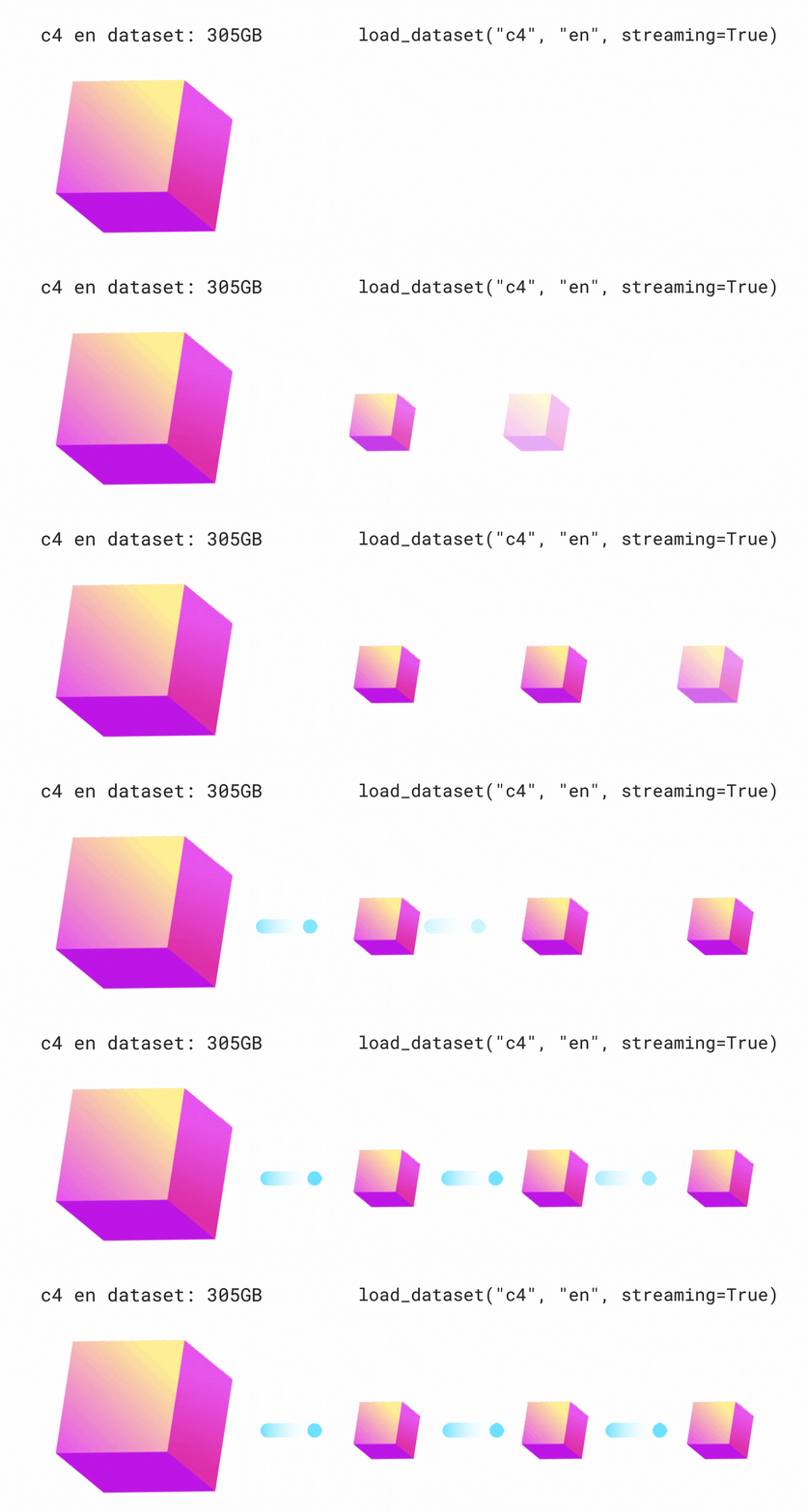
🤗 Datasets allow us to do just this. It is made possible through the use of streaming
mode, depicted graphically in Figure 1. Streaming allows us to load the data progressively as we iterate over the dataset.
Rather than downloading the whole dataset at once, we load the dataset sample by sample. We iterate over the dataset,
loading and preparing samples on the fly when they are needed. This way, we only ever load the samples that we’re using,
and not the ones that we’re not! Once we’re done with a sample, we continue iterating over the dataset and load the next one.
This is analogous to downloading a TV show versus streaming it. When we download a TV show, we download the entire video
offline and save it to our disk. We have to wait for the entire video to download before we can watch it and require as
much disk space as size of the video file. Compare this to streaming a TV show. Here, we don’t download any part of the
video to disk, but rather iterate over the remote video file and load each part in real-time as required. We don’t have
to wait for the full video to buffer before we can start watching, we can start as soon as the first portion of the video
is ready! This is the same streaming principle that we apply to loading datasets.
Streaming mode has three primary advantages over downloading the entire dataset at once:
- Disk space: samples are loaded to memory one-by-one as we iterate over the dataset. Since the data is not downloaded locally, there are no disk space requirements, so you can use datasets of arbitrary size.
- Download and processing time: audio datasets are large and need a significant amount of time to download and process. With streaming, loading and processing is done on the fly, meaning you can start using the dataset as soon as the first sample is ready.
- Easy experimentation: you can experiment on a handful samples to check that your script works without having to download the entire dataset.
There is one caveat to streaming mode. When downloading a dataset, both the raw data and processed data are saved locally
to disk. If we want to re-use this dataset, we can directly load the processed data from disk, skipping the download and
processing steps. Consequently, we only have to perform the downloading and processing operations once, after which we
can re-use the prepared data. With streaming mode, the data is not downloaded to disk. Thus, neither the downloaded nor
pre-processed data are cached. If we want to re-use the dataset, the streaming steps must be repeated, with the audio
files loaded and processed on the fly again. For this reason, it is advised to download datasets that you are likely to use
multiple times.
How can you enable streaming mode? Easy! Just set streaming=True when you load your dataset. The rest will be taken
care for you:
gigaspeech = load_dataset("speechcolab/gigaspeech", "xs", streaming=True)
All the steps covered so far in this tutorial can be applied to the streaming dataset without any code changes.
The only change is that you can no longer access individual samples using Python indexing (i.e. gigaspeech["train"][sample_idx]).
Instead, you have to iterate over the dataset, using a for loop for example.
Streaming mode can take your research to the next level: not only are the biggest datasets accessible to you, but you
can easily evaluate systems over multiple datasets in one go without worrying about your disk space. Compared
to evaluating on a single dataset, multi-dataset evaluation gives a better metric for the generalisation
abilities of a speech recognition system (c.f. End-to-end Speech Benchmark (ESB)).
The accompanying Google Colab
provides an example for evaluating the Whisper model on eight English speech recognition datasets in one script using
streaming mode.
A Tour of Audio Datasets on The Hub
This Section serves as a reference guide for the most popular speech recognition, speech translation and audio
classification datasets on the Hugging Face Hub. We can apply everything that we’ve covered for the GigaSpeech dataset
to any of the datasets on the Hub. All we have to do is switch the dataset identifier in the load_dataset function.
It’s that easy!
English Speech Recognition
Speech recognition, or speech-to-text, is the task of mapping from spoken speech to written text, where both the speech
and text are in the same language. We provide a summary of the most popular English speech recognition datasets on the Hub:
| Dataset | Domain | Speaking Style | Train Hours | Casing | Punctuation | License | Recommended Use |
|---|---|---|---|---|---|---|---|
| LibriSpeech | Audiobook | Narrated | 960 | ❌ | ❌ | CC-BY-4.0 | Academic benchmarks |
| Common Voice 11 | Wikipedia | Narrated | 2300 | ✅ | ✅ | CC0-1.0 | Non-native speakers |
| VoxPopuli | European Parliament | Oratory | 540 | ❌ | ✅ | CC0 | Non-native speakers |
| TED-LIUM | TED talks | Oratory | 450 | ❌ | ❌ | CC-BY-NC-ND 3.0 | Technical topics |
| GigaSpeech | Audiobook, podcast, YouTube | Narrated, spontaneous | 10000 | ❌ | ✅ | apache-2.0 | Robustness over multiple domains |
| SPGISpeech | Fincancial meetings | Oratory, spontaneous | 5000 | ✅ | ✅ | User Agreement | Fully formatted transcriptions |
| Earnings-22 | Fincancial meetings | Oratory, spontaneous | 119 | ✅ | ✅ | CC-BY-SA-4.0 | Diversity of accents |
| AMI | Meetings | Spontaneous | 100 | ✅ | ✅ | CC-BY-4.0 | Noisy speech conditions |
Refer to the Google Colab
for a guide on evaluating a system on all eight English speech recognition datasets in one script.
The following dataset descriptions are largely taken from the ESB Benchmark paper.
LibriSpeech ASR
LibriSpeech is a standard large-scale dataset for evaluating ASR systems. It consists of approximately 1,000
hours of narrated audiobooks collected from the LibriVox project. LibriSpeech has been
instrumental in facilitating researchers to leverage a large body of pre-existing transcribed speech data. As such, it
has become one of the most popular datasets for benchmarking academic speech systems.
librispeech = load_dataset("librispeech_asr", "all")
Common Voice
Common Voice is a series of crowd-sourced open-licensed speech datasets where speakers record text from Wikipedia in
various languages. Since anyone can contribute recordings, there is significant variation in both audio quality and
speakers. The audio conditions are challenging, with recording artefacts, accented speech, hesitations, and the presence
of foreign words. The transcriptions are both cased and punctuated. The English subset of version 11.0 contains
approximately 2,300 hours of validated data. Use of the dataset requires you to agree to the Common Voice terms of use,
which can be found on the Hugging Face Hub: mozilla-foundation/common_voice_11_0.
Once you have agreed to the terms of use, you will be granted access to the dataset. You will then need to provide an
authentication token from the Hub when you load the dataset.
common_voice = load_dataset("mozilla-foundation/common_voice_11", "en", use_auth_token=True)
VoxPopuli
VoxPopuli is a large-scale multilingual speech corpus consisting of data sourced from 2009-2020 European Parliament
event recordings. Consequently, it occupies the unique domain of oratory, political speech, largely sourced from
non-native speakers. The English subset contains approximately 550 hours labelled speech.
voxpopuli = load_dataset("facebook/voxpopuli", "en")
TED-LIUM
TED-LIUM is a dataset based on English-language TED Talk conference videos. The speaking style is oratory educational
talks. The transcribed talks cover a range of different cultural, political, and academic topics, resulting in a
technical vocabulary. The Release 3 (latest) edition of the dataset contains approximately 450 hours of training data.
The validation and test data are from the legacy set, consistent with earlier releases.
tedlium = load_dataset("LIUM/tedlium", "release3")
GigaSpeech
GigaSpeech is a multi-domain English speech recognition corpus curated from audiobooks, podcasts and YouTube. It covers
both narrated and spontaneous speech over a variety of topics, such as arts, science and sports. It contains training
splits varying from 10 hours – 10,000 hours and standardised validation and test splits.
gigaspeech = load_dataset("speechcolab/gigaspeech", "xs", use_auth_token=True)
SPGISpeech
SPGISpeech is an English speech recognition corpus composed of company earnings calls that have been manually
transcribed by S&P Global, Inc. The transcriptions are fully-formatted according to a professional style guide for
oratory and spontaneous speech. It contains training splits ranging from 200 hours – 5,000 hours, with canonical
validation and test splits.
spgispeech = load_dataset("kensho/spgispeech", "s", use_auth_token=True)
Earnings-22
Earnings-22 is a 119-hour corpus of English-language earnings calls collected from global companies. The dataset was
developed with the goal of aggregating a broad range of speakers and accents covering a range of real-world financial
topics. There is large diversity in the speakers and accents, with speakers taken from seven different language regions.
Earnings-22 was published primarily as a test-only dataset. The Hub contains a version of the dataset that has been
partitioned into train-validation-test splits.
earnings22 = load_dataset("revdotcom/earnings22")
AMI
AMI comprises 100 hours of meeting recordings captured using different recording streams. The corpus contains manually
annotated orthographic transcriptions of the meetings aligned at the word level. Individual samples of the AMI dataset
contain very large audio files (between 10 and 60 minutes), which are segmented to lengths feasible for training most
speech recognition systems. AMI contains two splits: IHM and SDM. IHM (individual headset microphone) contains easier
near-field speech, and SDM (single distant microphone) harder far-field speech.
ami = load_dataset("edinburghcstr/ami", "ihm")
Multilingual Speech Recognition
Multilingual speech recognition refers to speech recognition (speech-to-text) for all languages except English.
Multilingual LibriSpeech
Multilingual LibriSpeech is the multilingual equivalent of the LibriSpeech ASR corpus.
It comprises a large corpus of read audiobooks taken from the LibriVox project, making
it a suitable dataset for academic research. It contains data split into eight high-resource languages – English,
German, Dutch, Spanish, French, Italian, Portuguese and Polish.
Common Voice
Common Voice is a series of crowd-sourced open-licensed speech datasets where speakers record text from Wikipedia in
various languages. Since anyone can contribute recordings, there is significant variation in both audio quality and
speakers. The audio conditions are challenging, with recording artefacts, accented speech, hesitations, and the presence
of foreign words. The transcriptions are both cased and punctuated. As of version 11, there are over 100 languages
available, both low and high-resource.
VoxPopuli
VoxPopuli is a large-scale multilingual speech corpus consisting of data sourced from 2009-2020 European Parliament
event recordings. Consequently, it occupies the unique domain of oratory, political speech, largely sourced from
non-native speakers. It contains labelled audio-transcription data for 15 European languages.
FLEURS
FLEURS (Few-shot Learning Evaluation of Universal Representations of Speech) is a dataset for evaluating speech recognition
systems in 102 languages, including many that are classified as ‘low-resource’. The data is derived from the FLoRes-101
dataset, a machine translation corpus with 3001 sentence translations from English to 101 other languages. Native speakers
are recorded narrating the sentence transcriptions in their native language. The recorded audio data is paired with the
sentence transcriptions to yield multilingual speech recognition over all 101 languages. The training sets contain
approximately 10 hours of supervised audio-transcription data per language.
Speech Translation
Speech translation is the task of mapping from spoken speech to written text, where the speech and text are in different
languages (e.g. English speech to French text).
CoVoST 2
CoVoST 2 is a large-scale multilingual speech translation corpus covering translations from 21 languages into English
and from English into 15 languages. The dataset is created using Mozilla’s open-source Common Voice database of
crowd-sourced voice recordings. There are 2,900 hours of speech represented in the corpus.
FLEURS
FLEURS (Few-shot Learning Evaluation of Universal Representations of Speech) is a dataset for evaluating speech recognition
systems in 102 languages, including many that are classified as ‘low-resource’. The data is derived from the FLoRes-101
dataset, a machine translation corpus with 3001 sentence translations from English to 101 other languages. Native
speakers are recorded narrating the sentence transcriptions in their native languages. An -way parallel corpus of
speech translation data is constructed by pairing the recorded audio data with the sentence transcriptions for each of the
101 languages. The training sets contain approximately 10 hours of supervised audio-transcription data per source-target
language combination.
Audio Classification
Audio classification is the task of mapping a raw audio input to a class label output. Practical applications of audio
classification include keyword spotting, speaker intent and language identification.
SpeechCommands
SpeechCommands is a dataset comprised of one-second audio files, each containing either a single spoken word in English
or background noise. The words are taken from a small set of commands and are spoken by a number of different speakers.
The dataset is designed to help train and evaluate small on-device keyword spotting systems.
Multilingual Spoken Words
Multilingual Spoken Words is a large-scale corpus of one-second audio samples, each containing a single spoken word. The
dataset consists of 50 languages and more than 340,000 keywords, totalling 23.4 million one-second spoken examples or
over 6,000 hours of audio. The audio-transcription data is sourced from the Mozilla Common Voice project. Time stamps
are generated for every utterance on the word-level and used to extract individual spoken words and their corresponding
transcriptions, thus forming a new corpus of single spoken words. The dataset’s intended use is academic research and
commercial applications in multilingual keyword spotting and spoken term search.
FLEURS
FLEURS (Few-shot Learning Evaluation of Universal Representations of Speech) is a dataset for evaluating speech recognition
systems in 102 languages, including many that are classified as ‘low-resource’. The data is derived from the FLoRes-101
dataset, a machine translation corpus with 3001 sentence translations from English to 101 other languages. Native
speakers are recorded narrating the sentence transcriptions in their native languages. The recorded audio data is paired
with a label for the language in which it is spoken. The dataset can be used as an audio classification dataset for
language identification: systems are trained to predict the language of each utterance in the corpus.
Closing Remarks
In this blog post, we explored the Hugging Face Hub and experienced the Dataset Preview, an effective means of
listening to audio datasets before downloading them. We loaded an audio dataset with one line of Python
code and performed a series of generic pre-processing steps to prepare it for a machine learning model. In
total, this required just 13 lines of code, relying on simple Python functions to perform the necessary
operations. We introduced streaming mode, a method for loading and preparing samples of audio data on the fly. We
concluded by summarising the most popular speech recognition, speech translation and audio classification datasets on
the Hub.
Having read this blog, we hope you agree that 🤗 Datasets is the number one place for downloading and preparing audio
datasets. 🤗 Datasets is made possible through the work of the community. If you would like to contribute a dataset,
refer to the Guide for Adding a New Dataset.
Thank you to the following individuals who help contribute to the blog post: Vaibhav Srivastav, Polina Kazakova, Patrick von Platen, Omar Sanseviero and Quentin Lhoest.
