

Inference has landed in Optimum with support for Hugging Face Transformers pipelines, including text-generation using ONNX Runtime.
The adoption of BERT and Transformers continues to grow. Transformer-based models are now not only achieving state-of-the-art performance in Natural Language Processing but also for Computer Vision, Speech, and Time-Series. 💬 🖼 🎤 ⏳
Companies are now moving from the experimentation and research phase to the production phase in order to use Transformer models for large-scale workloads. But by default BERT and its friends are relatively slow, big, and complex models compared to traditional Machine Learning algorithms.
To solve this challenge, we created Optimum – an extension of Hugging Face Transformers to accelerate the training and inference of Transformer models like BERT.
In this blog post, you’ll learn:
Let’s get started! 🚀
1. What is Optimum? An ELI5
Hugging Face Optimum is an open-source library and an extension of Hugging Face Transformers, that provides a unified API of performance optimization tools to achieve maximum efficiency to train and run models on accelerated hardware, including toolkits for optimized performance on Graphcore IPU and Habana Gaudi. Optimum can be used for accelerated training, quantization, graph optimization, and now inference as well with support for transformers pipelines.
2. New Optimum inference and pipeline features
With release of Optimum 1.2, we are adding support for inference and transformers pipelines. This allows Optimum users to leverage the same API they are used to from transformers with the power of accelerated runtimes, like ONNX Runtime.
Switching from Transformers to Optimum Inference
The Optimum Inference models are API compatible with Hugging Face Transformers models. This means you can just replace your AutoModelForXxx class with the corresponding ORTModelForXxx class in Optimum. For example, this is how you can use a question answering model in Optimum:
from transformers import AutoTokenizer, pipeline
-from transformers import AutoModelForQuestionAnswering
+from optimum.onnxruntime import ORTModelForQuestionAnswering

-model = AutoModelForQuestionAnswering.from_pretrained("deepset/roberta-base-squad2") # pytorch checkpoint
+model = ORTModelForQuestionAnswering.from_pretrained("optimum/roberta-base-squad2") # onnx checkpoint
tokenizer = AutoTokenizer.from_pretrained("deepset/roberta-base-squad2")

optimum_qa = pipeline("question-answering", model=model, tokenizer=tokenizer)

question = "What's my name?"
context = "My name is Philipp and I live in Nuremberg."
pred = optimum_qa(question, context)
In the first release, we added support for ONNX Runtime but there is more to come!
These new ORTModelForXX can now be used with the transformers pipelines. They are also fully integrated into the Hugging Face Hub to push and pull optimized checkpoints from the community. In addition to this, you can use the ORTQuantizer and ORTOptimizer to first quantize and optimize your model and then run inference on it.
Check out End-to-End Tutorial on accelerating RoBERTa for question-answering including quantization and optimization for more details.
3. End-to-End tutorial on accelerating RoBERTa for Question-Answering including quantization and optimization
In this End-to-End tutorial on accelerating RoBERTa for question-answering, you will learn how to:
- Install
Optimumfor ONNX Runtime - Convert a Hugging Face
Transformersmodel to ONNX for inference - Use the
ORTOptimizerto optimize the model - Use the
ORTQuantizerto apply dynamic quantization - Run accelerated inference using Transformers pipelines
- Evaluate the performance and speed
Let’s get started 🚀
This tutorial was created and run on an m5.xlarge AWS EC2 Instance.
3.1 Install Optimum for Onnxruntime
Our first step is to install Optimum with the onnxruntime utilities.
pip install "optimum[onnxruntime]==1.2.0"
This will install all required packages for us including transformers, torch, and onnxruntime. If you are going to use a GPU you can install optimum with pip install optimum[onnxruntime-gpu].
3.2 Convert a Hugging Face Transformers model to ONNX for inference**
Before we can start optimizing we need to convert our vanilla transformers model to the onnx format. To do this we will use the new ORTModelForQuestionAnswering class calling the from_pretrained() method with the from_transformers attribute. The model we are using is the deepset/roberta-base-squad2 a fine-tuned RoBERTa model on the SQUAD2 dataset achieving an F1 score of 82.91 and as the feature (task) question-answering.
from pathlib import Path
from transformers import AutoTokenizer, pipeline
from optimum.onnxruntime import ORTModelForQuestionAnswering

model_id = "deepset/roberta-base-squad2"
onnx_path = Path("onnx")
task = "question-answering"


model = ORTModelForQuestionAnswering.from_pretrained(model_id, from_transformers=True)
tokenizer = AutoTokenizer.from_pretrained(model_id)


model.save_pretrained(onnx_path)
tokenizer.save_pretrained(onnx_path)


optimum_qa = pipeline(task, model=model, tokenizer=tokenizer, handle_impossible_answer=True)
prediction = optimum_qa(question="What's my name?", context="My name is Philipp and I live in Nuremberg.")

print(prediction)
We successfully converted our vanilla transformers to onnx and used the model with the transformers.pipelines to run the first prediction. Now let’s optimize it. 🏎
If you want to learn more about exporting transformers model check-out the documentation: Export 🤗 Transformers Models
3.3 Use the ORTOptimizer to optimize the model
After we saved our onnx checkpoint to onnx/ we can now use the ORTOptimizer to apply graph optimization such as operator fusion and constant folding to accelerate latency and inference.
from optimum.onnxruntime import ORTOptimizer
from optimum.onnxruntime.configuration import OptimizationConfig


optimizer = ORTOptimizer.from_pretrained(model_id, feature=task)
optimization_config = OptimizationConfig(optimization_level=99)


optimizer.export(
    onnx_model_path=onnx_path / "model.onnx",
    onnx_optimized_model_output_path=onnx_path / "model-optimized.onnx",
    optimization_config=optimization_config,
)
To test performance we can use the ORTModelForQuestionAnswering class again and provide an additional file_name parameter to load our optimized model. (This also works for models available on the hub).
from optimum.onnxruntime import ORTModelForQuestionAnswering


opt_model = ORTModelForQuestionAnswering.from_pretrained(onnx_path, file_name="model-optimized.onnx")


opt_optimum_qa = pipeline(task, model=opt_model, tokenizer=tokenizer, handle_impossible_answer=True)
prediction = opt_optimum_qa(question="What's my name?", context="My name is Philipp and I live in Nuremberg.")
print(prediction)
We will evaluate the performance changes in step 3.6 Evaluate the performance and speed in detail.
3.4 Use the ORTQuantizer to apply dynamic quantization
After we have optimized our model we can accelerate it even more by quantizing it using the ORTQuantizer. The ORTOptimizer can be used to apply dynamic quantization to decrease the size of the model size and accelerate latency and inference.
We use the avx512_vnni since the instance is powered by an intel cascade-lake CPU supporting avx512.
from optimum.onnxruntime import ORTQuantizer
from optimum.onnxruntime.configuration import AutoQuantizationConfig


quantizer = ORTQuantizer.from_pretrained(model_id, feature=task)
qconfig = AutoQuantizationConfig.avx512_vnni(is_static=False, per_channel=True)


quantizer.export(
    onnx_model_path=onnx_path / "model-optimized.onnx",
    onnx_quantized_model_output_path=onnx_path / "model-quantized.onnx",
    quantization_config=qconfig,
)
We can now compare this model size as well as some latency performance
import os

size = os.path.getsize(onnx_path / "model.onnx")/(1024*1024)
print(f"Vanilla Onnx Model file size: {size:.2f} MB")
size = os.path.getsize(onnx_path / "model-quantized.onnx")/(1024*1024)
print(f"Quantized Onnx Model file size: {size:.2f} MB")
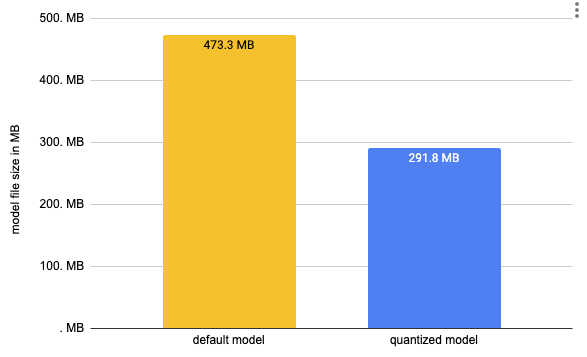
We decreased the size of our model by almost 50% from 473MB to 291MB. To run inference we can use the ORTModelForQuestionAnswering class again and provide an additional file_name parameter to load our quantized model. (This also works for models available on the hub).
quantized_model = ORTModelForQuestionAnswering.from_pretrained(onnx_path, file_name="model-quantized.onnx")


quantized_optimum_qa = pipeline(task, model=quantized_model, tokenizer=tokenizer, handle_impossible_answer=True)
prediction = quantized_optimum_qa(question="What's my name?", context="My name is Philipp and I live in Nuremberg.")
print(prediction)
Nice! The model predicted the same answer.
3.5 Run accelerated inference using Transformers pipelines
Optimum has built-in support for transformers pipelines. This allows us to leverage the same API that we know from using PyTorch and TensorFlow models. We have already used this feature in steps 3.2,3.3 & 3.4 to test our converted and optimized models. At the time of writing this, we are supporting ONNX Runtime with more to come in the future. An example of how to use the transformers pipelines can be found below.
from transformers import AutoTokenizer, pipeline
from optimum.onnxruntime import ORTModelForQuestionAnswering

tokenizer = AutoTokenizer.from_pretrained(onnx_path)
model = ORTModelForQuestionAnswering.from_pretrained(onnx_path)

optimum_qa = pipeline("question-answering", model=model, tokenizer=tokenizer)
prediction = optimum_qa(question="What's my name?", context="My name is Philipp and I live in Nuremberg.")

print(prediction)
In addition to this we added a pipelines API to Optimum to guarantee more safety for your accelerated models. Meaning if you are trying to use optimum.pipelines with an unsupported model or task you will see an error. You can use optimum.pipelines as a replacement for transformers.pipelines.
from transformers import AutoTokenizer
from optimum.onnxruntime import ORTModelForQuestionAnswering
from optimum.pipelines import pipeline

tokenizer = AutoTokenizer.from_pretrained(onnx_path)
model = ORTModelForQuestionAnswering.from_pretrained(onnx_path)

optimum_qa = pipeline("question-answering", model=model, tokenizer=tokenizer, handle_impossible_answer=True)
prediction = optimum_qa(question="What's my name?", context="My name is Philipp and I live in Nuremberg.")

print(prediction)
3.6 Evaluate the performance and speed
During this End-to-End tutorial on accelerating RoBERTa for Question-Answering including quantization and optimization, we created 3 different models. A vanilla converted model, an optimized model, and a quantized model.
As the last step of the tutorial, we want to take a detailed look at the performance and accuracy of our model. Applying optimization techniques, like graph optimizations or quantization not only impact performance (latency) those also might have an impact on the accuracy of the model. So accelerating your model comes with a trade-off.
Let’s evaluate our models. Our transformers model deepset/roberta-base-squad2 was fine-tuned on the SQUAD2 dataset. This will be the dataset we use to evaluate our models.
from datasets import load_metric,load_dataset

metric = load_metric("squad_v2")
dataset = load_dataset("squad_v2")["validation"]

print(f"length of dataset {len(dataset)}")
We can now leverage the map function of datasets to iterate over the validation set of squad 2 and run prediction for each data point. Therefore we write a evaluate helper method which uses our pipelines and applies some transformation to work with the squad v2 metric.
This can take quite a while (1.5h)
def evaluate(example):
  default = optimum_qa(question=example["question"], context=example["context"])
  optimized = opt_optimum_qa(question=example["question"], context=example["context"])
  quantized = quantized_optimum_qa(question=example["question"], context=example["context"])
  return {
      'reference': {'id': example['id'], 'answers': example['answers']},
      'default': {'id': example['id'],'prediction_text': default['answer'], 'no_answer_probability': 0.},
      'optimized': {'id': example['id'],'prediction_text': optimized['answer'], 'no_answer_probability': 0.},
      'quantized': {'id': example['id'],'prediction_text': quantized['answer'], 'no_answer_probability': 0.},
      }

result = dataset.map(evaluate)
Now lets compare the results
default_acc = metric.compute(predictions=result["default"], references=result["reference"])
optimized = metric.compute(predictions=result["optimized"], references=result["reference"])
quantized = metric.compute(predictions=result["quantized"], references=result["reference"])

print(f"vanilla model: exact={default_acc['exact']}% f1={default_acc['f1']}%")
print(f"optimized model: exact={optimized['exact']}% f1={optimized['f1']}%")
print(f"quantized model: exact={quantized['exact']}% f1={quantized['f1']}%")
Our optimized & quantized model achieved an exact match of 78.75% and an f1 score of 81.83% which is 99.61% of the original accuracy. Achieving 99% of the original model is very good especially since we used dynamic quantization.
Okay, let’s test the performance (latency) of our optimized and quantized model.
But first, let’s extend our context and question to a more meaningful sequence length of 128.
context="Hello, my name is Philipp and I live in Nuremberg, Germany. Currently I am working as a Technical Lead at Hugging Face to democratize artificial intelligence through open source and open science. In the past I designed and implemented cloud-native machine learning architectures for fin-tech and insurance companies. I found my passion for cloud concepts and machine learning 5 years ago. Since then I never stopped learning. Currently, I am focusing myself in the area NLP and how to leverage models like BERT, Roberta, T5, ViT, and GPT2 to generate business value."
question="As what is Philipp working?"
To keep it simple, we are going to use a python loop and calculate the avg/mean latency for our vanilla model and for the optimized and quantized model.
from time import perf_counter
import numpy as np

def measure_latency(pipe):
    latencies = []

    for _ in range(10):
        _ = pipe(question=question, context=context)

    for _ in range(100):
        start_time = perf_counter()
        _ =  pipe(question=question, context=context)
        latency = perf_counter() - start_time
        latencies.append(latency)

    time_avg_ms = 1000 * np.mean(latencies)
    time_std_ms = 1000 * np.std(latencies)
    return f"Average latency (ms) - {time_avg_ms:.2f} +\- {time_std_ms:.2f}"

print(f"Vanilla model {measure_latency(optimum_qa)}")
print(f"Optimized & Quantized model {measure_latency(quantized_optimum_qa)}")
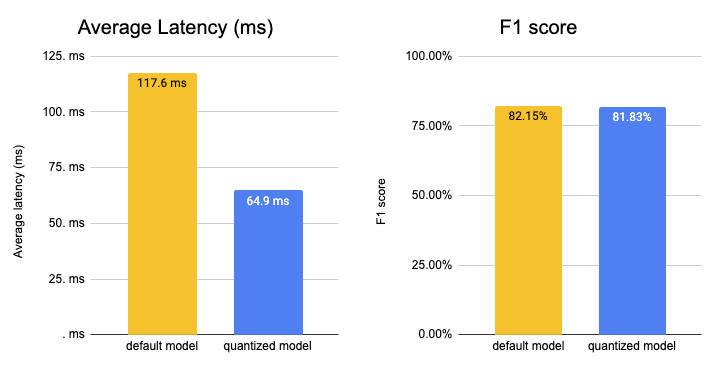
We managed to accelerate our model latency from 117.61ms to 64.94ms or roughly 2x while keeping 99.61% of the accuracy. Something we should keep in mind is that we used a mid-performant CPU instance with 2 physical cores. By switching to GPU or a more performant CPU instance, e.g. ice-lake powered you can decrease the latency number down to a few milliseconds.
4. Current Limitations
We just started supporting inference in https://github.com/huggingface/optimum so we would like to share current limitations as well. All of those limitations are on the roadmap and will be resolved in the near future.
- Remote Models > 2GB: Currently, only models smaller than 2GB can be loaded from the Hugging Face Hub. We are working on adding support for models > 2GB / multi-file models.
- Seq2Seq tasks/model: We don’t have support for seq2seq tasks, like summarization and models like T5 mostly due to the limitation of the single model support. But we are actively working to solve it, to provide you with the same experience you are familiar with in transformers.
- Past key values: Generation models like GPT-2 use something called past key values which are precomputed key-value pairs of the attention blocks and can be used to speed up decoding. Currently the ORTModelForCausalLM is not using past key values.
- No cache: Currently when loading an optimized model (*.onnx), it will not be cached locally.
5. Optimum Inference FAQ
Which tasks are supported?
You can find a list of all supported tasks in the documentation. Currently support pipelines tasks are feature-extraction, text-classification, token-classification, question-answering, zero-shot-classification, text-generation
Which models are supported?
Any model that can be exported with transformers.onnx and has a supported task can be used, this includes among others BERT, ALBERT, GPT2, RoBERTa, XLM-RoBERTa, DistilBERT ….
Which runtimes are supported?
Currently, ONNX Runtime is supported. We are working on adding more in the future. Let us know if you are interested in a specific runtime.
How can I use Optimum with Transformers?
You can find an example and instructions in our documentation.
How can I use GPUs?
To be able to use GPUs you simply need to install optimum[onnxruntine-gpu] which will install the required GPU providers and use them by default.
How can I use a quantized and optimized model with pipelines?
You can load the optimized or quantized model using the new ORTModelForXXX classes using the from_pretrained method. You can learn more about it in our documentation.
6. What’s next?
What’s next for Optimum you ask? A lot of things. We are focused on making Optimum the reference open-source toolkit to work with transformers for acceleration & optimization. To be able to achieve this we will solve the current limitations, improve the documentation, create more content and examples and push the limits for accelerating and optimizing transformers.
Some important features on the roadmap for Optimum amongst the current limitations are:
- Support for speech models (Wav2vec2) and speech tasks (automatic speech recognition)
- Support for vision models (ViT) and vision tasks (image classification)
- Improve performance by adding support for OrtValue and IOBinding
- Easier ways to evaluate accelerated models
- Add support for other runtimes and providers like TensorRT and AWS-Neuron
Thanks for reading! If you are as excited as I am about accelerating Transformers, make them efficient and scale them to billions of requests. You should apply, we are hiring.🚀
If you have any questions, feel free to contact me, through Github, or on the forum. You can also connect with me on Twitter or LinkedIn.
