

Thanks to Amit Gupta, Senior Director- AI/ML and Mark Wang, Software Engineering PMTS from Salesforce for your contributions in the vision and partnership of cross-Region inference routing on SageMaker AI.
Salesforce’s Agentforce Foundation team serves a wide variety of models for products across Salesforce, including Agentforce and the Salesforce Trust Layer, in 30+ global Regions. These include both models trained in house and open source models. Hosting models separately in each Region splits capacity and makes traffic spikes harder to absorb, which turns a capacity shortfall into an availability problem.
This post shows how Salesforce set up the cross-Region inference routing in SageMaker AI and how it lets the team add capacity securely while keeping its data residency commitments. It also walks through how Salesforce sees where each request was served and why. The cross-Region inference routing gives an application one invocation path across SageMaker AI endpoints in several Regions and accounts, and sends each request to an endpoint that can serve it. Those endpoints are Salesforce’s own, already deployed. The post starts with the capacity problem Salesforce faced, explains how the router works and how Salesforce integrated it into its Internal Gateway, walks through an example setup, and then describes what the team observed.
Why serving these models makes capacity a reliability problem
Salesforce’s Agentforce Foundation team serves customers from the Region their requests come from, across 30+ global Regions and hundreds of AWS accounts, and they provision capacity based on each customer’s traffic. Every customer has its own peak window, and those windows often overlap. Provisioning for the overlapping peak would be the safe choice, but it costs too much. Customers also onboard new business units at short notice, so they must grow the fleet quickly. Adding capacity quickly, Region by Region, leaves Salesforce with capacity fragmentation: some Regions have idle instances while others run out.
Before the cross-Region inference routing in SageMaker AI, Salesforce used its Internal Gateway to send traffic that the local endpoints couldn’t handle to other Regions. The team built and operated this path, supported by basic health checks, retries, and Region-switching logic. That approach had two gaps. First, the gateway had no capacity signals from either the local or the remote endpoint, so it couldn’t tell when to shift traffic or whether the destination had room. Second, cross-Region traffic had to leave the virtual private cloud (VPC) through a NAT gateway and an internet gateway and travel over public AWS networking. In design reviews, the team also raised the risk of cascading failures: moving traffic during an incident can overload the next Region, so Salesforce needed a cap on cross-Region traffic.
Building this logic separately in every application doesn’t scale across Salesforce. The team needed a managed, capacity-aware routing path.
What the inference router does
The inference router is a Regional SageMaker AI resource in your account. Your application invokes the router instead of an endpoint, passing a routing target name with the same request body and content type it sends to InvokeEndpoint today. A routing target is a name you choose for one logical model, such as a toxicity classifier, and it lists the endpoints and inference components that may serve that model by their full Amazon Resource Names (ARNs). A router holds one routing target per model, and a problem with one model’s endpoints does not move traffic for the others. A routing target can mix single-model endpoints and inference components.
Because each destination is named by its ARN, it can be in another Region or another AWS account. The account that owns an endpoint grants access through a resource-based endpoint policy that allows one named router to invoke it, which is how Salesforce runs it.
The router prefers its own Region, and while the local destination serves successfully, requests stay there. The router judges each destination by the outcomes of recent requests. Platform faults, 5xx errors from the model container, throttles, and timeouts lower a destination’s health. As they persist, the router moves a growing share of new requests to healthy destinations, typically starting within about a minute. It can take several minutes for a destination with little traffic. Signals such as scaling progress and failed instance launches affect how quickly the router responds once errors appear, but they do not move traffic by themselves. After recovery, traffic returns over several minutes, more slowly than it left, so it does not swing back and forth. When a destination fails a request without running the model, for example by throttling it, the router retries that request once on another destination.
Client errors such as invalid input do not move traffic, because they would fail the same way in any Region. Model latency does not move traffic either, because a slow response often reflects a long prompt or output and does not by itself mean the endpoint is unhealthy. The router also does not deploy models, copy artifacts, or add instances. It uses the capacity you have deployed, and each endpoint’s own autoscaling keeps adding instances as its traffic grows.
How Salesforce integrated the router into its Internal Gateway
In Salesforce’s Internal Gateway, the router call sits exactly where the direct InvokeEndpoint call used to be: in the per-request egress path, after the data residency check and before response handling. That check is the one routing decision the gateway keeps. A request tagged with a residency requirement is pinned to its in-Region routing target, whose only destination is the local endpoint, so it can never fail over across a boundary. Everything else goes to the router with the same body, content type, and accept type the gateway already sent. Capacity awareness, health assessment, and failover now live in the routing layer instead of in Salesforce’s code.
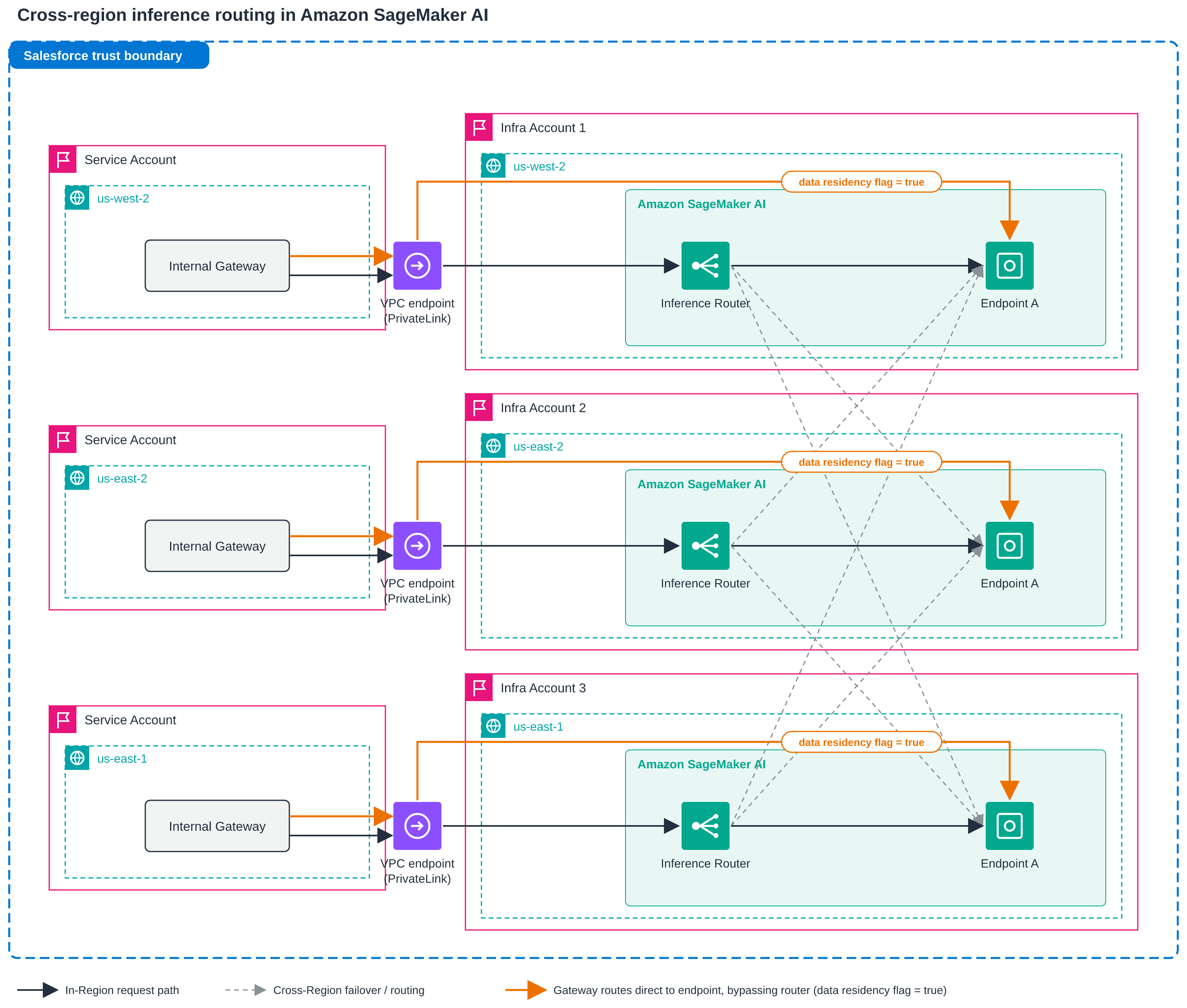
Figure 1: End-to-end architecture for cross-Region inference routing at Salesforce. In each Region, the Internal Gateway sends client requests through a VPC endpoint (AWS PrivateLink). Requests with the data residency flag set to true go directly to the in-Region Endpoint A and never leave their Region. All other requests go to the local inference router, which sends traffic to its local Endpoint A by default and fails over to Endpoint A in another Region when the local endpoint shows signs of capacity constraints
Salesforce treats the two routing fields on every response as first-class telemetry. The gateway logs InvokedRoutedResourceArn and RoutingReason on the same structured line as the existing request ID and trace ID, and emits them as application performance monitoring (APM) tags. Because the ARN carries the Region and account, a single log line shows whether a request ran locally or crossed a boundary, and why: local-preferred, failover, capacity-available, or only-healthy. The team joins these fields against the router’s Amazon CloudWatch metrics when investigating a traffic shift.
The gateway’s timeout accounts for cross-Region round-trip latency, so a request that fails over has time to complete in the remote Region. Because the router already retries once on another destination, the gateway adds no retries of its own, which keeps attempts from multiplying during an incident.
Example setup
The following walkthrough shows the configuration Salesforce tested, using example IDs and names. Salesforce first created a router in the US West (Oregon) Region (us-west-2) with a local destination and confirmed that requests were routed to it. The team then registered an endpoint in the US East (Ohio) Region (us-east-2) owned by a different account, removed the local destination, and confirmed that requests reached the remote endpoint across the account and Region boundary. In the examples, the router account is 111122223333, and the account that owns the us-east-2 endpoint is 444455556666.
Authorize the router on the destination endpoint
In the account that owns the us-east-2 endpoint, the owner attaches a resource-based policy that allows the router account to invoke the endpoint, with a condition that limits access to one named router. The router does not need to exist yet, so you can use the ARN of the router you plan to create.
The sagemaker:SourceInferenceRouterArn condition means the router account can reach the endpoint only through that router. The endpoint owner can revoke access at any time with delete-endpoint-policy.
Create the router
In the router account, create the router in us-west-2 with one routing target that lists both destinations by ARN.
Each additional model becomes another entry in RoutingTargets.
Confirm that each destination is routable
Before sending traffic, call DescribeInferenceRouter and check each destination’s RoutingStatus. Routable means SageMaker AI could read the destination and it can serve traffic. Unroutable means the destination was read but can’t serve right now, for example because the endpoint is not InService. Unknown means SageMaker AI couldn’t read the destination with your credentials, for example because you lack sagemaker:DescribeEndpoint (or sagemaker:DescribeInferenceComponent for an inference component), or, for a destination in another account, because its endpoint policy doesn’t grant Describe.
Invoke the router instead of the endpoint
The change in the calling code is small. The request body, content type, and accept type stay exactly as they were. The client and operation change, and the endpoint name is replaced by the router name and the routing target name.
An InferenceId and CustomAttributes are passed through to the destination as with InvokeEndpoint, so identifiers such as a trace ID travel with the request. Members such as TargetVariant and InferenceComponentName are not used, because the routing target replaces them.
Seeing where requests went
Most teams evaluating a routing layer first ask how to tell what it did. The inference router answers on every response and in Amazon CloudWatch. Each response carries the ARN of the destination that served it and a routing reason, in the InvokedRoutedResourceArn and RoutingReason fields and in the matching X-Amzn-SageMaker-Invoked-Routed-Resource-Arn and X-Amzn-SageMaker-Invoked-Routing-Reason headers. Because the ARN includes the Region and account, logging both values with your own request logs gives you a per-request record of whether each call ran locally or crossed a boundary.
The routing reason takes one of four values. local-preferred means a healthy destination in the router’s Region served the request. failover means a destination in the router’s Region exists but isn’t serving reliably, so the router sent the request elsewhere. capacity-available means no destination in the router’s Region could take the request, and it went to one of several healthy destinations in other Regions. only-healthy means it was served by the only eligible destination that was healthy.
In aggregate, the router publishes OpenTelemetry metrics to CloudWatch in its own account and Region, each carrying the router name and destination ARN, so the cross-Region picture is visible from one place. aws.sagemaker.inference_router.invocations counts requests per destination, and its error.type attribute splits failures into invocation_4xx, invocation_5xx (including timeouts), and invocation_model_error for errors returned by the model.
aws.sagemaker.inference_router.destination.duration measures the time each destination took, and aws.sagemaker.inference_router.overhead.duration measures the time the router added, including the network to and from a remote Region. aws.sagemaker.inference_router.destination.status reports each destination’s health state as healthy, overloaded, or degraded. You query these metrics with PromQL in CloudWatch Query Studio, and you can place them next to each endpoint’s existing SageMaker AI metrics on a cross-account, cross-Region dashboard.
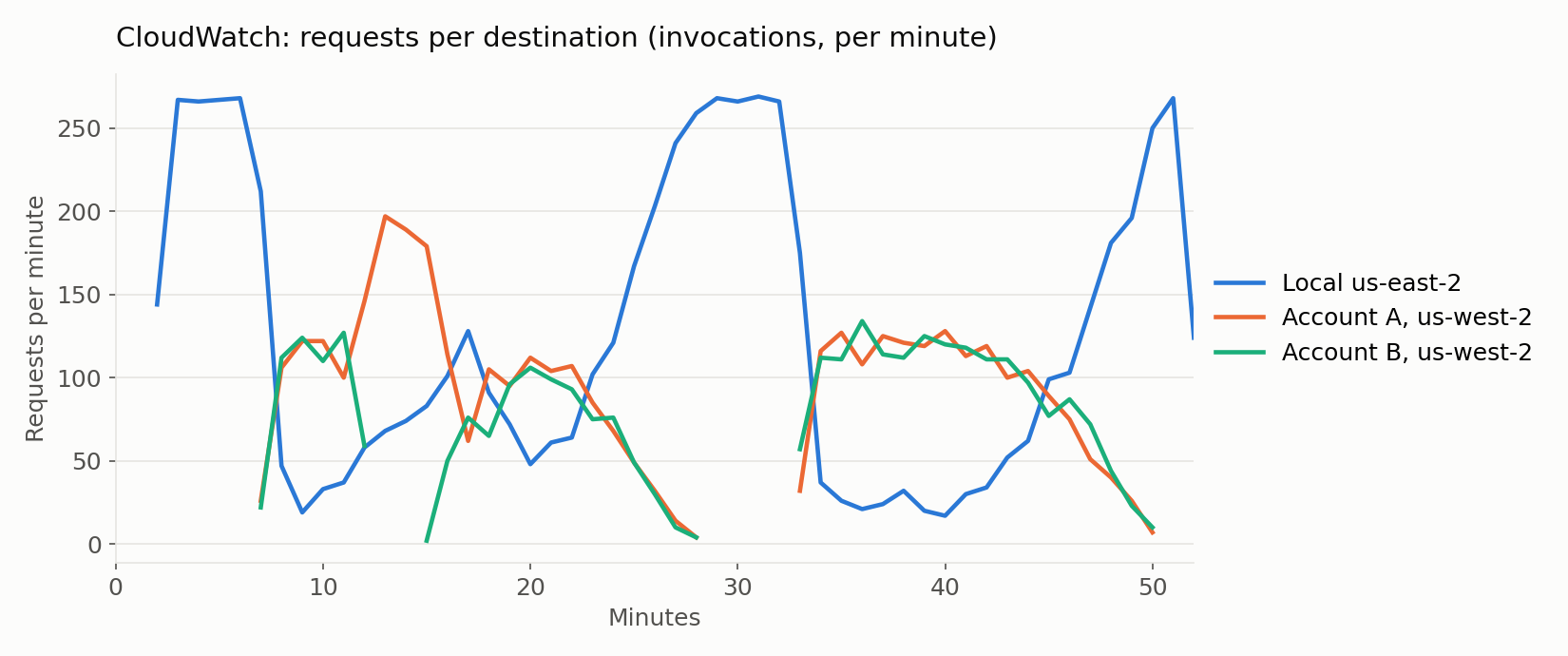
Figure 2: CloudWatch dashboard during a failover test run by AWS with a test model. Requests per destination shift from the local us-east-2 endpoint to endpoints in us-west-2 as the local destination becomes degraded, then return gradually after recovery
Testing failover across accounts and Regions
Salesforce tested the router in two configurations. First, same-Region routing in us-west-2, where the Internal Gateway called the local inference router and the router sent requests to the local Endpoint A. Second, cross-account, cross-Region routing, where the router in us-west-2 also listed an endpoint in us-east-2 owned by a separate infrastructure account. Before sending traffic, the team called DescribeInferenceRouter and confirmed that the routing target listed both destinations and that both reported a RoutingStatus of Routable. Requests sent to the router were then served by the local endpoint, with a routing reason of local-preferred. Setup took little effort: the endpoint owner added an endpoint policy for the router’s account, and the router call replaced the direct InvokeEndpoint call in the gateway’s egress path, with the same request body, content type, and accept type.
To test failover, the team flooded the local endpoint in us-west-2 until it was saturated, while a separate probe kept invoking the router and recorded where each request was served and how long it took. For about five minutes of saturation, probe latency at p50 rose from 0.2 seconds to 45 to 58 seconds, and traffic stayed in us-west-2. This is the intended behavior, because latency alone does not move traffic. When requests began to exceed the model container’s 60-second handler timeout and return errors, the router started to shift traffic. The first requests reached us-east-2 about two minutes after the first errors, and within another minute about 78 percent of probe traffic was served in us-east-2. The remaining 20 to 25 percent stayed local so the router could detect recovery.
Once traffic had moved, p50 latency returned to 0.2 seconds, and the cross-Region path added under 100 milliseconds at p50. After the local endpoint recovered, traffic returned to us-west-2 gradually over about 10 minutes, and the probe recorded no errors during failover or failback. The InvokedRoutedResourceArn and RoutingReason fields on each response, together with the router’s per-destination invocation metrics in CloudWatch, showed the whole sequence without any extra instrumentation.
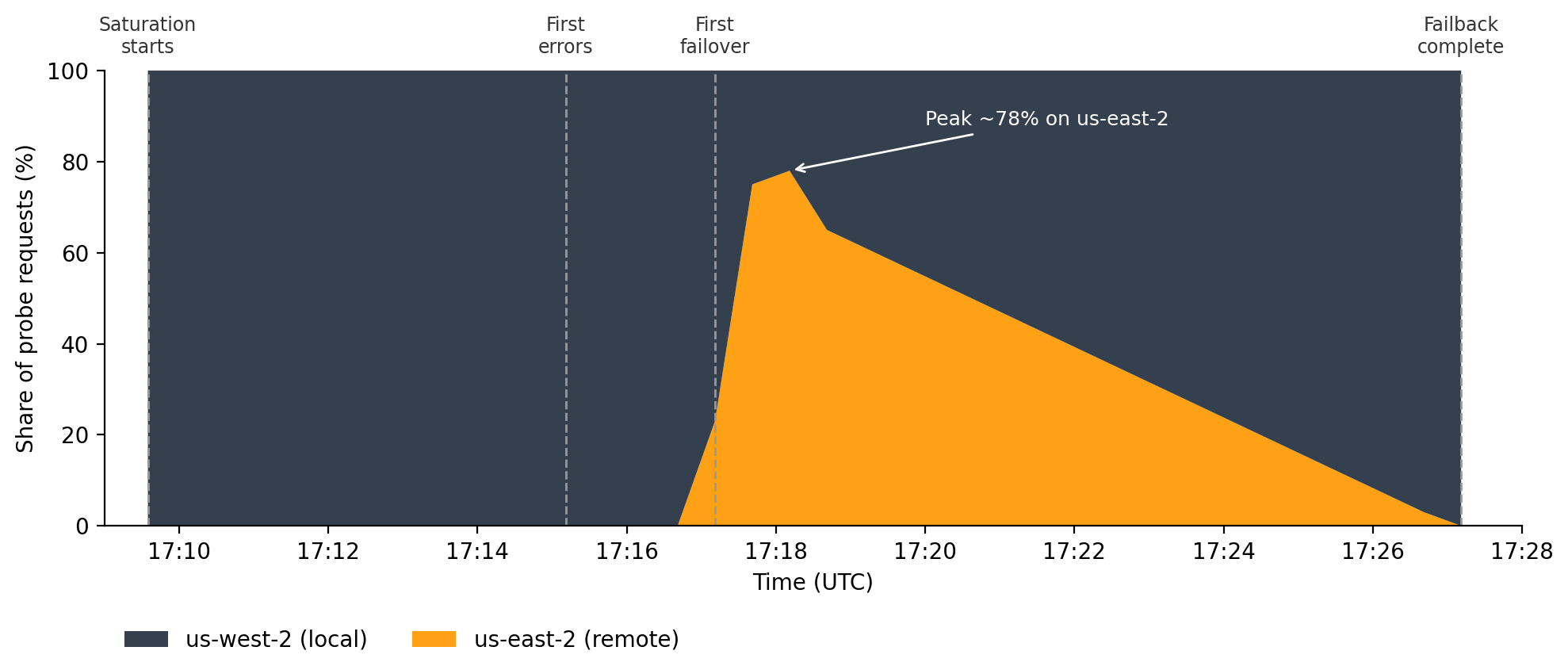
Figure 3: Share of probe requests by Region during the Salesforce failover test (UTC). Traffic stays in us-west-2 while the local endpoint is saturated, shifts to us-east-2 once requests begin returning errors (peaking at about 78 percent), then returns gradually to us-west-2 over about 10 minutes after recovery
The router lets Salesforce replace operational logic the team used to build and run itself: the health checks, retries, and Region-switching logic in the Internal Gateway. Capacity signals and failover now live in the routing layer, not in each application.
Before broader adoption, Salesforce plans to repeat the failover test with the local endpoint held at saturation for longer, measure cross-Region latency at millisecond precision, evaluate cascading-Region behavior at the cross-Region cap, and roll out the router across more Regions.
“With the new cross-Region inference routing in Amazon SageMaker AI, we can add capacity securely and keep our data residency commitments. Workloads that must stay in a region stay there, and only eligible traffic can be served from another Region. A single managed call works alongside our existing failover logic, so we didn’t have to re-architect our application or change our payloads. SageMaker AI handles routing, health detection, and fallback, and customer data always stays within the Salesforce trust boundary. We decide which Regions are eligible and control access through endpoint policies that we own. Because inference router works with Amazon CloudWatch and AWS CloudTrail, we also get a complete observability, cost-tracking, and governance architecture for our workloads.”
— Richard Chang, Software Engineering Architect, Salesforce
Best practices and what to watch
Keep the same model, container image, and artifacts available in every Region you register, because the router does not copy them, and a destination that runs a different model version will return different answers to the same request.
Size each destination Region for its own traffic plus the overflow you expect to send it. The router does not create capacity, and if every eligible destination is busy, your application receives the destinations’ own errors. Configure autoscaling on each destination the way you do today, with enough headroom that a receiving endpoint can scale out under its own policy when traffic arrives from another Region.
Customers can set the cap in the receiving endpoint’s configuration (CrossRegionTrafficConfig), as a per-instance request rate and the largest share of the endpoint’s capacity that remote traffic may use. Local traffic never counts against the cap. When remote traffic reaches it, the endpoint stops accepting additional requests from other Regions and the router sends them to other destinations, so local callers keep their capacity. The cap applies to real-time endpoints.
Conclusion
Salesforce serves a wide variety of models for products across the company in 30+ global Regions, and hosting them separately in each Region had turned capacity shortfalls into availability problems. With the inference router, Salesforce registers the endpoints it already runs in different Regions and accounts behind one call, so traffic that a local endpoint cannot serve reaches capacity elsewhere instead of failing. Requests that must stay in a Region stay there, endpoint owners authorize cross-account access through policies they control, and every response shows where a request ran and why. SageMaker AI handles the routing, health assessment, and gradual return of traffic after recovery, instead of each calling application building that logic itself. This lets Salesforce add capacity securely while keeping its data residency commitments.
The cross-Region inference routing in Amazon SageMaker AI is generally available starting November 18, 2026, in all commercial Regions where inference is supported for real-time endpoints. To get started, see the Inference router documentation in the Amazon SageMaker AI Developer Guide and the CreateInferenceRouter API reference.
About the authors
