Close Menu
techwavedispatch.com

    Subscribe to Updates

    Get the latest creative news from FooBar about art, design and business.

    What's Hot

    [2608.13506] Equivariant learning of a transferable three-dimensional classical density functional

    November 25, 2026

    Physical regime changes expose formula misuse in large language models

    November 25, 2026

    Plug-and-play Geo-linear Residual Adapter for Geometric Rectification of Foundation Model Feature Manifolds

    November 25, 2026
    Facebook X (Twitter) Instagram
    Trending
    • [2608.13506] Equivariant learning of a transferable three-dimensional classical density functional
    • Physical regime changes expose formula misuse in large language models
    • Plug-and-play Geo-linear Residual Adapter for Geometric Rectification of Foundation Model Feature Manifolds
    • Stein Guidance without Gradients: Discretization Uniform Diffusion Inference Time Scaling beyond Particle SMC
    • [2604.23351] When Chain-of-Thought Fails, the Solution Hides in the Hidden States
    • US financial crimes bureau discloses ‘cybersecurity incident’
    • Change This Roku TV Setting To Watch Movies How They Were Filmed
    • Aegis: A Conversational Prototype for Lung Cancer Risk Information and Follow-up
    Facebook X (Twitter) Instagram
    techwavedispatch.com
    Subscribe
    Wednesday, November 25
    • Home
    • AI Tools & Software
    • Machine Learning
    • Generative AI
    • Robotics & Automation
    • Future Tech & Hardware
    • AI in Business
    • Ethics & Regulations
    • More
      • Gadgets & Smart Devices
      • Cybersecurity & AI
      • Tech Breakthroughs
    techwavedispatch.com
    Home»Gadgets & Smart Devices»Commons Reasons Your Android Phone’s Icons Won’t Move And How To Fix It
    Gadgets & Smart Devices

    Commons Reasons Your Android Phone’s Icons Won’t Move And How To Fix It

    adminBy adminNovember 24, 2026No Comments3 Mins Read
    Facebook Twitter Pinterest LinkedIn Tumblr Email
    Commons Reasons Your Android Phone’s Icons Won’t Move And How To Fix It
    Share
    Facebook Twitter LinkedIn Pinterest Email

    It’s most likely your home screen settings.
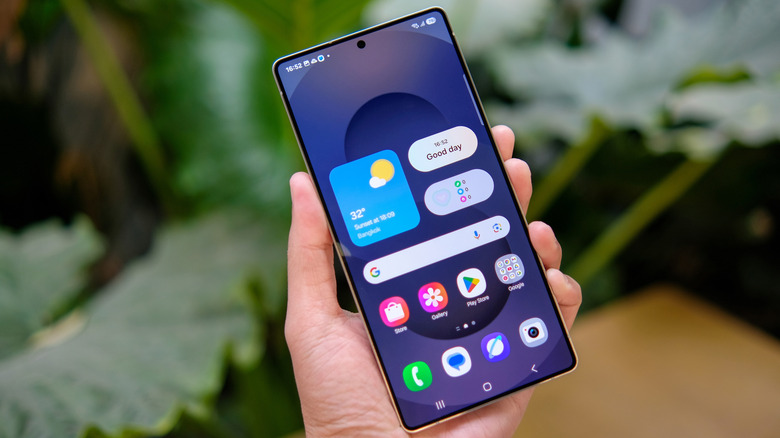

    A person holding an Android phone, showing its home screen.
    Framesira/Shutterstock

    Android phones offer plenty of customization options to help you organize your apps. Some settings, unbeknownst to users, can reorganize your phone’s icons or prevent you from moving them at all. A home screen that keeps changing can be frustrating, but the good news is you can fix it without much troubleshooting.

    Many Android phones can auto-arrange icons in your app drawer, usually called automatic sorting. This causes your phone to organize icons in alphabetical order, by install date or by other listed criteria. App or OS updates can also change your home screen grid, so don’t be alarmed if icons rearrange after a major software update.

    If your icons aren’t moving at all, check your home screen and launcher cache settings. A locked home screen is the main culprit on most phones. However, if you’re using a Google Pixel or stock Android without a locked home screen setting, clearing your launcher cache is another option. Employing either solution is fairly straightforward.

    Fixing a locked home screen

    The most likely cause of locked icons is a locked home screen. Many Android manufacturers enable locked home screens by default, preventing you from moving icons. You can fix this by going into your phone’s home screen settings and turning the setting off.

    Most Samsung phones let you access this setting by going to Settings and searching for “Home Screen.” From there, look for the option “Lock Home Screen Layout.” Toggle it off to enable icon movement again. If you are using another type of Android device, you can usually find this setting under the “Home” tab of your device.

    Once you’ve unlocked your home screen, you might notice that your icons will sometimes reorganize themselves without your input. This could be due to some auto-sort options in your phone settings. You can find these sorting options in your home screen settings—on Samsung phones, under “Settings,” while on some Android phones, under “Home.” If your home screen layout is still not to your liking, consider resetting your home screen and restart your phone.

    Clearing a bloated launcher cache

    On Android devices without a locked home screen layout, such as Google Pixel phones, you may want to clear your launcher cache instead. Your phone’s launcher cache saves all temporary data related to your home screen. If this cache gets bloated, it can make your phone more prone to crashing and cause inconsistent home screen behavior, including frozen icons.

    Clearing the launcher cache is similar across Android phones, though the launcher app varies by manufacturer. Head to your phone’s settings menu and look through your apps. You’re looking for your phone’s launcher. Google Pixel uses the Pixel Launcher; Samsung phones use One UI. Select the app and head to its storage settings. You should see an option to clear its cache. After you clear it, you should notice your home screen is more responsive. We also suggest rebooting your phone once you’ve cleared the cache to ensure it actually gets cleared out. If your phone remains unresponsive, restart your phone in safe mode to see whether a third-party app is causing the problem.

    Android Commons fix Icons Move phones Reasons wont
    Share. Facebook Twitter Pinterest LinkedIn Tumblr Email
    admin
    • Website

    Related Posts

    Change This Roku TV Setting To Watch Movies How They Were Filmed

    November 25, 2026

    This Helpful Apple Watch Feature Works Seamlessly With Apple CarPlay

    November 25, 2026

    You Don’t Have To Look At Your Apple Watch To Get The Time

    November 25, 2026
    Leave A Reply Cancel Reply

    Top Posts

    NVIDIA Is Investigating Reports That CEO Jensen Huang Was The Target Of Chinese Spy Efforts

    November 8, 202619 Views

    ADIndex: Layer-Adaptive Sparse Attention Indexing via Group-Level Distillation

    November 11, 20266 Views

    Anthropic releases new Mythos and Fable models amid RSI concerns

    November 9, 20266 Views

    If AGI is so close, why is everyone leaving? The neolabs and their bets

    November 6, 20266 Views
    Don't Miss
    Machine Learning

    [2608.13506] Equivariant learning of a transferable three-dimensional classical density functional

    By adminNovember 25, 20260

    [Submitted on 13 Aug 2026 (v1), last revised 21 Nov 2026 (this version, v2)] View…

    Physical regime changes expose formula misuse in large language models

    November 25, 2026

    Plug-and-play Geo-linear Residual Adapter for Geometric Rectification of Foundation Model Feature Manifolds

    November 25, 2026

    Stein Guidance without Gradients: Discretization Uniform Diffusion Inference Time Scaling beyond Particle SMC

    November 25, 2026
    About Us

    Welcome to TechWave Dispatch

    At TechWave Dispatch, we bring you the latest news, insights, and developments from the ever-evolving world of technology. Our mission is to keep readers informed about the innovations shaping our digital future.

    From artificial intelligence and machine learning to cybersecurity, robotics, smart devices, and groundbreaking technologies, we cover the topics that matter in today's fast-moving tech landscape.

    Our Picks

    [2608.13506] Equivariant learning of a transferable three-dimensional classical density functional

    November 25, 2026

    Physical regime changes expose formula misuse in large language models

    November 25, 2026

    Plug-and-play Geo-linear Residual Adapter for Geometric Rectification of Foundation Model Feature Manifolds

    November 25, 2026
    Most Popular

    The General Purpose Pendulum – O’Reilly

    November 6, 20260 Views

    Robot Videos: Home Cable Robot, JPL turns 90, and More

    November 6, 20260 Views

    RIP Cybertruck. You Were Unloved, Unwanted, and Utterly Absurd

    November 6, 20260 Views
    Facebook X (Twitter) Instagram Pinterest
    • Terms and Conditions
    • Privacy Policy
    • Contact Us
    • About Us
    © 2026 TechWave Dispatch. All Rights Reserved.

    Type above and press Enter to search. Press Esc to cancel.