Close Menu
techwavedispatch.com

    Subscribe to Updates

    Get the latest creative news from FooBar about art, design and business.

    What's Hot

    The Pros And Cons Of Using Mechanical Vs. Membrane Keyboards

    November 29, 2026

    What Is The Globe Icon On Your MacBook Keyboard Used For?

    November 29, 2026

    How Long Is A New Smart TV Actually Supposed To Last?

    November 29, 2026
    Facebook X (Twitter) Instagram
    Trending
    • The Pros And Cons Of Using Mechanical Vs. Membrane Keyboards
    • What Is The Globe Icon On Your MacBook Keyboard Used For?
    • How Long Is A New Smart TV Actually Supposed To Last?
    • Are Intel Arc GPUs Still Worth Buying In 2026?
    • 11 Handy Ways You Can Reuse Your Old iPad
    • Here's how much it would cost to build a PC similar to the PlayStation 5 Pro
    • Why You Should Consider Using Your Old Phone As A Smart Home Remote
    • Your iPhone’s Camera Can Do A Lot More Than Take Pictures
    Facebook X (Twitter) Instagram
    techwavedispatch.com
    Subscribe
    Sunday, November 29
    • Home
    • AI Tools & Software
    • Machine Learning
    • Generative AI
    • Robotics & Automation
    • Future Tech & Hardware
    • AI in Business
    • Ethics & Regulations
    • More
      • Gadgets & Smart Devices
      • Cybersecurity & AI
      • Tech Breakthroughs
    techwavedispatch.com
    Home»Gadgets & Smart Devices»What Is The Globe Icon On Your MacBook Keyboard Used For?
    Gadgets & Smart Devices

    What Is The Globe Icon On Your MacBook Keyboard Used For?

    adminBy adminNovember 29, 2026No Comments4 Mins Read
    Facebook Twitter Pinterest LinkedIn Tumblr Email
    What Is The Globe Icon On Your MacBook Keyboard Used For?
    Share
    Facebook Twitter LinkedIn Pinterest Email

    With all these useful talents provided by your confusing little Globe key, perhaps it’s time you began to use it as much as I do?


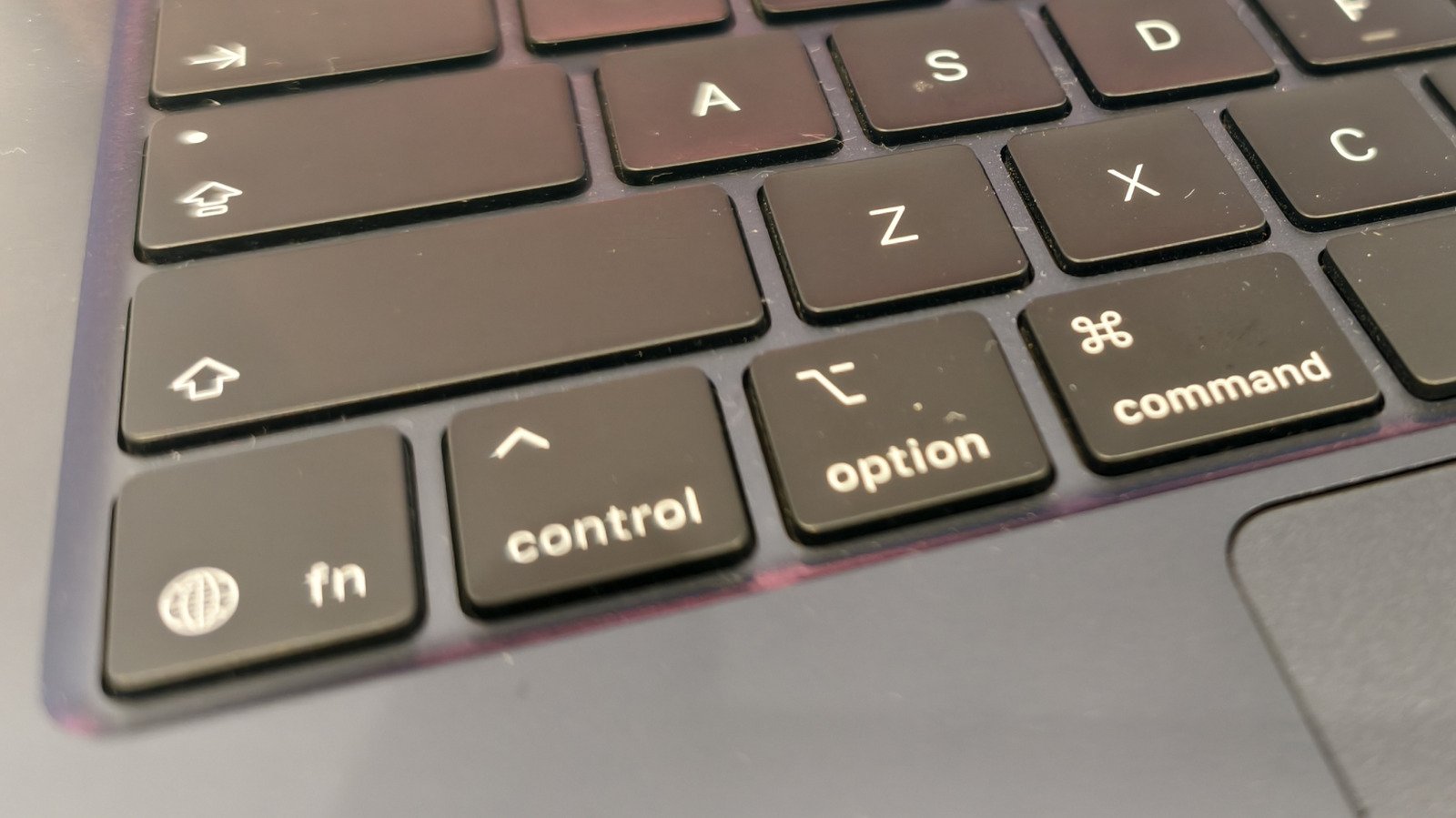
    A MacBook keyboard that shows the combined globe and Fn button.
    For East/Shutterstock

    Do you ignore the Globe key on the M6 MacBook? Or are you sticking with your M4 and M5 model? Maybe you’ve learned to tap it sharply once to access the Emoji on your Mac while typing. I use it all the time and wanted to explain why.

    While it’s not on most third-party keyboards, the Globe key is a fixture on MacBooks such as the latest and greatest M6 and other Apple keyboards. It doubles as the Function (Fn) key, which is why it carries both a globe icon and the letters “Fn.” It still works as a Function key: hold it while pressing one of the “F” keys along the top row of the keyboard to trigger their actions, which can include shortcuts on your Mac. Doing so overrides any F key’s default system function, such as brightness, volume controls and Spotlight search. In this case, Globe/Fn acts as a modifier key.

    If you use F-keys extensively in your work (I’m looking at you, programmers and gamers), you can make them the default behavior. Open Settings > Keyboard and toggle Use F1, F2, etc. keys as standard function keys to On. Moving forward, you’ll need to press the Globe/Fn button to access brightness and volume controls.

    The MacBook Globe key lets you navigate your Mac


    This young woman is lying on her bed with her Mac.
    Showtime.photo/Shutterstock

    Combined with a letter, your little Globe key also helps you in other ways:

    • Fn + E: Opens the Emoji and Symbols viewer.
    • Fn + D: Starts or stops voice dictation.
    • Fn + C: Opens Control Center.
    • Fn + N: Opens Notification Center.
    • Fn + A: Moves keyboard focus to the Mac icon and activates the Dock.
    • Fn + Q: Creates a Quick Note in Notes.

    If you see no value in any of those, you can assign the Globe with a more useful task in System Settings > Keyboard > Keyboard Shortcuts > Modifier Keys where you use the drop down menu so that a single tap of the Globe icon acts just like the Control, Option, Command, or Escape keys, or No Action.

    It’s also a Page Up/Down button. Press Globe + Backspace/Delete to perform a forward delete; use Globe and an up or down arrow to scroll one full page at a time; or use it with the left or right arrows to jump to the beginning or end of a document.

    If you’re multilingual, you may have multiple language keyboards enabled on your Mac. A quick press of the globe key lets you seamlessly switch between them.

    You can customize what a single tap does in Settings > Keyboard > Press Globe key to. The dropdown menu lets you set it to Change Input Source, Show Emoji & Symbols, Start Dictation, or Do Nothing.

    How to use the Globe key like a pro


    A Mac on a desk.
    Nwz/Shutterstock

    When working on a MacBook, the Globe key comes into its own for the window tiling functions it unlocks. These are useful on any display, but they prove invaluable when working across multiple apps on a smaller screen.

    • Globe + Control + Arrow keys: Snap the active window to the top, left, bottom or right of the screen.

    • Globe + Control + Shift + Arrow keys: Tile the active window to one half of the display while automatically placing the second most recently used window in the opposite half.

    • Globe + Control + Option + Shift + Arrow key: Arrange three windows with one window taking up half the space.

    • Globe + Control + F: Expand the active window to fill the whole desktop, but not in full-screen mode.

    • Globe + Control + C: Center the active window on screen or use R instead of C to return the window to its previous dimensions.

    Finally, the little globe keyboard character helps navigate the desktop. Globe + F toggles full-screen on and off, while Globe + H moves open windows aside. Tap Globe + M to move keyboard focus to the top menu bar, allowing users to navigate app menu items using the arrow keys. Press Globe + Control + F8 to focus on the status icons on the right of the menu, or use Globe + Shift + A to open or close the App Browser.  With all these useful talents provided by the confusing little Globe key, it might be time to start using it more often.

    Globe icon Keyboard MacBook
    Share. Facebook Twitter Pinterest LinkedIn Tumblr Email
    admin
    • Website

    Related Posts

    The Pros And Cons Of Using Mechanical Vs. Membrane Keyboards

    November 29, 2026

    How Long Is A New Smart TV Actually Supposed To Last?

    November 29, 2026

    Are Intel Arc GPUs Still Worth Buying In 2026?

    November 29, 2026
    Leave A Reply Cancel Reply

    Top Posts

    NVIDIA Is Investigating Reports That CEO Jensen Huang Was The Target Of Chinese Spy Efforts

    November 8, 202620 Views

    Mixture of Experts Explained

    November 13, 202610 Views

    Anthropic launches Claude Meetings to turn workplace discussions into plans and tasks

    November 10, 20269 Views

    Finetuning olmOCR to be a faithful OCR-Engine

    November 10, 20268 Views
    Don't Miss
    Gadgets & Smart Devices

    The Pros And Cons Of Using Mechanical Vs. Membrane Keyboards

    By adminNovember 29, 20260

    It’s easier than ever to get into clacky keyboards. Here’s what you should consider before…

    What Is The Globe Icon On Your MacBook Keyboard Used For?

    November 29, 2026

    How Long Is A New Smart TV Actually Supposed To Last?

    November 29, 2026

    Are Intel Arc GPUs Still Worth Buying In 2026?

    November 29, 2026
    About Us

    Welcome to TechWave Dispatch

    At TechWave Dispatch, we bring you the latest news, insights, and developments from the ever-evolving world of technology. Our mission is to keep readers informed about the innovations shaping our digital future.

    From artificial intelligence and machine learning to cybersecurity, robotics, smart devices, and groundbreaking technologies, we cover the topics that matter in today's fast-moving tech landscape.

    Our Picks

    The Pros And Cons Of Using Mechanical Vs. Membrane Keyboards

    November 29, 2026

    What Is The Globe Icon On Your MacBook Keyboard Used For?

    November 29, 2026

    How Long Is A New Smart TV Actually Supposed To Last?

    November 29, 2026
    Most Popular

    Why the 2026 Solar Eclipse Will Reshape Corona Studies

    November 6, 20260 Views

    A new way for LLMs to retain knowledge in continual learning

    November 6, 20260 Views

    Can a Radar-Equipped AC Actually Cut Your Power Bill?

    November 6, 20260 Views
    Facebook X (Twitter) Instagram Pinterest
    • Terms and Conditions
    • Privacy Policy
    • Contact Us
    • About Us
    © 2026 TechWave Dispatch. All Rights Reserved.

    Type above and press Enter to search. Press Esc to cancel.