Close Menu
techwavedispatch.com

    Subscribe to Updates

    Get the latest creative news from FooBar about art, design and business.

    What's Hot

    Which Amazon Kindle Models Are Good For Reading Manga And Comics?

    November 29, 2026

    How To Tell If A USB-C Port Is Damaged

    November 29, 2026

    You Can Save And Store Your Snapchat Memories For Free – Here’s How

    November 29, 2026
    Facebook X (Twitter) Instagram
    Trending
    • Which Amazon Kindle Models Are Good For Reading Manga And Comics?
    • How To Tell If A USB-C Port Is Damaged
    • You Can Save And Store Your Snapchat Memories For Free – Here’s How
    • 10 Uses For NFC Tags In And Around Your Home
    • How To Block Bad Ads On Your Android Phone With An Ad Blocker
    • Here’s How Much It Would Cost To Build A PC Similar To The Standard PlayStation 5
    • Cyber Monday Deals, Curated Live By Our Experts (2026)
    • Iran reportedly used Starlink in war with US
    Facebook X (Twitter) Instagram
    techwavedispatch.com
    Subscribe
    Sunday, November 29
    • Home
    • AI Tools & Software
    • Machine Learning
    • Generative AI
    • Robotics & Automation
    • Future Tech & Hardware
    • AI in Business
    • Ethics & Regulations
    • More
      • Gadgets & Smart Devices
      • Cybersecurity & AI
      • Tech Breakthroughs
    techwavedispatch.com
    Home»Gadgets & Smart Devices»How To Tell If A USB-C Port Is Damaged
    Gadgets & Smart Devices

    How To Tell If A USB-C Port Is Damaged

    adminBy adminNovember 29, 2026No Comments3 Mins Read
    Facebook Twitter Pinterest LinkedIn Tumblr Email
    How To Tell If A USB-C Port Is Damaged
    Share
    Facebook Twitter LinkedIn Pinterest Email

    A faulty USB-C port can leave your device without power or a reliable connection, but the cause isn’t always physical.


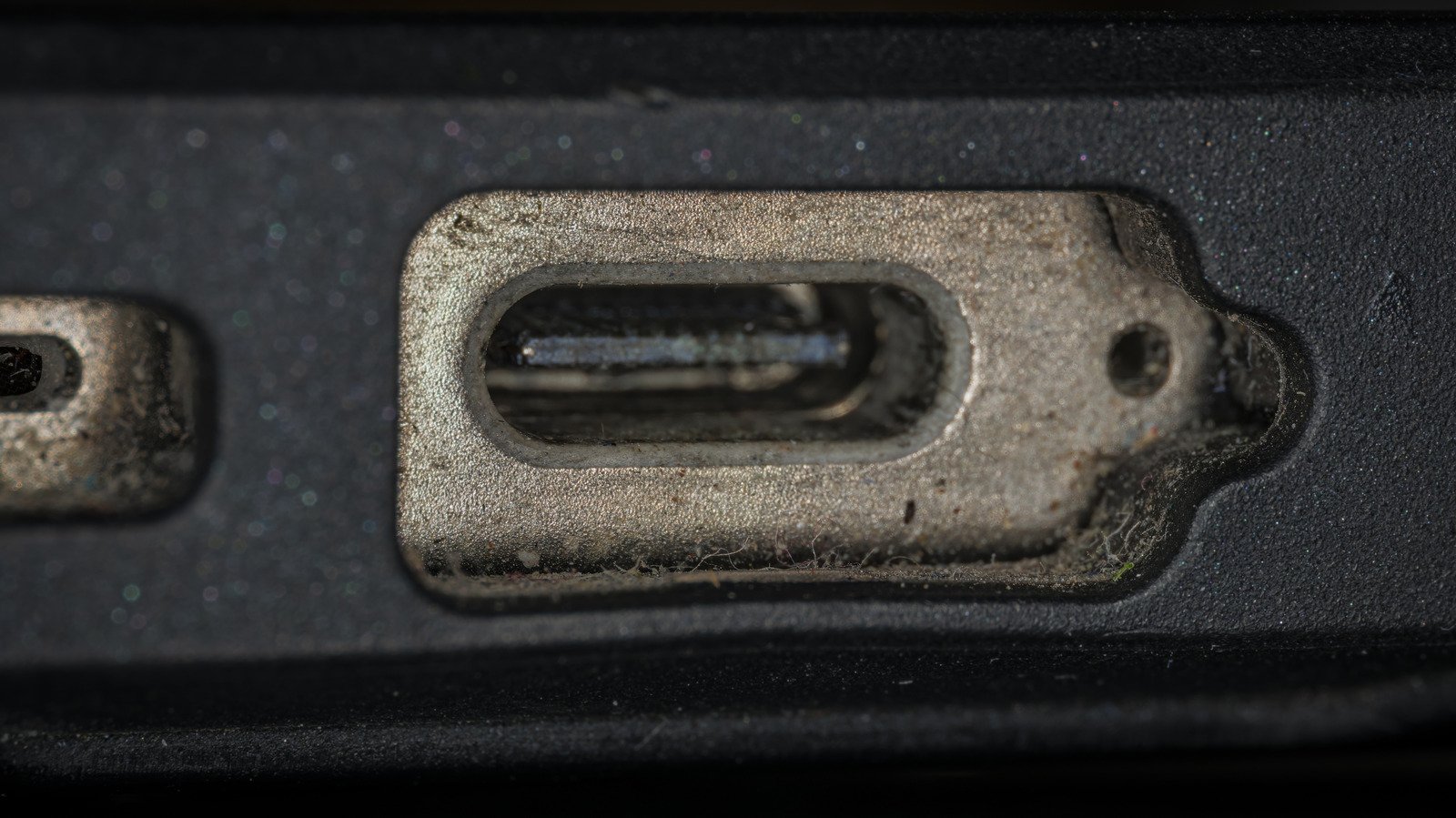
    A severely worn USB-C port.
    D. Maulding/Shutterstock

    Device ports used to be a lot more fragile. Older PCs, for example, had giant exposed serial and parallel ports, matched with connectors that featured all-too-bendable pins. In retrospect, it’s amazing we put up with them for as long as we did.

    USB-C still has flaws in this department, though, and the consequences can be just as severe, if not worse. Many devices rely on the format not just for data, but for power delivery. If a smartphone’s charging port ends up broken and it doesn’t support wireless charging, it’s just a matter of time before its battery drains to zero. A broken port isn’t the only concern, either, given the dangers of using old, damaged charging cables.

    To tell if a USB-C port is damaged, look for bent or broken pins, discoloration or inconsistent charging and data transfers. These signs warrant a closer look, but debris, faulty cables and software issues can also cause problems without damage to the port itself.

    The signs that a USB-C port is damaged


    Plugging into the USB-C port on a smartphone.
    PawelKacperek/Shutterstock

    Your first step should be to aim a flashlight at the port and search for any debris or, yes, bent or broken pins. Debris is probably the best-case scenario, since safely cleaning out your USB port should get you back in action, assuming any material isn’t broken off of the device itself. Shut the hardware down and unplug it, then hold it with the port facing down and gently tap it against your hand to dislodge loose debris.

    Another sign to watch out for is discoloration. While there might (hypothetically) be innocent explanations, this could also be the result of liquids, grime or scorching. If you suspect scorching — look for brownish or blackish markings — you should stop using the device and shut it off until you can get it repaired.

    If you’ve ruled out these more obvious signs, pay attention to how well data and/or power perform.  A functioning port is consistent. If flow is erratic or not happening at all, that suggests something isn’t working properly, even if it’s not the port itself. Try a known-working cable and, for charging problems, a known-working charger to rule those out. Keep in mind that if nothing’s happening, you might alternately be plugged into an incompatible port. On computers specifically, there could be problems with corrupt, missing or misconfigured software drivers.

    Ways to cope with a faulty USB-C port


    A USB hub plugged into a MacBook.
    vshtun/Shutterstock

    If there’s no sign of physical damage, it may be worth cleaning out a port regardless of whether you notice any debris. Dust can be hard to spot. If you’re on a computer, find and open Windows Update or macOS’ Software Update to make sure you’ve got the latest USB and motherboard drivers. Note that while Apple tends to bundle driver updates into broader macOS releases, Microsoft offers them independently.

    A dead USB port isn’t necessarily the end of the world. If your device has multiple USB ports, you may be able to restore or even expand your options by plugging in one of the best USB-C hubs or a Thunderbolt dock, as appropriate. Connected devices share the connection’s bandwidth. If the hub has no external power supply, they also share the power available from the computer’s port. Whether you reach either limit depends on what you connect. Consider which devices you’ll need to use at the same time, such as a phone you’re charging and a hard drive you’re backing up.

    Damaged port USBC
    Share. Facebook Twitter Pinterest LinkedIn Tumblr Email
    admin
    • Website

    Related Posts

    Which Amazon Kindle Models Are Good For Reading Manga And Comics?

    November 29, 2026

    You Can Save And Store Your Snapchat Memories For Free – Here’s How

    November 29, 2026

    10 Uses For NFC Tags In And Around Your Home

    November 29, 2026
    Leave A Reply Cancel Reply

    Top Posts

    NVIDIA Is Investigating Reports That CEO Jensen Huang Was The Target Of Chinese Spy Efforts

    November 8, 202620 Views

    Mixture of Experts Explained

    November 13, 202610 Views

    Anthropic launches Claude Meetings to turn workplace discussions into plans and tasks

    November 10, 20269 Views

    Finetuning olmOCR to be a faithful OCR-Engine

    November 10, 20268 Views
    Don't Miss
    Gadgets & Smart Devices

    Which Amazon Kindle Models Are Good For Reading Manga And Comics?

    By adminNovember 29, 20260

    The rise of color E Ink screens has made reading comics on a Kindle better…

    How To Tell If A USB-C Port Is Damaged

    November 29, 2026

    You Can Save And Store Your Snapchat Memories For Free – Here’s How

    November 29, 2026

    10 Uses For NFC Tags In And Around Your Home

    November 29, 2026
    About Us

    Welcome to TechWave Dispatch

    At TechWave Dispatch, we bring you the latest news, insights, and developments from the ever-evolving world of technology. Our mission is to keep readers informed about the innovations shaping our digital future.

    From artificial intelligence and machine learning to cybersecurity, robotics, smart devices, and groundbreaking technologies, we cover the topics that matter in today's fast-moving tech landscape.

    Our Picks

    Which Amazon Kindle Models Are Good For Reading Manga And Comics?

    November 29, 2026

    How To Tell If A USB-C Port Is Damaged

    November 29, 2026

    You Can Save And Store Your Snapchat Memories For Free – Here’s How

    November 29, 2026
    Most Popular

    CWE-bench v2: More coverage, quality, and transparency

    November 6, 20260 Views

    The Lawyer Holding Big Tech Accountable by ‘Beating the Tar Out of Them’ in Court

    November 6, 20260 Views

    10 ways we’re amplifying human ingenuity

    November 6, 20260 Views
    Facebook X (Twitter) Instagram Pinterest
    • Terms and Conditions
    • Privacy Policy
    • Contact Us
    • About Us
    © 2026 TechWave Dispatch. All Rights Reserved.

    Type above and press Enter to search. Press Esc to cancel.