


TL;DR
Add local obstacle avoidance to Microduck while keeping its walking policy fixed. Build varied courses with reusable SimReady assets, model ToF sensing with Newton’s raycaster, and train a controller in Isaac Lab to adjust gamepad velocity commands around obstacles. This tutorial covers simulation training, evaluation, export, and real-robot deployment.
Introduction
A walking policy can keep Microduck balanced, but it does not tell the robot how to steer around an obstacle in its path. In this workflow, we reuse the walking policy from our first Microduck tutorial and keep its weights fixed. This follow-up trains a separate avoidance controller using time-of-flight (ToF) sensing. You choose a direction with a gamepad; the controller adjusts the velocity command before passing it to the walking policy.
NVIDIA Isaac Lab is an open-source framework for training policies across thousands of GPU-parallel simulations and it provides the robot-learning environment. Newton simulates physics and the sensor’s depth measurements. We will cover the control architecture, train on varied obstacle layouts, evaluate the resulting policies, and prepare the interface for hardware testing.
1. Set Microduck obstacle avoidance in Isaac Lab
For simulation and training, prepare:
-
A Linux system with a compatible NVIDIA GPU and driver. See the Isaac Lab installation guide for platform requirements.
-
Git with Git LFS, and the uv package manager.
For physical-robot testing, prepare:
-
A configured Microduck. Load the same backlash walking-policy export used by the navigation task.
-
A supported ToF sensor with its configuration recorded.
-
A paired gamepad and a level test area with obstacles.
Quick install
Install uv if it is not already installed. Then clone the exp/microduck branch of the Isaac Lab repository and install its dependencies:
git lfs install
git clone --branch exp/microduck https://github.com/isaac-sim/IsaacLab.git
cd IsaacLab
uv sync --frozen
Once setup is complete, list the available Microduck environments and presets:
uv run isaaclab list_envs --keyword MicroDuck --show_presets
Download the walking policy
Download and export the upstream backlash walking checkpoint once before training. The obstacle avoidance task loads the exported walking policy automatically.
uv run isaaclab play \
  --task IsaacContrib-Velocity-Rough-MicroDuck \
  --rl_library rsl_rl --checkpoint pretrained \
  --num_envs 1 --visualizer none \
  --video newton_gl --video_length 1 \
  presets=backlash
2. Build the obstacle course
The environment combines simple primitives with OpenUSD assets available through SimReady Central on Hugging Face. We use a cardboard box, office bin, bedside cabinet alongside cones. From the IsaacLab repository root, download the pinned box, bin and cabinet packages into assets/simready.
uvx --from huggingface-hub hf download nvidia/simready-assets \
  --repo-type dataset \
  --revision 9d4556bfe80868c1d27a7a7ba1c2774e63e8cedd \
  --include "box_cardboard_a01/*" \
  --include "trashCan_office_black_a03/*" \
  --include "table_bedside_b01/*" \
  --local-dir ./assets/simready
At each episode reset, the environment code automatically samples a layout, shuffles the props, and varies their placement and rotation. Most courses scatter obstacles ahead of the duck, with a smaller mix of clear paths, barriers and passages. The code also mirrors layouts and mixes aligned and staggered rows.
Goals start ahead of the duck. Movement commands guide it toward the goal while the policy adjusts them around obstacles.

Figure 1. Varied obstacle-course layouts with SimReady assets and primitive geometry.
3. Understand how ToF sensing guides the walking policy
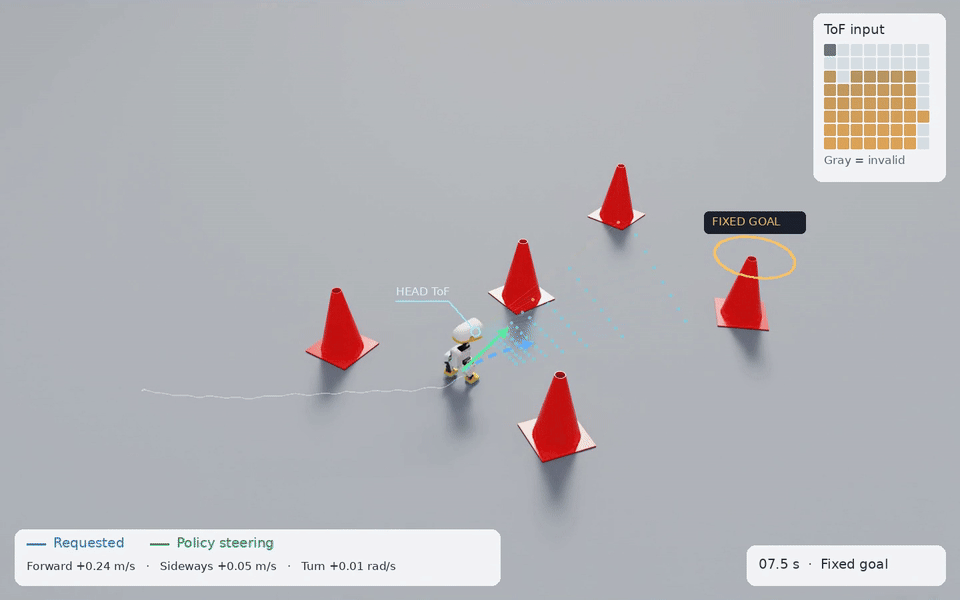
The IsaacContrib-ObstacleAvoidance-Flat-MicroDuck task separates obstacle avoidance from balance. A navigation policy uses ToF sensing to adjust forward, lateral, and yaw commands at 50 Hz. The frozen walking policy then converts those commands into joint actions, allowing the robot to learn obstacle avoidance without retraining its walking behavior.
During training, the navigation policy’s actor receives ToF history and body and controller state available on the real robot. Its critic has access to additional simulation state to guide learning, but is not needed for deployment.
Rewards encourage progress toward the goal, safe arrivals, and movement around obstacles. Following a movement command earns credit only when the robot makes progress with sufficient clearance; risky approaches reduce that credit. Penalties discourage fast approaches, abrupt command changes, collisions, and falls.
The obstacle-avoidance task lives in isaaclab_tasks.contrib.microduck_obstacle. Its configuration is in obstacle_avoidance_env_cfg.py, ToF sensing is in sensors.py, and actions, commands, observations and rewards are organized under mdp/.
Model the ToF sensor
MicroDuckToFCamera extends Newton’s LegacyMultiMeshRayCasterCamera to model the VL53L5CX—a compact time-of-flight (ToF) sensor on the microduck that measures distance across an 8×8 grid at 15Hz. The simulated sensor has a 45° field of view and a 0.12–4 m range. It follows the duck’s head, with placement similar to the sensor on the real duck.
Real recordings informed the sensor placement and floor readings in simulation. Training adds noise, delays and missing measurements—including near the grid’s edges—to expose the policy to imperfect data. The excerpt below shows selected sensor settings already included in the task configuration. You do not need to edit or run this code separately.
head_tof = MicroDuckToFCameraCfg(
    prim_path=MICRODUCK_HEAD_BODY_PATH,
    update_period=1.0 / 15.0,
    pattern_cfg=patterns.PinholeCameraPatternCfg(
        focal_length=1.0, width=8, height=8,
        horizontal_aperture=_TOF_APERTURE,
        vertical_aperture=_TOF_APERTURE,
    ),
    randomization=ToFRandomizationCfg(
        mount_pitch_degrees=(-10.0, 10.0),
        mount_height_m=(-0.02, 0.02),
        floor_validity_midpoint_offset_m=(0.0, 0.13),
        near_floor_edge_impairment_probability=0.5,
    ),
    data_types=["distance_to_image_plane", "distance_to_camera"],
    max_distance=TOF_MAX_RANGE,
    depth_clipping_behavior="zero",
)
4. Train the Microduck policy across parallel environments
Train the navigation policy with PPO across 16,384 parallel environments for 1,500 training iterations. Its actor, critic, normalizers, and optimizer start fresh. The task configuration loads the fixed walking checkpoint, robot model, and obstacle assets.
The 16,384 environments shown here are configurable, not a minimum requirement. Lower --num_envs to fit your GPU’s available memory. With fewer environments collecting experience in parallel, reaching comparable policy performance may require more training iterations and longer training time. We also trained this policy on NVIDIA DGX Spark in approximately 6 hours using 4,096 parallel environments for 3,000 PPO updates, demonstrating a smaller-scale configuration for the same workflow.
Run this command to train the policy:
uv run isaaclab train \
  --task IsaacContrib-ObstacleAvoidance-Flat-MicroDuck \
  --rl_library rsl_rl \
  --num_envs 16384 \
  --max_iterations 1500 \
  --seed 42 \
  --device cuda:0 \
  --visualizer none \
  presets=backlash

Figure 2. Parallel MicroDuck obstacle-avoidance simulation
5. Inspect behavior and export the policy to ONNX
Playback uses the same props, primitives, frozen walker and sensor randomization as training, with a different seed for new obstacle arrangements.
Navigation checkpoints are saved under logs/rsl_rl/microduck_obstacle_avoidance_tof_flat_backlash/ relative to the repository root. Choose a model_ file from your run and replace /absolute/path/to/model.pt below with its path. This plays the policy, opens the Newton viewer and records 20 seconds of simulation. Set –viz to none for headless recording.
uv run --extra video isaaclab play \
  --task IsaacContrib-ObstacleAvoidance-Flat-MicroDuck \
  --rl_library rsl_rl \
  --checkpoint /absolute/path/to/model.pt \
  --num_envs 1 \
  --seed 6173 \
  --device cuda:0 \
  --viz newton_gl \
  --video newton_gl \
  --video_length 1000 \
  presets=backlash
Playback saves TorchScript and ONNX models in the checkpoint’s exported folder. Keep the ONNX data file alongside the model.
Figure 3. Cone-course evaluation with requested motion, policy steering, and ToF input overlays.
6. Test obstacle avoidance on a real Microduck
These deployment tools run the navigation model on a laptop and send adjusted gamepad commands to the walking policy on the robot. Use the same walking policy that was used during navigation training.
Section 1 saves the walker’s ONNX export to .pretrained_checkpoints/rsl_rl/https/omniverse-content-production.s3-us-west-2.amazonaws.com/Assets/Isaac/6.2/Isaac/IsaacLab/PretrainedCheckpoints/rsl_rl/exported/policy.onnx, relative to the Isaac Lab repository root.
Load that walking policy using Pollen’s policy-loading guide. The deployment README includes the transfer steps, including how to package an ONNX export that uses an external data file.
From your Isaac Lab checkout, set up SSH access and check inference with the robot standing upright and still:
cd scripts/deploy/microduck_tof_nav
ssh-copy-id microduck@ROBOT_HOST
uv run nav_pad.py --robot ROBOT_HOST \
  --model /absolute/path/to/navigation/exported/policy.onnx \
  --dry-run --seconds 30
Dry-run copies the helpers and streams sensor data, but sends no movement commands. Watch the proposed commands as obstacles enter the sensor’s view. Keep the navigation ONNX and any companion .data file together.
Once those checks pass, start supervised gamepad navigation:
uv run nav_pad.py --robot ROBOT_HOST \
  --model /absolute/path/to/navigation/exported/policy.onnx
Hold the stick forward to request movement; the policy adjusts the command to avoid obstacles. Release the stick to stop, press X to toggle navigation, and use Ctrl-C to end the session. Forward speed is capped at 0.15 m/s by default, with an additional close-obstacle brake and stale-input stopping. Start in a clear area and verify stopping before testing a course.
See the deployment README for controls, logs and troubleshooting.

Figure 4. Microduck steers around cones using its 8×8 ToF sensor, with real footage on the left and a 3D rebuild from its logs on the right. Blue shows the policy steering, purple shows the operator intervention.
7. Explore other locomotion skills for Microduck in Isaac Lab
The Microduck task collection includes velocity tracking on flat and rough terrain; stand-up recovery, sit–stand transitions, and walking with fall recovery (VelStand); ball kicking, ground picking, and forward rolls (Roulade). Roller-skating tasks add velocity tracking and swizzle motion, crouch-gliding, slope descent, standing up on skates, and spins.

Figure 5. Fifteen Microduck task views: flat and rough-terrain walking, recovery, object interaction, and roller-skating motions.
Build your next policy
Start with the first Microduck tutorial, then choose a task from the Microduck task collection to build your next policy in Isaac Lab with Newton. Explore new behaviors by changing commands, rewards, or environments—from rough-terrain walking to perception-driven obstacle avoidance. Evaluate your policy on scenes outside the training set before testing on the robot.
Resources
Acknowledgments
This workflow builds on Pollen Robotics’ Microduck hardware and software, the original Microduck reinforcement-learning project, BAM actuator modeling work, and the Isaac Lab and Newton integrations.
