Close Menu
techwavedispatch.com

    Subscribe to Updates

    Get the latest creative news from FooBar about art, design and business.

    What's Hot

    Common Reasons Why Some USB Ports Are Red

    November 22, 2026

    Turning Thermal Noise Into Ultra-Low-Power Signals

    November 22, 2026

    Does Old Computer Hardware Ever Become Truly Useless?

    November 22, 2026
    Facebook X (Twitter) Instagram
    Trending
    • Common Reasons Why Some USB Ports Are Red
    • Turning Thermal Noise Into Ultra-Low-Power Signals
    • Does Old Computer Hardware Ever Become Truly Useless?
    • What Are The Key Differences?
    • What Does The Blue Snowflake Icon Mean For Your Tesla Battery?
    • Apple HomeView audio review: Good sound, weird CarPlay apps
    • AI is getting better faster than experts can reliably test whether new systems are safe, METR warns
    • GLP-1 drugs could have a surprisingly large environmental payoff
    Facebook X (Twitter) Instagram
    techwavedispatch.com
    Subscribe
    Sunday, November 22
    • Home
    • AI Tools & Software
    • Machine Learning
    • Generative AI
    • Robotics & Automation
    • Future Tech & Hardware
    • AI in Business
    • Ethics & Regulations
    • More
      • Gadgets & Smart Devices
      • Cybersecurity & AI
      • Tech Breakthroughs
    techwavedispatch.com
    Home»Gadgets & Smart Devices»Common Reasons Why Some USB Ports Are Red
    Gadgets & Smart Devices

    Common Reasons Why Some USB Ports Are Red

    adminBy adminNovember 22, 2026No Comments3 Mins Read
    Facebook Twitter Pinterest LinkedIn Tumblr Email
    Common Reasons Why Some USB Ports Are Red
    Share
    Facebook Twitter LinkedIn Pinterest Email

    While there’s no color-coding standard, red USB ports typically indicate these features.


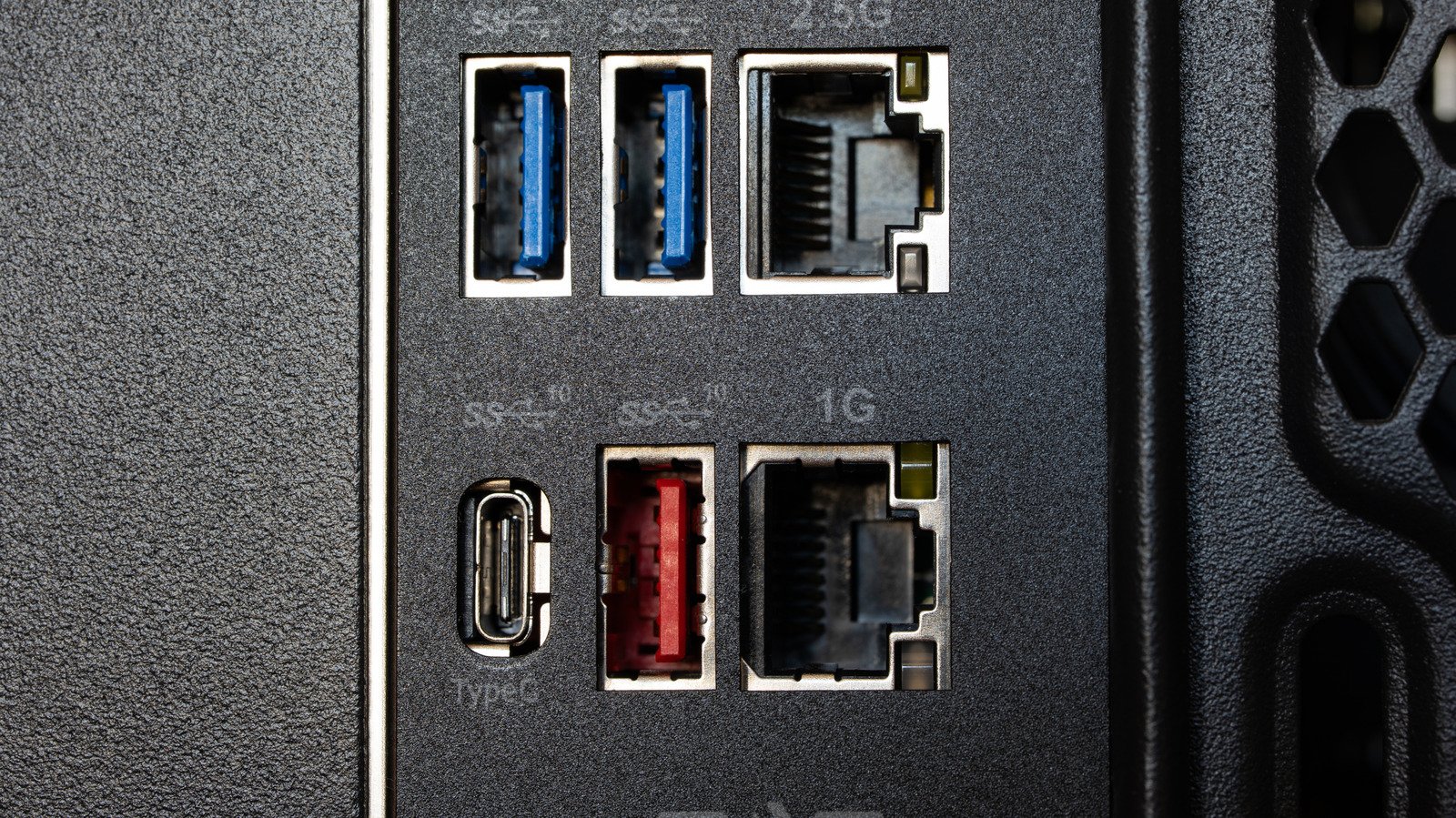
    Back of a desktop computer showing one red and two blue USB ports.
    Octavian Lazar/Shutterstock

    Pick a USB port at random and you’ll probably see either black, white or blue. While those colors are fairly standard, red, yellow or purple USB ports have also popped up on some devices. It’s often unclear what exactly the color signifies. The unsatisfying yet true answer is “it depends,” but it’s worth looking into what a red USB port on your device could mean.

    An organization known as the USB Implementers Forum sets the specifications of various USB types, but it doesn’t determine what ports themselves can look like, so manufacturers are free to apply colors like red however they see fit. Different companies typically stick to one use for each color, though, and they tend to use red to signify a few similar things, including fast speeds and always-on ports.

    There’s no set standard for red USB ports

    In general, red is used on ports of the USB 3.2 or 3.1 Gen 2 standards. Ports of this type can transfer data at up to 20 Gbps, making them some of the fastest ports in common usage. These standards were succeeded by USB4, which can reach speeds of 40 to 80 Gbps, but is only available in USB-C formats, and these are not color-coded. For most purposes, that means a red USB port is likely to indicate the fastest port available on your device.

    Red ports can carry other meanings, though. Some manufacturers use red to mark always-on charging ports, which can continue supplying power to connected devices even when your computer is turned off. Red USB ports are usually best suited to SSDs or other storage devices due to their transfer speeds, but they can also be helpful to keep other devices charged overnight.

    How to be sure what a USB port’s color means


    Orange and green USB ports.
    Photocrazy 7/Shutterstock

    Since colors aren’t standardized, red USB ports might not all have the same functionality even on devices from the same manufacturer. The only way to really be sure of what different colors mean without testing every port yourself is to check the manual for the specific device model you’re using. While USB 3.2 and always-on ports are both fairly common, they’re more likely to show up on higher-end devices like gaming laptops and motherboards than on everyday electronics.

    If you can’t find a model number or just want some idea of what a port does at a glance, you can also check the port itself for more information. Manufacturers often mark faster ports with the symbol SS to indicate SuperSpeed or use a number to indicate the exact speed. A lightning bolt is commonly used to mark always-on ports, though it’s possible that a port with this symbol also offers a higher speed.

    The good news is that the only risk you run by using the wrong colored USB port is not getting the most power out of it. USB ports are made to be backward compatible, so you can plug a cable into a port of an earlier or later USB generation and it will still work, even if it can’t take advantage of its highest transfer speeds.

    Common Ports Reasons red USB
    Share. Facebook Twitter Pinterest LinkedIn Tumblr Email
    admin
    • Website

    Related Posts

    Does Old Computer Hardware Ever Become Truly Useless?

    November 22, 2026

    What Are The Key Differences?

    November 22, 2026

    What Does The Blue Snowflake Icon Mean For Your Tesla Battery?

    November 22, 2026
    Leave A Reply Cancel Reply

    Top Posts

    NVIDIA Is Investigating Reports That CEO Jensen Huang Was The Target Of Chinese Spy Efforts

    November 8, 202619 Views

    ADIndex: Layer-Adaptive Sparse Attention Indexing via Group-Level Distillation

    November 11, 20266 Views

    Anthropic releases new Mythos and Fable models amid RSI concerns

    November 9, 20266 Views

    If AGI is so close, why is everyone leaving? The neolabs and their bets

    November 6, 20266 Views
    Don't Miss
    Gadgets & Smart Devices

    Common Reasons Why Some USB Ports Are Red

    By adminNovember 22, 20260

    While there’s no color-coding standard, red USB ports typically indicate these features. …

    Turning Thermal Noise Into Ultra-Low-Power Signals

    November 22, 2026

    Does Old Computer Hardware Ever Become Truly Useless?

    November 22, 2026

    What Are The Key Differences?

    November 22, 2026
    About Us

    Welcome to TechWave Dispatch

    At TechWave Dispatch, we bring you the latest news, insights, and developments from the ever-evolving world of technology. Our mission is to keep readers informed about the innovations shaping our digital future.

    From artificial intelligence and machine learning to cybersecurity, robotics, smart devices, and groundbreaking technologies, we cover the topics that matter in today's fast-moving tech landscape.

    Our Picks

    Common Reasons Why Some USB Ports Are Red

    November 22, 2026

    Turning Thermal Noise Into Ultra-Low-Power Signals

    November 22, 2026

    Does Old Computer Hardware Ever Become Truly Useless?

    November 22, 2026
    Most Popular

    Egyptian and Nigerian English join the Open ASR Leaderboard

    November 6, 20260 Views

    Ads in Chatbots Have Arrived. Here’s What’s Working—and What’s Not

    November 6, 20260 Views

    Big Tech lost big in the 2026 election

    November 6, 20260 Views
    Facebook X (Twitter) Instagram Pinterest
    • Terms and Conditions
    • Privacy Policy
    • Contact Us
    • About Us
    © 2026 TechWave Dispatch. All Rights Reserved.

    Type above and press Enter to search. Press Esc to cancel.