


Embedding models are useful for many applications such as retrieval, reranking, clustering, and classification. The research community has witnessed significant advancements in recent years in embedding models, leading to substantial enhancements in all applications building on semantic representation. Models such as BGE, GTE, and E5 are placed at the top of the MTEB benchmark and in some cases outperform proprietary embedding services. There are a variety of model sizes found in Hugging Face’s Model hub, from lightweight (100-350M parameters) to 7B models (such as Salesforce/SFR-Embedding-Mistral). The lightweight models based on an encoder architecture are ideal candidates for optimization and utilization on CPU backends running semantic search-based applications, such as Retrieval Augmented Generation (RAG).
In this blog, we will show how to unlock significant performance boost on Xeon based CPUs, and show how easy it is to integrate optimized models into existing RAG pipelines using fastRAG.
Information Retrieval with Embedding Models
Embedding models encode textual data into dense vectors, capturing semantic and contextual meaning. This enables accurate information retrieval by representing word and document relationships more contextually. Typically, semantic similarity will be measured by cosine similarity between the embedding vectors.
Should dense vectors always be used for information retrieval? The two dominant approaches have trade-offs:
- Sparse retrieval matches n-grams, phrases, or metadata to search large collections efficiently and at scale. However, it may miss relevant documents due to lexical gaps between the query and the document.
- Semantic retrieval encodes text into dense vectors, capturing context and meaning better than bag-of-words. It can retrieve semantically related documents despite lexical mismatches. However, it’s computationally intensive, has higher latency, and requires sophisticated encoding models compared to lexical matching like BM25.
Embedding models and RAG
Embedding models serve multiple and critical purposes in RAG applications:
- Offline Process: Encoding documents into dense vectors during indexing/updating of the retrieval document store (index).
- Query Encoding: At query time, they encode the input query into a dense vector representation for retrieval.
- Reranking: After initial retrieval, they can rerank the retrieved documents by encoding them into dense vectors and comparing against the query vector. This allows reranking documents that initially lacked dense representations.
Optimizing the embedding model component in RAG pipelines is highly desirable for a higher efficiency experience, more particularly:
- Document Indexing/Updating: Higher throughput allows encoding and indexing large document collections more rapidly during initial setup or periodic updates.
- Query Encoding: Lower query encoding latency is critical for responsive real-time retrieval. Higher throughput supports encoding many concurrent queries efficiently, enabling scalability.
- Reranking Retrieved Documents: After initial retrieval, embedding models need to quickly encode the retrieved candidates for reranking. Lower latency allows rapid reranking of documents for time-sensitive applications. Higher throughput supports reranking larger candidate sets in parallel for more comprehensive reranking.
Optimizing Embedding Models with Optimum Intel and IPEX
Optimum Intel is an open-source library that accelerates end-to-end pipelines built with Hugging Face libraries on Intel Hardware. Optimum Intel includes several techniques to accelerate models such as low-bit quantization, model weight pruning, distillation, and an accelerated runtime.
The runtime and optimizations included in Optimum Intel take advantage of Intel® Advanced Vector Extensions 512 (Intel® AVX-512), Vector Neural Network Instructions (VNNI) and Intel® Advanced Matrix Extensions (Intel® AMX) on Intel CPUs to accelerate models. Specifically, it has built-in BFloat16 (bf16) and int8 GEMM accelerators in every core to accelerate deep learning training and inference workloads. AMX accelerated inference is introduced in PyTorch 2.0 and Intel Extension for PyTorch (IPEX) in addition to other optimizations for various common operators.
Optimizing pre-trained models can be done easily with Optimum Intel; many simple examples can be found here.
Example: Optimizing BGE Embedding Models
In this blog, we focus on recently released embedding models by researchers at the Beijing Academy of Artificial Intelligence, as their models show competitive results on the widely adopted MTEB leaderboard.
BGE Technical Details
Bi-encoder models are Transformer-based encoders trained to minimize a similarity metric, such as cosine-similarity, between two semantically similar texts as vectors. For example, popular embedding models use a BERT model as a base pre-trained model and fine-tune it for embedding documents. The vector representing the encoded text is created from the model outputs; for example, it can be the [CLS] token vector or a mean of all the token vectors.
Unlike more complex embedding architectures, bi-encoders encode only single documents, thus they lack contextual interaction between encoded entities such as query-document and document-document. However, state-of-the-art bi-encoder embedding models present competitive performance and are extremely fast due to their simple architecture.
We focus on 3 BGE models: small, base, and large consisting of 45M, 110M, and 355M parameters encoding to 384/768/1024 sized embedding vectors, respectively.
We note that the optimization process we showcase below is generic and can be applied to other embedding models (including bi-encoders, cross-encoders, and such).
Step-by-step: Optimization by Quantization
We present a step-by-step guide for enhancing the performance of embedding models, focusing on reducing latency (with a batch size of 1) and increasing throughput (measured in documents encoded per second). This recipe utilizes optimum-intel and Intel Neural Compressor to quantize the model, and uses IPEX for optimized runtime on Intel-based hardware.
Step 1: Installing Packages
To install optimum-intel and intel-extension-for-transformers run the following command:
pip install -U optimum[neural-compressor] intel-extension-for-transformers
Step 2: Post-training Static Quantization
Post-training static quantization requires a calibration set to determine the dynamic range of weights and activations. The calibration is done by running a representative set of data samples through the model, collecting statistics, and then quantizing the model based on the gathered info to minimize the accuracy loss.
The following snippet shows a code snippet for quantization:
def quantize(model_name: str, output_path: str, calibration_set: "datasets.Dataset"):
    model = AutoModel.from_pretrained(model_name)
    tokenizer = AutoTokenizer.from_pretrained(model_name)

    def preprocess_function(examples):
        return tokenizer(examples["text"], padding="max_length", max_length=512, truncation=True)

    vectorized_ds = calibration_set.map(preprocess_function, num_proc=10)
    vectorized_ds = vectorized_ds.remove_columns(["text"])

    quantizer = INCQuantizer.from_pretrained(model)
    quantization_config = PostTrainingQuantConfig(approach="static", backend="ipex", domain="nlp")
    quantizer.quantize(
        quantization_config=quantization_config,
        calibration_dataset=vectorized_ds,
        save_directory=output_path,
        batch_size=1,
    )
    tokenizer.save_pretrained(output_path)
In our calibration process we use a subset of the qasper dataset.
Step 3: Loading and running inference
Loading a quantized model can be done by simply running:
from optimum.intel import IPEXModel

model = IPEXModel.from_pretrained("Intel/bge-small-en-v1.5-rag-int8-static")
Encoding sentences into vectors can be done similarly to what we are used to with the Transformers library:
from transformers import AutoTokenizer

tokenizer = AutoTokenizer.from_pretrained("Intel/bge-small-en-v1.5-rag-int8-static")
inputs = tokenizer(sentences, return_tensors="pt")

with torch.no_grad():
    outputs = model(**inputs)

    embeddings = outputs[0][:, 0]
We provide additional and important details on how to configure the CPU-backend setup in the evaluation section below (correct machine setup).
Model Evaluation with MTEB
Quantizing the models’ weights to a lower precision introduces accuracy loss, as we lose precision moving from fp32 weights to int8. Therefore, we aim to validate the accuracy of the optimized models by comparing them to the original models with two MTEB tasks:
- Retrieval – where a corpus is encoded and ranked lists are created by searching the index given a query.
- Reranking – reranking the retrieval’s results for better relevance given a query.
The table below shows the average accuracy (on multiple datasets) of each task type (MAP for Reranking, NDCG@10 for Retrieval), where int8 is our quantized model and fp32 is the original model (results taken from the official MTEB leaderboard). The quantized models show less than 1% error rate compared to the original model in the Reranking task and less than 1.55% in the Retrieval task.
| Reranking | Retrieval | |||||||||||||||||||||||||||||
|---|---|---|---|---|---|---|---|---|---|---|---|---|---|---|---|---|---|---|---|---|---|---|---|---|---|---|---|---|---|---|
|
|
|
Speed and Latency
We compare the performance of our models with two other common methods of usage of models:
- Using PyTorch and Huggingface’s Transformers library with
bf16. - Using Intel extension for PyTorch (IPEX) runtime with
bf16and tracing the model using torchscript.
Experimental setup notes:
- Hardware (CPU): 4th gen Intel Xeon 8480+ with 2 sockets, 56 cores per socket.
- The Pytorch model was evaluated with 56 cores on 1 CPU socket.
- IPEX/Optimum setups were evaluated with ipexrun, 1 CPU socket, and cores ranging from 22-56.
- TCMalloc was installed and defined as an environment variable in all runs.
How did we run the evaluation?
We created a script that generated random examples using the vocabulary of the model. We loaded the original model and the optimized model and compared how much time it takes to encode those examples in the two scenarios we mentioned above: latency when encoding in batch size 1, and throughput using batched example encoding.
- Baseline PyTorch and Hugging Face:
import torch
from transformers import AutoModel

model = AutoModel.from_pretrained("BAAI/bge-small-en-v1.5")

@torch.inference_mode()
def encode_text():
    outputs = model(inputs)

with torch.cpu.amp.autocast(dtype=torch.bfloat16):
    encode_text()
- IPEX torchscript and
bf16:
import torch
from transformers import AutoModel
import intel_extension_for_pytorch as ipex


model = AutoModel.from_pretrained("BAAI/bge-small-en-v1.5")
model = ipex.optimize(model, dtype=torch.bfloat16)

vocab_size = model.config.vocab_size
batch_size = 1
seq_length = 512
d = torch.randint(vocab_size, size=[batch_size, seq_length])
model = torch.jit.trace(model, (d,), check_trace=False, strict=False)
model = torch.jit.freeze(model)

@torch.inference_mode()
def encode_text():
    outputs = model(inputs)

with torch.cpu.amp.autocast(dtype=torch.bfloat16):
    encode_text()
- Optimum Intel with IPEX and
int8model:
import torch
from optimum.intel import IPEXModel

model = IPEXModel.from_pretrained("Intel/bge-small-en-v1.5-rag-int8-static")

@torch.inference_mode()
def encode_text():
    outputs = model(inputs)

encode_text()
Latency performance
In this evaluation, we aim to measure how fast the models respond. This is an example use case for encoding queries in RAG pipelines. In this evaluation we set the batch size to 1 and we measure latency of different document lengths.
We can see that the quantized model has the best latency overall, under 10 ms for the small and base models and <20 ms for the large model. Compared to the original model, the quantized model shows up to 4.5x speedup in latency.
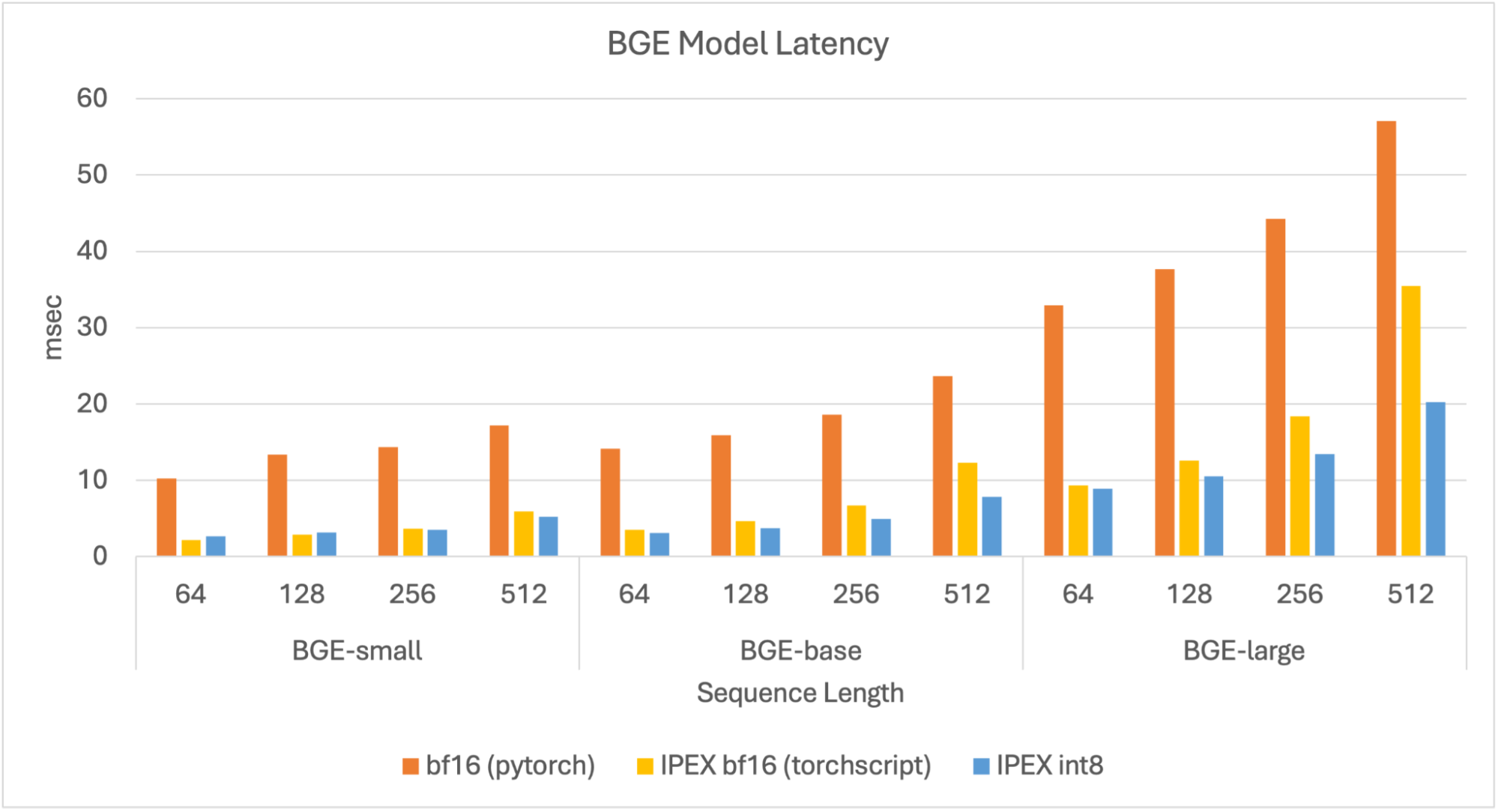
Figure 1. Latency for BGE models.
Throughput Performance
In our throughput evaluation, we aim to search for peak encoding performance in terms of documents per second. We set text lengths to be 256 tokens longs, as it is a good estimate of an average document in a RAG pipeline, and evaluate with different batch sizes (4, 8, 16, 32, 64, 128, 256).
Results show that the quantized models reach higher throughput values compared to the other models, and reach peak throughput at batch size 128. Overall, for all model sizes, the quantized model shows up to 4x improvement compared to the baseline bf16 model in various batch sizes.
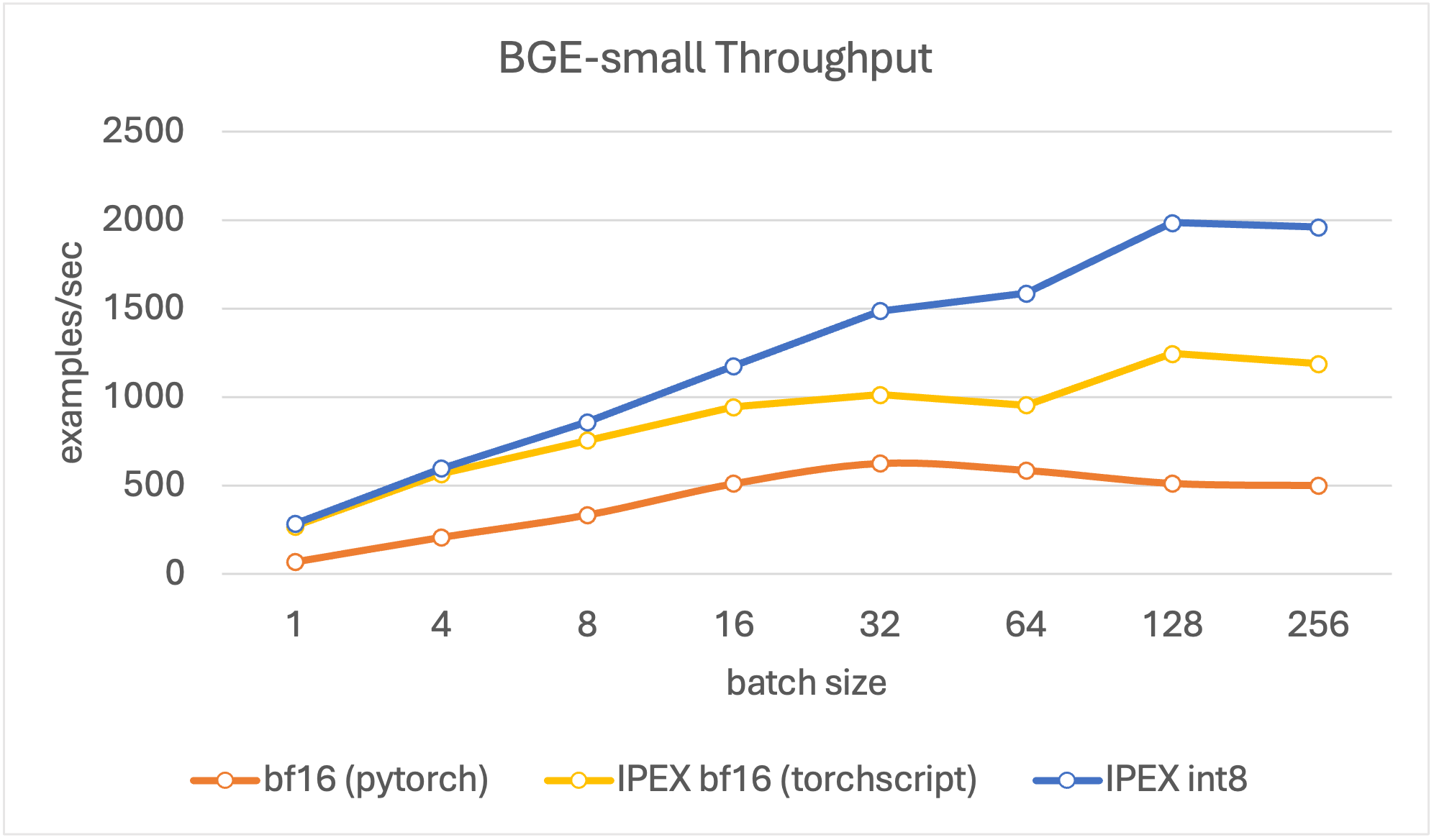
Figure 2. Throughput for BGE small.
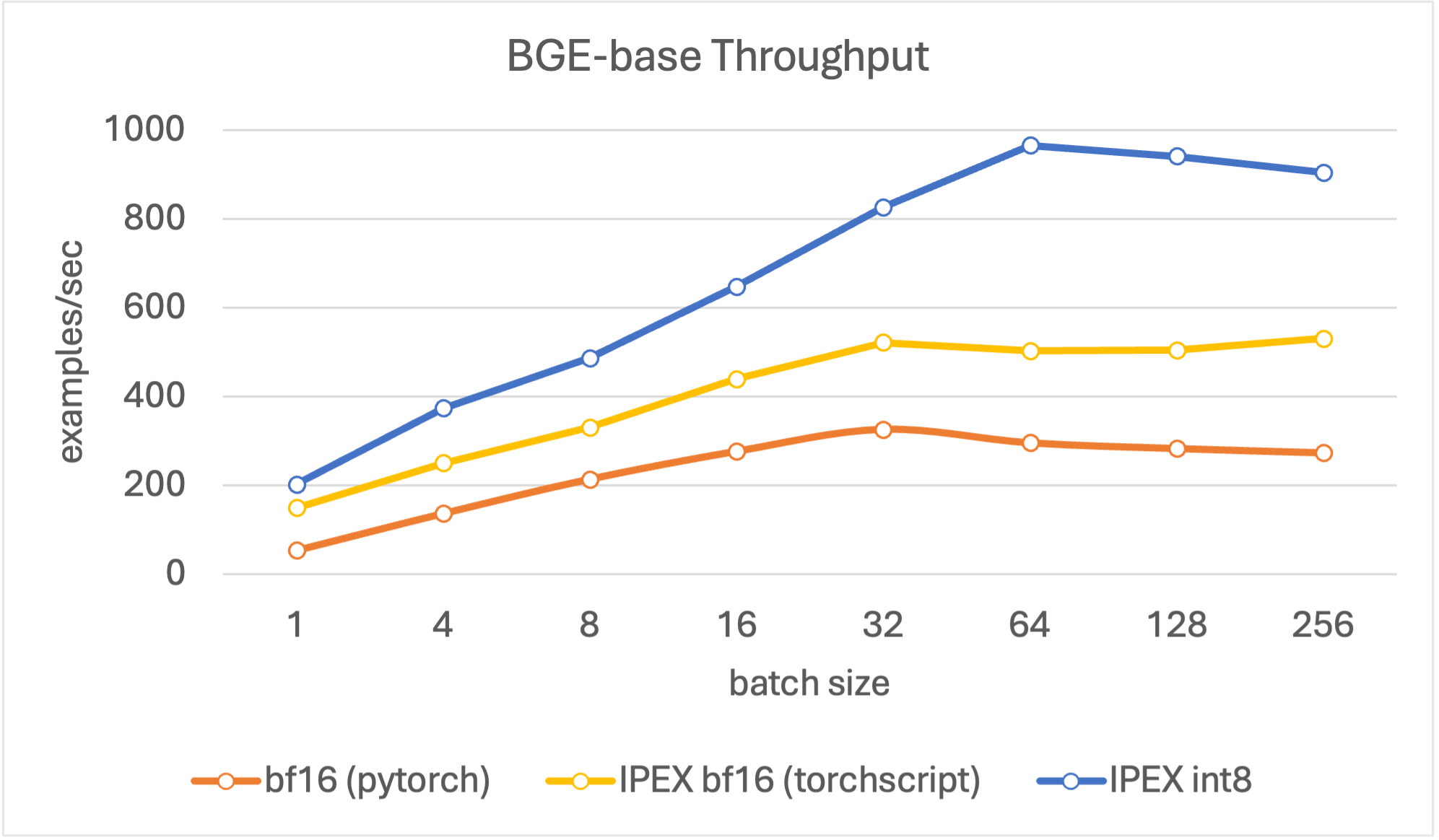
Figure 3. Throughput for BGE base.
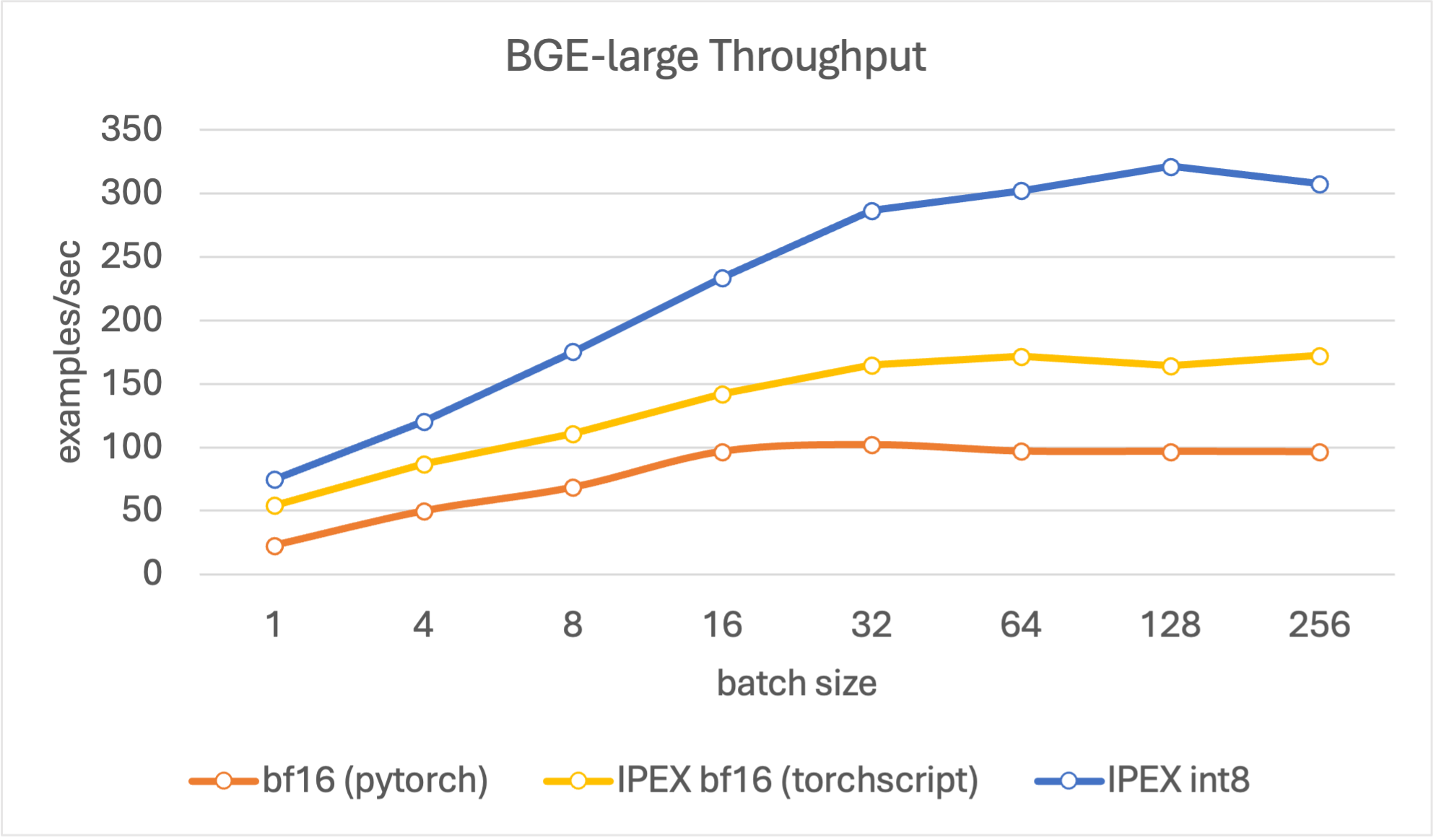
Figure 4. Throughput for BGE large.
Optimized Embedding Models with fastRAG

As an example, we will demonstrate how to integrate the optimized Retrieval/Reranking models into fastRAG (which can also be easily integrated into other RAG frameworks such as Langchain and LlamaIndex).
fastRAG is a research framework, developed by Intel Labs, for efficient and optimized retrieval augmented generative pipelines, incorporating state-of-the-art LLMs and Information Retrieval. fastRAG is fully compatible with Haystack and includes novel and efficient RAG modules for efficient deployment on Intel hardware.
To get started with fastRAG we invite readers to see the installation instructions here and get started with fastRAG using our guide.
We integrated the optimized bi-encoder embedding models in two modules:
QuantizedBiEncoderRetriever– for indexing and retrieving documents from a dense indexQuantizedBiEncoderRanker– for reranking a list of documents using the embedding model as part of an elaborate retrieval pipeline.
Fast indexing using the optimized Retriever
Let’s create a dense index by using a dense retriever that utilizes an optimized embedding model.
First, create a document store:
from haystack.document_store import InMemoryDocumentStore

document_store = InMemoryDocumentStore(use_gpu=False, use_bm25=False, embedding_dim=384, return_embedding=True)
Then, add some documents to it:
from haystack.schema import Document


examples = [
   "There is a blue house on Oxford Street.",
   "Paris is the capital of France.",
   "The first commit in fastRAG was in 2022"
]

documents = []
for i, d in enumerate(examples):
    documents.append(Document(content=d, id=i))
document_store.write_documents(documents)
Load a Retriever with an optimized bi-encoder embedding model, and encode all the documents in the document store:
from fastrag.retrievers import QuantizedBiEncoderRetriever

model_id = "Intel/bge-small-en-v1.5-rag-int8-static"
retriever = QuantizedBiEncoderRetriever(document_store=document_store, embedding_model=model_id)
document_store.update_embeddings(retriever=retriever)
Reranking using the Optimized Ranker
Below is an example of loading an optimized model into a ranker node that encodes and re-ranks all the documents it retrieves from an index given a query:
from haystack import Pipeline
from fastrag.rankers import QuantizedBiEncoderRanker

ranker = QuantizedBiEncoderRanker("Intel/bge-large-en-v1.5-rag-int8-static")

p = Pipeline()
p.add_node(component=retriever, name="retriever", inputs=["Query"])
p.add_node(component=ranker, name="ranker", inputs=["retriever"])
results = p.run(query="What is the capital of France?")


print(results)
Done! The created pipeline can be used to retrieve documents from a document store and rank the retrieved documents using (another) embedding models to re-order the documents.
A more complete example is provided in this notebook.
For more RAG-related methods, models and examples we invite the readers to explore fastRAG/examples notebooks.
