


Introduction
In this blog post, we will look at how to fine-tune Llama 2 70B using PyTorch FSDP and related best practices. We will be leveraging Hugging Face Transformers, Accelerate and TRL. We will also learn how to use Accelerate with SLURM.
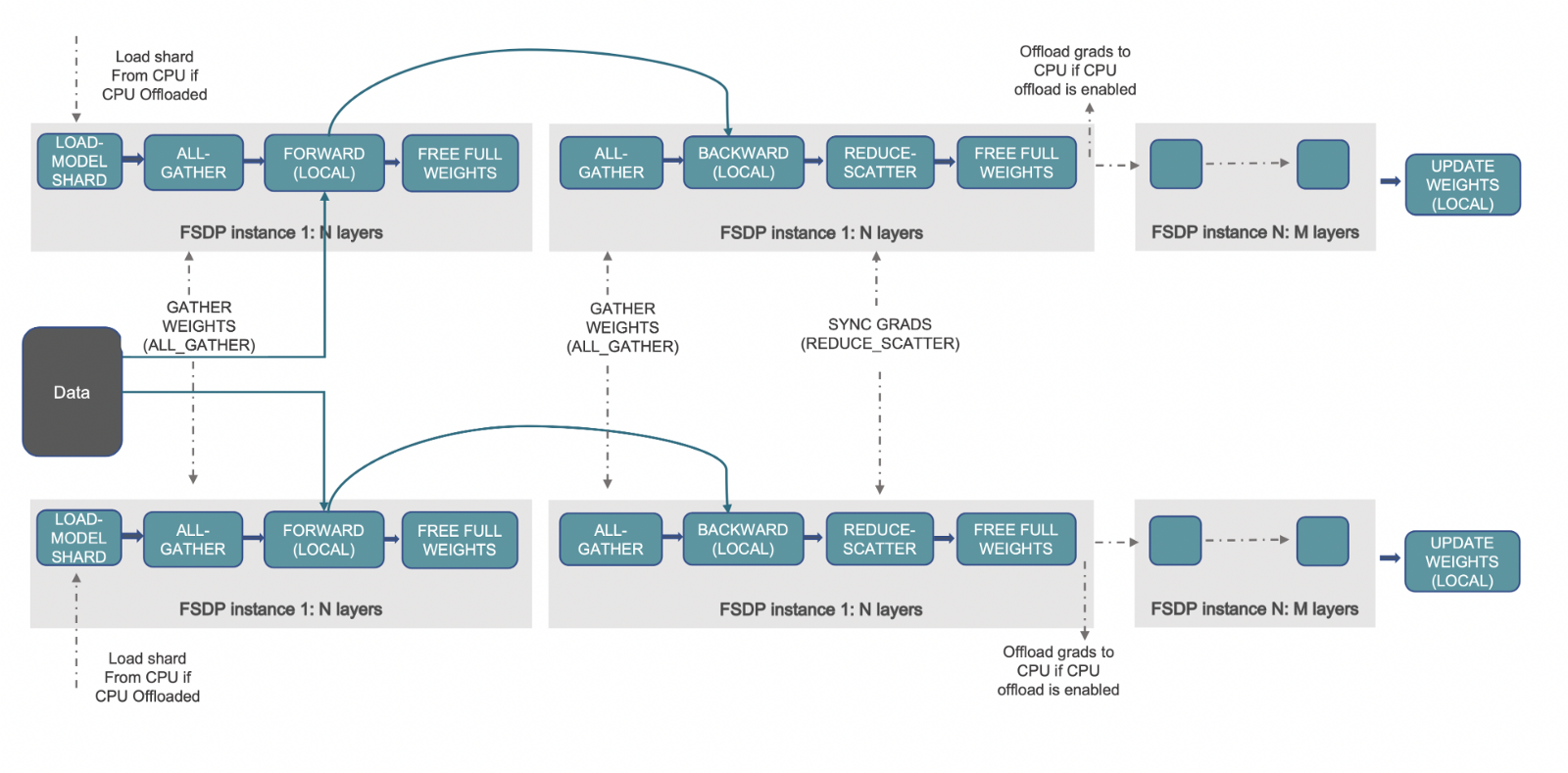
Fully Sharded Data Parallelism (FSDP) is a paradigm in which the optimizer states, gradients and parameters are sharded across devices. During the forward pass, each FSDP unit performs an all-gather operation to get the complete weights, computation is performed followed by discarding the shards from other devices. After the forward pass, the loss is computed followed by the backward pass. In the backward pass, each FSDP unit performs an all-gather operation to get the complete weights, with computation performed to get the local gradients. These local gradients are averaged and sharded across the devices via a reduce-scatter operation so that each device can update the parameters of its shard. For more information on what PyTorch FSDP is, please refer to this blog post: Accelerate Large Model Training using PyTorch Fully Sharded Data Parallel.
(Source: link)
Hardware Used
Number of nodes: 2. Minimum required is 1.
Number of GPUs per node: 8
GPU type: A100
GPU memory: 80GB
intra-node connection: NVLink
RAM per node: 1TB
CPU cores per node: 96
inter-node connection: Elastic Fabric Adapter
Challenges with fine-tuning LLaMa 70B
We encountered three main challenges when trying to fine-tune LLaMa 70B with FSDP:
-
FSDP wraps the model after loading the pre-trained model. If each process/rank within a node loads the Llama-70B model, it would require 70*4*8 GB ~ 2TB of CPU RAM, where 4 is the number of bytes per parameter and 8 is the number of GPUs on each node. This would result in the CPU RAM getting out of memory leading to processes being terminated.
-
Saving entire intermediate checkpoints using
FULL_STATE_DICTwith CPU offloading on rank 0 takes a lot of time and often results in NCCL Timeout errors due to indefinite hanging during broadcasting. However, at the end of training, we want the whole model state dict instead of the sharded state dict which is only compatible with FSDP. -
We need to improve the speed and reduce the VRAM usage to train faster and save compute costs.
Let’s look at how to solve the above challenges and fine-tune a 70B model!
Before we get started, here’s all the required resources to reproduce our results:
-
Codebase:
https://github.com/pacman100/DHS-LLM-Workshop/tree/main/chat_assistant/sft/training with flash-attn V2 -
FSDP config: https://github.com/pacman100/DHS-LLM-Workshop/blob/main/chat_assistant/training/configs/fsdp_config.yaml
-
SLURM script
launch.slurm: https://gist.github.com/pacman100/1cb1f17b2f1b3139a63b764263e70b25 -
Model:
meta-llama/Llama-2-70b-chat-hf -
Dataset: smangrul/code-chat-assistant-v1 (mix of LIMA+GUANACO with proper formatting in a ready-to-train format)
Pre-requisites
First follow these steps to install Flash Attention V2: Dao-AILab/flash-attention: Fast and memory-efficient exact attention (github.com). Install the latest nightlies of PyTorch with CUDA ≥11.8. Install the remaining requirements as per DHS-LLM-Workshop/code_assistant/training/requirements.txt. Here, we will be installing 🤗 Accelerate and 🤗 Transformers from the main branch.
Fine-Tuning
Addressing Challenge 1
PRs huggingface/transformers#25107 and huggingface/accelerate#1777 solve the first challenge and requires no code changes from user side. It does the following:
- Create the model with no weights on all ranks (using the
metadevice). - Load the state dict only on rank==0 and set the model weights with that state dict on rank 0
- For all other ranks, do
torch.empty(*param.size(), dtype=dtype)for every parameter onmetadevice - So, rank==0 will have loaded the model with correct state dict while all other ranks will have random weights.
- Set
sync_module_states=Trueso that FSDP object takes care of broadcasting them to all the ranks before training starts.
Below is the output snippet on a 7B model on 2 GPUs measuring the memory consumed and model parameters at various stages. We can observe that during loading the pre-trained model rank 0 & rank 1 have CPU total peak memory of 32744 MB and 1506 MB , respectively. Therefore, only rank 0 is loading the pre-trained model leading to efficient usage of CPU RAM. The whole logs at be found here
accelerator.process_index=0 GPU Memory before entering the loading : 0
accelerator.process_index=0 GPU Memory consumed at the end of the loading (end-begin): 0
accelerator.process_index=0 GPU Peak Memory consumed during the loading (max-begin): 0
accelerator.process_index=0 GPU Total Peak Memory consumed during the loading (max): 0
accelerator.process_index=0 CPU Memory before entering the loading : 926
accelerator.process_index=0 CPU Memory consumed at the end of the loading (end-begin): 26415
accelerator.process_index=0 CPU Peak Memory consumed during the loading (max-begin): 31818
accelerator.process_index=0 CPU Total Peak Memory consumed during the loading (max): 32744

accelerator.process_index=1 GPU Memory before entering the loading : 0
accelerator.process_index=1 GPU Memory consumed at the end of the loading (end-begin): 0
accelerator.process_index=1 GPU Peak Memory consumed during the loading (max-begin): 0
accelerator.process_index=1 GPU Total Peak Memory consumed during the loading (max): 0
accelerator.process_index=1 CPU Memory before entering the loading : 933
accelerator.process_index=1 CPU Memory consumed at the end of the loading (end-begin): 10
accelerator.process_index=1 CPU Peak Memory consumed during the loading (max-begin): 573
accelerator.process_index=1 CPU Total Peak Memory consumed during the loading (max): 1506
Addressing Challenge 2
It is addressed via choosing SHARDED_STATE_DICT state dict type when creating FSDP config. SHARDED_STATE_DICT saves shard per GPU separately which makes it quick to save or resume training from intermediate checkpoint. When FULL_STATE_DICT is used, first process (rank 0) gathers the whole model on CPU and then saving it in a standard format.
Let’s create the accelerate config via below command:
accelerate config --config_file "fsdp_config.yaml"
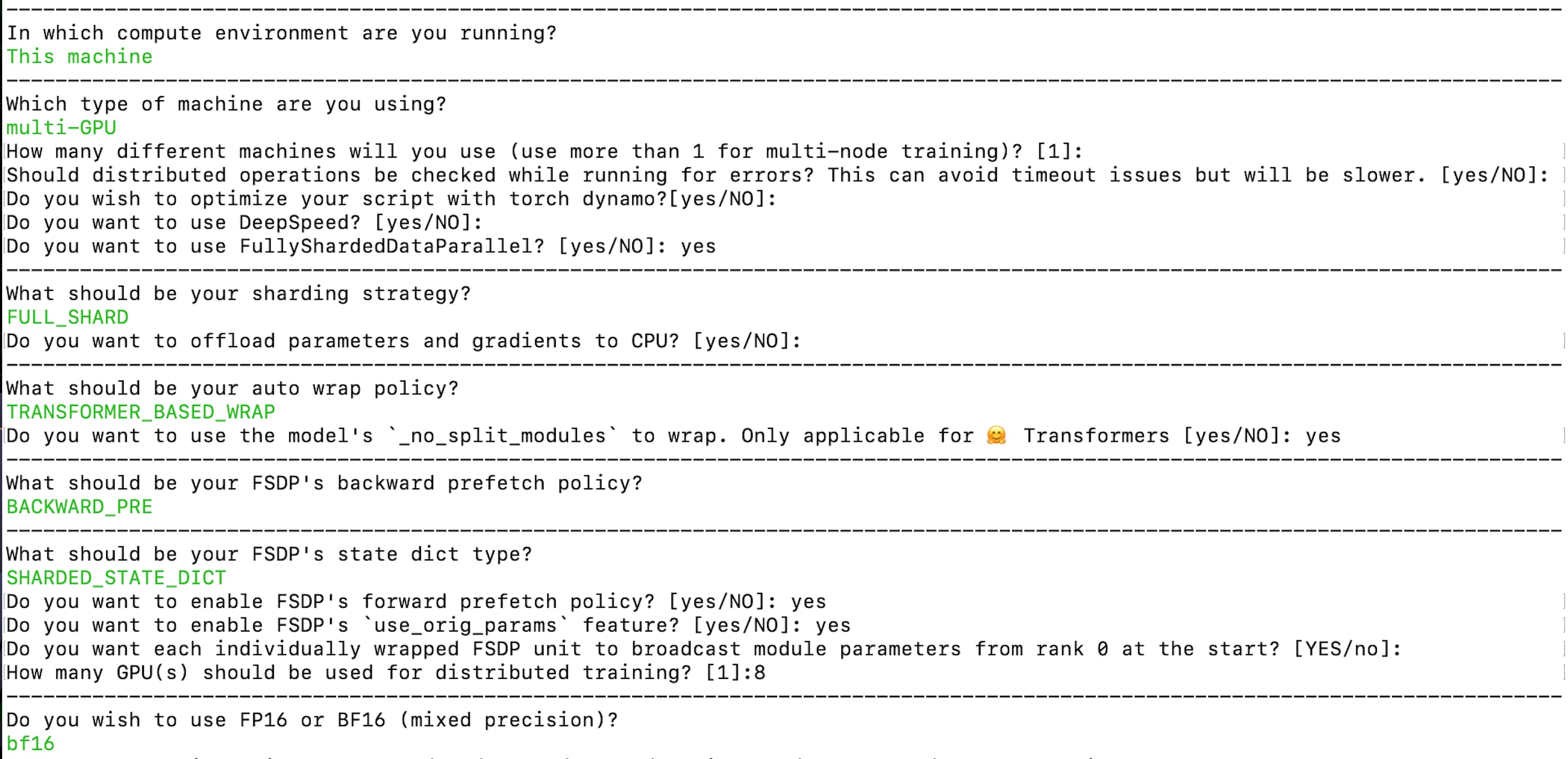
The resulting config is available here: fsdp_config.yaml. Here, the sharding strategy is FULL_SHARD. We are using TRANSFORMER_BASED_WRAP for auto wrap policy and it uses _no_split_module to find the Transformer block name for nested FSDP auto wrap. We use SHARDED_STATE_DICT to save the intermediate checkpoints and optimizer states in this format recommended by the PyTorch team. Make sure to enable broadcasting module parameters from rank 0 at the start as mentioned in the above paragraph on addressing Challenge 1. We are enabling bf16 mixed precision training.
For final checkpoint being the whole model state dict, below code snippet is used:
if trainer.is_fsdp_enabled:
    trainer.accelerator.state.fsdp_plugin.set_state_dict_type("FULL_STATE_DICT")

trainer.save_model(script_args.output_dir)
Addressing Challenge 3
Flash Attention and enabling gradient checkpointing are required for faster training and reducing VRAM usage to enable fine-tuning and save compute costs. The codebase currently uses monkey patching and the implementation is at chat_assistant/training/llama_flash_attn_monkey_patch.py.
FlashAttention: Fast and Memory-Efficient Exact Attention with IO-Awareness introduces a way to compute exact attention while being faster and memory-efficient by leveraging the knowledge of the memory hierarchy of the underlying hardware/GPUs – The higher the bandwidth/speed of the memory, the smaller its capacity as it becomes more expensive.
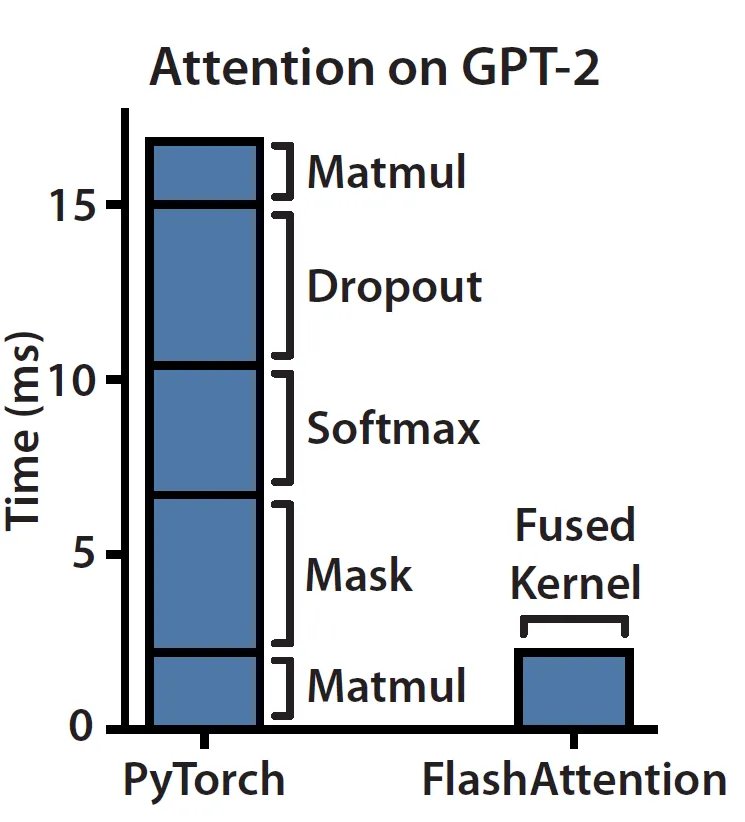
If we follow the blog Making Deep Learning Go Brrrr From First Principles, we can figure out that Attention module on current hardware is memory-bound/bandwidth-bound. The reason being that Attention mostly consists of elementwise operations as shown below on the left hand side. We can observe that masking, softmax and dropout operations take up the bulk of the time instead of matrix multiplications which consists of the bulk of FLOPs.
(Source: link)
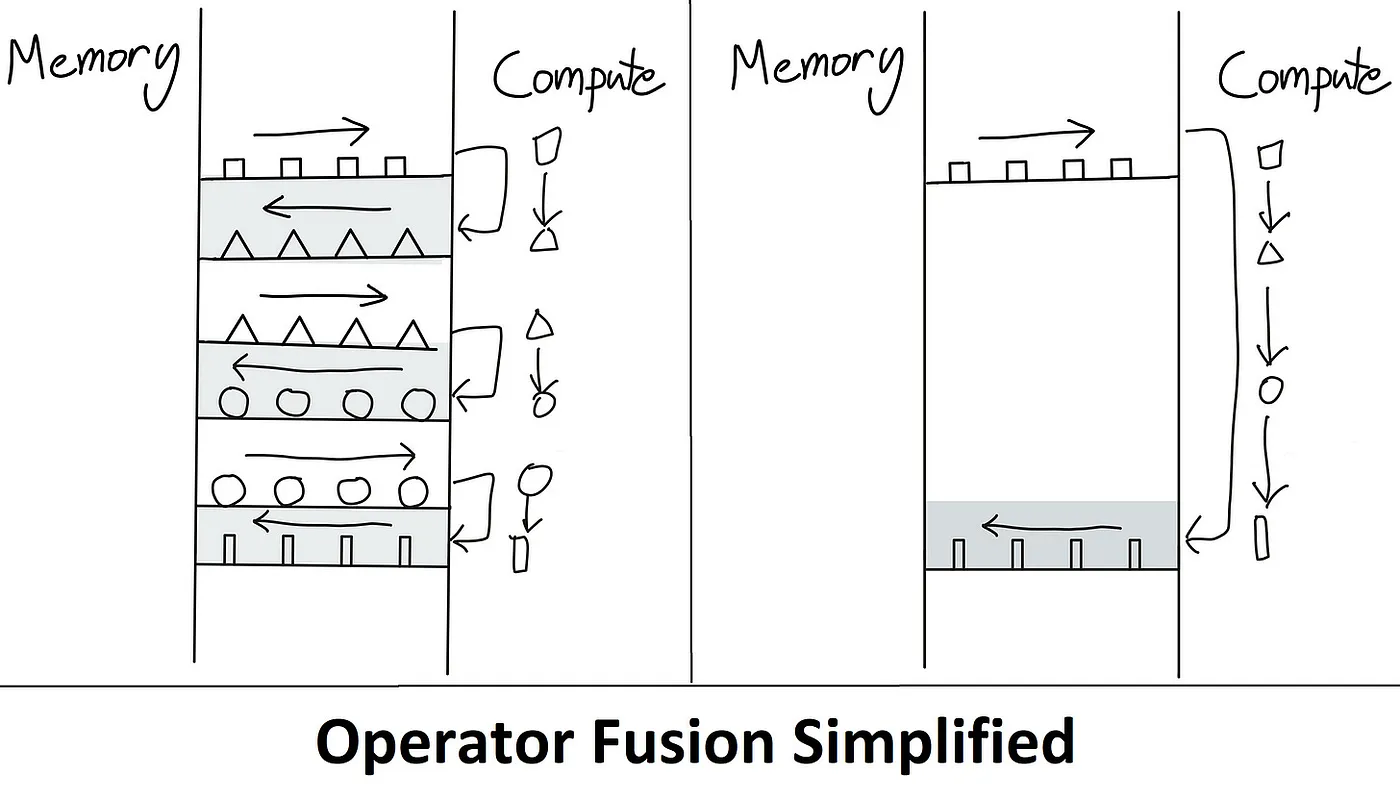
This is precisely the problem that Flash Attention addresses. The idea is to remove redundant HBM reads/writes. It does so by keeping everything in SRAM, perform all the intermediate steps and only then write the final result back to HBM, also known as Kernel Fusion. Below is an illustration of how this overcomes the memory-bound bottleneck.
(Source: link)
Tiling is used during forward and backward passes to chunk the NxN softmax/scores computation into blocks to overcome the limitation of SRAM memory size. To enable tiling, online softmax algorithm is used. Recomputation is used during backward pass in order to avoid storing the entire NxN softmax/score matrix during forward pass. This greatly reduces the memory consumption.
For a simplified and in depth understanding of Flash Attention, please refer the blog posts ELI5: FlashAttention and Making Deep Learning Go Brrrr From First Principles along with the original paper FlashAttention: Fast and Memory-Efficient Exact Attention
with IO-Awareness.
Bringing it all-together
To run the training using Accelerate launcher with SLURM, refer this gist launch.slurm. Below is an equivalent command showcasing how to use Accelerate launcher to run the training. Notice that we are overriding main_process_ip , main_process_port , machine_rank , num_processes and num_machines values of the fsdp_config.yaml. Here, another important point to note is that the storage is stored between all the nodes.
accelerate launch \
    --config_file configs/fsdp_config.yaml \
    --main_process_ip $MASTER_ADDR \
    --main_process_port $MASTER_PORT \
    --machine_rank \$MACHINE_RANK \
    --num_processes 16 \
    --num_machines 2 \
    train.py \
    --seed 100 \
    --model_name "meta-llama/Llama-2-70b-chat-hf" \
    --dataset_name "smangrul/code-chat-assistant-v1" \
    --chat_template_format "none" \
    --add_special_tokens False \
    --append_concat_token False \
    --splits "train,test" \
    --max_seq_len 2048 \
    --max_steps 500 \
    --logging_steps 25 \
    --log_level "info" \
    --eval_steps 100 \
    --save_steps 250 \
    --logging_strategy "steps" \
    --evaluation_strategy "steps" \
    --save_strategy "steps" \
    --push_to_hub \
    --hub_private_repo True \
    --hub_strategy "every_save" \
    --bf16 True \
    --packing True \
    --learning_rate 5e-5 \
    --lr_scheduler_type "cosine" \
    --weight_decay 0.01 \
    --warmup_ratio 0.03 \
    --max_grad_norm 1.0 \
    --output_dir "/shared_storage/sourab/experiments/full-finetune-llama-chat-asst" \
    --per_device_train_batch_size 1 \
    --per_device_eval_batch_size 1 \
    --gradient_accumulation_steps 1 \
    --gradient_checkpointing True \
    --use_reentrant False \
    --dataset_text_field "content" \
    --use_flash_attn True \
    --ddp_timeout 5400 \
    --optim paged_adamw_32bit
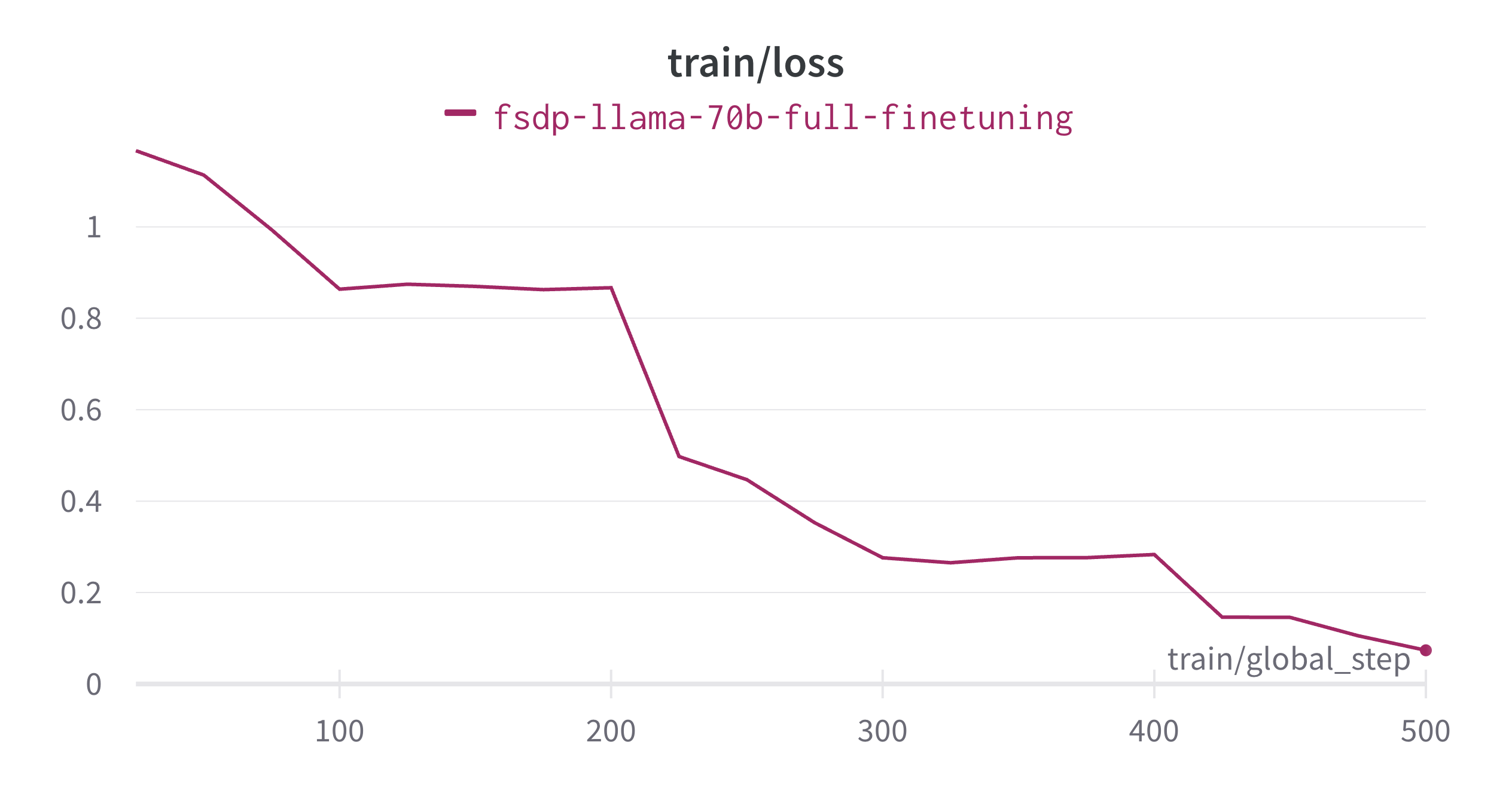
Fine-tuning completed in ~13.5 hours and below is the training loss plot.
Important Note:
Here, if you are using only a single node with 8 A100 80GB GPUs, then paged_adamw_32bit optimizer from bitsandbytes is required. For more information about paged optimizers, please refer https://huggingface.co/docs/bitsandbytes/main/en/optimizers#paged-optimizers.
Below is an example conversation using the above model:
System Prompt: You are a helpful, respectful and honest assistant. Always answer as helpfully \
as possible, while being safe. Your answers should not include any harmful, \
unethical, racist, sexist, toxic, dangerous, or illegal content. Please ensure that \
your responses are socially unbiased and positive in nature.

If a question does not make any sense, or is not factually coherent, explain why \
instead of answering something not correct. If you don’t know the answer to a \
question, please don’t share false information.

- Human: What is Deep Learning? Explain like a Pirate.

+ Assistant: Arrr Grumete! Are ye lookin' fer a proper explanation o' Deep Learnin'?
+ Alright then, listen up me hearty! Deep Learnin' be a type o' machine learnin' that uses artificial neural networks to analyze data.
+ Aye, ye heard that right, mateys! Artificial neural networks be models o' the human brain, but instead o' using neurons, they use interconnected nodes or "artificial neurons" to process information.
+ These nodes work together to form layers o' processing units that can learn from large amounts o' data.
+ The more data these systems receive, the better they get at recognizing patterns and makin' decisions on their own.
+ So hoist the sails and set course for adventure with deep learnin', me hearties! It's a treasure trove o' knowledge just waitin' to be discovered.
+ Fair winds and following seas!

- Human: Now explain it like a chef.

+ Assistant: Certainly! Here's an explanation of deep learning from a culinary perspective:

+ Think of a recipe as a sequence of steps used to transform raw ingredients into a delicious dish.
+ Similarly, in deep learning, there are multiple layers of "ingredients" (or features) that are combined and transformed through various operations to produce a final output or prediction.
+ Each layer builds upon the previous one, refining and enhancing the representation of the input data until it reaches the desired outcome.
+ Just as different spices enhance the flavors of food, each layer adds depth and complexity to the model's understanding of the input, allowing it to make more accurate predictions.
+ And much like how chefs must carefully balance the amount of salt, sugar, and other seasonings in a recipe, the training process in deep learning involves adjusting the weights and biases of the network to achieve the perfect blend of accuracy and efficiency.
+ With enough practice and experimentation, anyone can become a master chef... I mean, a master of deep learning! Bon appétit!
The whole conversation is formatted as below:
<|system|> system message <|endoftext|> <|prompter|> Q1 <|endoftext|> <|assistant|> A1 <|endoftext|> ...
Conclusion
We successfully fine-tuned 70B Llama model using PyTorch FSDP in a multi-node multi-gpu setting while addressing various challenges. We saw how 🤗 Transformers and 🤗 Accelerates now supports efficient way of initializing large models when using FSDP to overcome CPU RAM getting out of memory. This was followed by recommended practices for saving/loading intermediate checkpoints and how to save the final model in a way to readily use it. To enable faster training and reducing GPU memory usage, we outlined the importance of Flash Attention and Gradient Checkpointing. Overall, we can see how a simple config using 🤗 Accelerate enables finetuning of such large models in a multi-node multi-gpu setting.
