


A free add-on puts Musk’s chatbot inside Google Docs, Sheets and Slides.
If you’ve been on X recently, you’ve probably noticed people (or bots) tagging Grok under posts to fact check a claim or generate an image, but most Google Workspace users have no idea that Grok can now work inside Docs, Sheets and Slides, too. SpaceXAI released a free Grok add-on for Google Workspace in July 2026, and getting it running is a matter of just a few clicks. Install it once from the Google Workspace Marketplace, open it via the Extensions menu in whichever app you’re working in and off you go.
That one installation covers all three of Google’s Workspace editors, with Grok opening in a side panel next to the file rather than in a separate tab. It’s the same spot where you’ll find Google’s Gemini panel. From there, Grok can answer questions about a spreadsheet and highlight the cells it used, turn an outline into a slide deck and knock rough notes into a formatted doc. While it’s free and easy to insert Grok into your workspace, there are some factors worth considering before rolling out the welcome mat.
How to install and use Grok in Google Workspace
Grok is listed on the Google Workspace Marketplace and is free to install. Open it, click Install and choose the Google account you want to use, then click Continue. If you’d rather not leave the file you’re in, you can also install Grok directly from inside Docs, Sheets or Slides by navigating to Extensions > Add-ons > Get add-ons. Workspace admins can also deploy it across an entire org.
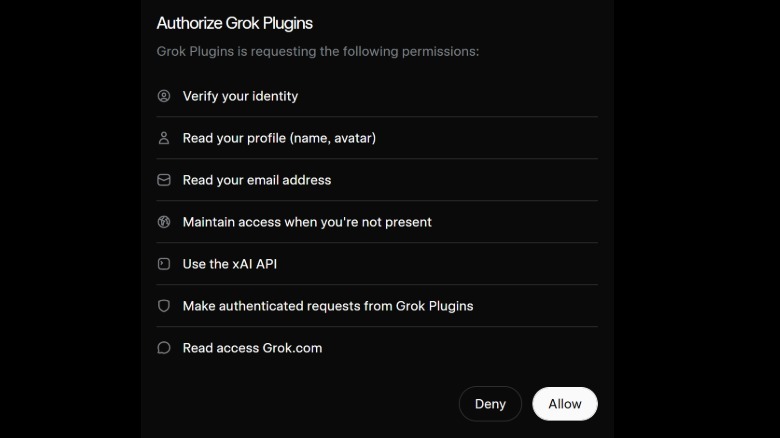
Clicking Continue brings up Google’s permission screens. Grok will ask for see, edit, create and delete permissions for all Google Docs files and every Slides presentation in your account, even if you’re installing it from within an individual file. It has narrower access to Sheets, covering only those that the add-on has been installed in, and its overall Drive access only stretches to files you use with Grok. It’ll also ask for permissions to connect to an external service, which allows Grok to send what it reads to SpaceXAI.
Once Grok is installed, open any doc, spreadsheet or presentation and nav to Extensions > Grok > Open Grok to bring up the side panel. You’ll then be prompted to Get Started and sign in. Once authenticated, Grok will be accessible and usable across all three Workspace apps.
 Luke James for Engadget
What Grok can do in Google Workspace
Grok can write directly onto the page in Google Docs, doing all the things you’d expect an LLM to do, such as turn rough notes into a draft with proper docs headings and lists. However, when I asked it to turn notes on installation instructions into a draft, the results were AI slop. Grok’s changes show up as visible revisions in Google Docs version history and, with Grok’s connectors switched on, it can apparently pull in context from recent emails or files in Google Drive. I personally wasn’t willing to give it that level of access to my emails or files and hooked it up to my secondary spam Gmail and Workspace account instead.
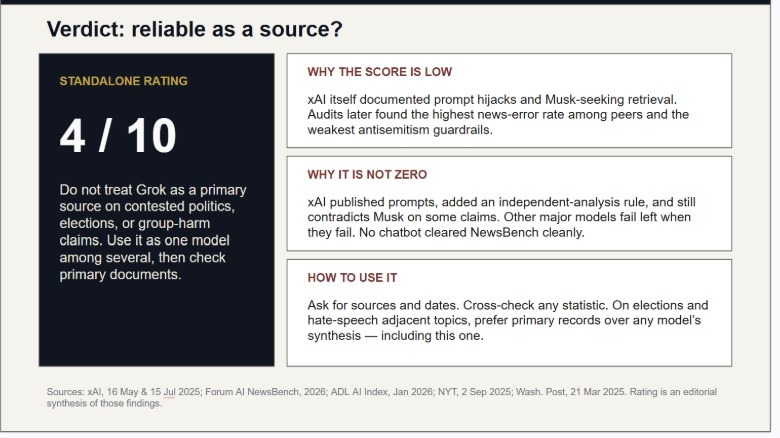
In Slides, Grok can build a presentation deck from an outline and add new slides that match the existing theme, researching the topic from the Web or from X (though that doesn’t seem like a great idea, in my opinion.) To its credit, SpaceXAI’s use cases page has some fairly interesting examples to borrow as prompts. I asked Grok to build a six-slide deck based on its track record for accuracy and political bias since 2025, with cited sources on every slide and concluding with a rating of how reliable Grok is as a source.
 Luke James for Engadget
In Sheets, Grok can read whatever ranges you select, answer with citations, point to specific cells, write formulas into the formula bar and insert charts. It can also rerun scenarios when you change an assumption, with each change being implemented as an ordinary edit that can be undone later.
Grok vs Google Gemini
Google’s Gemini chatbot is built into Workspace by default and opens from the Ask Gemini icon at the top-right of Gmail, Docs, Sheets, Slides, Drive and Chat. But it’s not free: Work accounts need an eligible Workspace plan, while personal accounts need a Google AI Plus, Pro or Ultra subscription.
Google folded Gemini into its Business and Enterprise plans in January 2025, ending a separate add-on that had taken a Business Standard seat to $32 per user per month. Google’s agent is paywalled now as well, and even while expanding access to its Gemini Spark agentic AI assistant, the company only brought Spark to US subscribers on the paid AI Pro plan in July 2026.
Grok costs nothing to add, and it’s the only one of the two that pulls research from X into whatever you’re generating, but whether that’s a plus or not is certainly debatable. Gemini integrates with more apps than Grok, and it can be run in Gmail, Drive and Chat, while Grok is restricted to Docs, Sheets and Slides. However, you can get around this somewhat and give Grok access to gmail and Drive files via connectors. If you don’t pay for Gemini, Grok is the simplest free way to get an AI side panel into Google Workspace, but only if you’re comfortable with giving it the access it asks for. If you already have a Gemini subscription or access via work, there’s little point using Grok unless you especially want it to cite information from the cesspit that is X.com.
