

🤗 Accelerate
Run your raw PyTorch training scripts on any kind of device.
Most high-level libraries above PyTorch provide support for distributed training and mixed precision, but the abstraction they introduce require a user to learn a new API if they want to customize the underlying training loop. 🤗 Accelerate was created for PyTorch users who like to have full control over their training loops but are reluctant to write (and maintain) the boilerplate code needed to use distributed training (for multi-GPU on one or several nodes, TPUs, …) or mixed precision training. Plans forward include support for fairscale, deepseed, AWS SageMaker specific data-parallelism and model parallelism.
It provides two things: a simple and consistent API that abstracts that boilerplate code and a launcher command to easily run those scripts on various setups.
Easy integration!
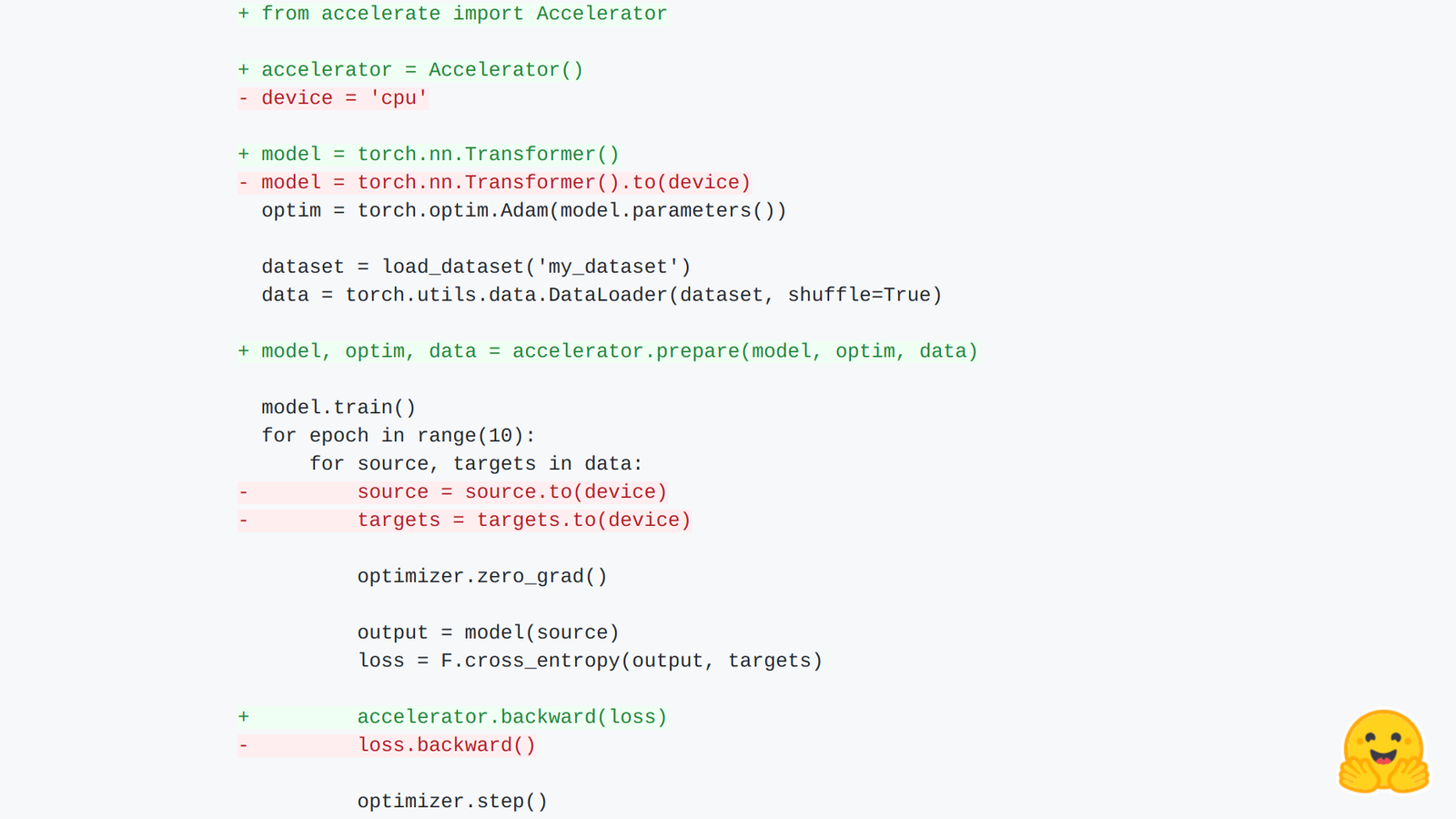
Let’s first have a look at an example:
  import torch
  import torch.nn.functional as F
  from datasets import load_dataset
+ from accelerate import Accelerator

+ accelerator = Accelerator()
- device="cpu"
+ device = accelerator.device

  model = torch.nn.Transformer().to(device)
  optim = torch.optim.Adam(model.parameters())

  dataset = load_dataset('my_dataset')
  data = torch.utils.data.DataLoader(dataset, shuffle=True)

+ model, optim, data = accelerator.prepare(model, optim, data)

  model.train()
  for epoch in range(10):
      for source, targets in data:
          source = source.to(device)
          targets = targets.to(device)

          optimizer.zero_grad()

          output = model(source)
          loss = F.cross_entropy(output, targets)

-         loss.backward()
+         accelerator.backward(loss)

          optimizer.step()
By just adding five lines of code to any standard PyTorch training script, you can now run said script on any kind of distributed setting, as well as with or without mixed precision. 🤗 Accelerate even handles the device placement for you, so you can simplify the training loop above even further:
  import torch
  import torch.nn.functional as F
  from datasets import load_dataset
+ from accelerate import Accelerator

+ accelerator = Accelerator()
- device="cpu"

- model = torch.nn.Transformer().to(device)
+ model = torch.nn.Transformer()
  optim = torch.optim.Adam(model.parameters())

  dataset = load_dataset('my_dataset')
  data = torch.utils.data.DataLoader(dataset, shuffle=True)

+ model, optim, data = accelerator.prepare(model, optim, data)

  model.train()
  for epoch in range(10):
      for source, targets in data:
-         source = source.to(device)
-         targets = targets.to(device)

          optimizer.zero_grad()

          output = model(source)
          loss = F.cross_entropy(output, targets)

-         loss.backward()
+         accelerator.backward(loss)

          optimizer.step()
In contrast, here are the changes needed to have this code run with distributed training are the followings:
+ import os
  import torch
  import torch.nn.functional as F
  from datasets import load_dataset
+ from torch.utils.data import DistributedSampler
+ from torch.nn.parallel import DistributedDataParallel

+ local_rank = int(os.environ.get("LOCAL_RANK", -1))
- device="cpu"
+ device = device = torch.device("cuda", local_rank)

  model = torch.nn.Transformer().to(device)
+ model = DistributedDataParallel(model)
  optim = torch.optim.Adam(model.parameters())

  dataset = load_dataset('my_dataset')
+ sampler = DistributedSampler(dataset)
- data = torch.utils.data.DataLoader(dataset, shuffle=True)
+ data = torch.utils.data.DataLoader(dataset, sampler=sampler)

  model.train()
  for epoch in range(10):
+     sampler.set_epoch(epoch)
      for source, targets in data:
          source = source.to(device)
          targets = targets.to(device)

          optimizer.zero_grad()

          output = model(source)
          loss = F.cross_entropy(output, targets)

          loss.backward()

          optimizer.step()
These changes will make your training script work for multiple GPUs, but your script will then stop working on CPU or one GPU (unless you start adding if statements everywhere). Even more annoying, if you wanted to test your script on TPUs you would need to change different lines of codes. Same for mixed precision training. The promise of 🤗 Accelerate is:
- to keep the changes to your training loop to the bare minimum so you have to learn as little as possible.
- to have the same functions work for any distributed setup, so only have to learn one API.
How does it work?
To see how the library works in practice, let’s have a look at each line of code we need to add to a training loop.
accelerator = Accelerator()
On top of giving the main object that you will use, this line will analyze from the environment the type of distributed training run and perform the necessary initialization. You can force a training on CPU or a mixed precision training by passing cpu=True or fp16=True to this init. Both of those options can also be set using the launcher for your script.
model, optim, data = accelerator.prepare(model, optim, data)
This is the main bulk of the API and will prepare the three main type of objects: models (torch.nn.Module), optimizers (torch.optim.Optimizer) and dataloaders (torch.data.dataloader.DataLoader).
Model
Model preparation include wrapping it in the proper container (for instance DistributedDataParallel) and putting it on the proper device. Like with a regular distributed training, you will need to unwrap your model for saving, or to access its specific methods, which can be done with accelerator.unwrap_model(model).
Optimizer
The optimizer is also wrapped in a special container that will perform the necessary operations in the step to make mixed precision work. It will also properly handle device placement of the state dict if its non-empty or loaded from a checkpoint.
DataLoader
This is where most of the magic is hidden. As you have seen in the code example, the library does not rely on a DistributedSampler, it will actually work with any sampler you might pass to your dataloader (if you ever had to write a distributed version of your custom sampler, there is no more need for that!). The dataloader is wrapped in a container that will only grab the indices relevant to the current process in the sampler (or skip the batches for the other processes if you use an IterableDataset) and put the batches on the proper device.
For this to work, Accelerate provides a utility function that will synchronize the random number generators on each of the processes run during distributed training. By default, it only synchronizes the generator of your sampler, so your data augmentation will be different on each process, but the random shuffling will be the same. You can of course use this utility to synchronize more RNGs if you need it.
accelerator.backward(loss)
This last line adds the necessary steps for the backward pass (mostly for mixed precision but other integrations will require some custom behavior here).
What about evaluation?
Evaluation can either be run normally on all processes, or if you just want it to run on the main process, you can use the handy test:
if accelerator.is_main_process():
But you can also very easily run a distributed evaluation using Accelerate, here is what you would need to add to your evaluation loop:
+ eval_dataloader = accelerator.prepare(eval_dataloader)
  predictions, labels = [], []
  for source, targets in eval_dataloader:
      with torch.no_grad():
          output = model(source)

-     predictions.append(output.cpu().numpy())
-     labels.append(targets.cpu().numpy())
+     predictions.append(accelerator.gather(output).cpu().numpy())
+     labels.append(accelerator.gather(targets).cpu().numpy())

  predictions = np.concatenate(predictions)
  labels = np.concatenate(labels)

+ predictions = predictions[:len(eval_dataloader.dataset)]
+ labels = label[:len(eval_dataloader.dataset)]

  metric_compute(predictions, labels)
Like for the training, you need to add one line to prepare your evaluation dataloader. Then you can just use accelerator.gather to gather across processes the tensors of predictions and labels. The last line to add truncates the predictions and labels to the number of examples in your dataset because the prepared evaluation dataloader will return a few more elements to make sure batches all have the same size on each process.
One launcher to rule them all
The scripts using Accelerate will be completely compatible with your traditional launchers, such as torch.distributed.launch. But remembering all the arguments to them is a bit annoying and when you’ve setup your instance with 4 GPUs, you’ll run most of your trainings using them all. Accelerate comes with a handy CLI that works in two steps:
accelerate config
This will trigger a little questionnaire about your setup, which will create a config file you can edit with all the defaults for your training commands. Then
accelerate launch path_to_script.py --args_to_the_script
will launch your training script using those default. The only thing you have to do is provide all the arguments needed by your training script.
To make this launcher even more awesome, you can use it to spawn an AWS instance using SageMaker. Look at this guide to discover how!
How to get involved?
To get started, just pip install accelerate or see the documentation for more install options.
Accelerate is a fully open-sourced project, you can find it on GitHub, have a look at its documentation or skim through our basic examples. Please let us know if you have any issue or feature you would like the library to support. For all questions, the forums is the place to check!
For more complex examples in situation, you can look at the official Transformers examples. Each folder contains a run_task_no_trainer.py that leverages the Accelerate library!
