

This is an example on how to deploy the open-source LLMs, like BLOOM to Amazon SageMaker for inference using the new Hugging Face LLM Inference Container.
We will deploy the 12B Pythia Open Assistant Model, an open-source Chat LLM trained with the Open Assistant dataset.
The example covers:
- Setup development environment
- Retrieve the new Hugging Face LLM DLC
- Deploy Open Assistant 12B to Amazon SageMaker
- Run inference and chat with our model
- Create Gradio Chatbot backed by Amazon SageMaker
You can find the code for the example also in the notebooks repository.
What is Hugging Face LLM Inference DLC?
Hugging Face LLM DLC is a new purpose-built Inference Container to easily deploy LLMs in a secure and managed environment. The DLC is powered by Text Generation Inference (TGI), an open-source, purpose-built solution for deploying and serving Large Language Models (LLMs). TGI enables high-performance text generation using Tensor Parallelism and dynamic batching for the most popular open-source LLMs, including StarCoder, BLOOM, GPT-NeoX, Llama, and T5.
Text Generation Inference is already used by customers such as IBM, Grammarly, and the Open-Assistant initiative implements optimization for all supported model architectures, including:
Officially supported model architectures are currently:
With the new Hugging Face LLM Inference DLCs on Amazon SageMaker, AWS customers can benefit from the same technologies that power highly concurrent, low latency LLM experiences like HuggingChat, OpenAssistant, and Inference API for LLM models on the Hugging Face Hub.
Let’s get started!
1. Setup development environment
We are going to use the sagemaker python SDK to deploy BLOOM to Amazon SageMaker. We need to make sure to have an AWS account configured and the sagemaker python SDK installed.
!pip install "sagemaker==2.175.0" --upgrade --quiet
If you are going to use Sagemaker in a local environment, you need access to an IAM Role with the required permissions for Sagemaker. You can find here more about it.
import sagemaker
import boto3
sess = sagemaker.Session()


sagemaker_session_bucket=None
if sagemaker_session_bucket is None and sess is not None:

    sagemaker_session_bucket = sess.default_bucket()

try:
    role = sagemaker.get_execution_role()
except ValueError:
    iam = boto3.client('iam')
    role = iam.get_role(RoleName='sagemaker_execution_role')['Role']['Arn']

sess = sagemaker.Session(default_bucket=sagemaker_session_bucket)

print(f"sagemaker role arn: {role}")
print(f"sagemaker session region: {sess.boto_region_name}")
2. Retrieve the new Hugging Face LLM DLC
Compared to deploying regular Hugging Face models, we first need to retrieve the container uri and provide it to our HuggingFaceModel model class with a image_uri pointing to the image. To retrieve the new Hugging Face LLM DLC in Amazon SageMaker, we can use the get_huggingface_llm_image_uri method provided by the sagemaker SDK. This method allows us to retrieve the URI for the desired Hugging Face LLM DLC based on the specified backend, session, region, and version. You can find the available versions here
from sagemaker.huggingface import get_huggingface_llm_image_uri


llm_image = get_huggingface_llm_image_uri(
  "huggingface",
  version="1.0.3"
)


print(f"llm image uri: {llm_image}")
3. Deploy Open Assistant 12B to Amazon SageMaker
Note: Quotas for Amazon SageMaker can vary between accounts. If you receive an error indicating you’ve exceeded your quota, you can increase them through the Service Quotas console.
To deploy Open Assistant Model to Amazon SageMaker we create a HuggingFaceModel model class and define our endpoint configuration including the hf_model_id, instance_type etc. We will use a g5.12xlarge instance type, which has 4 NVIDIA A10G GPUs and 96GB of GPU memory.
Note: We could also optimize the deployment for cost and use g5.2xlarge instance type and enable int-8 quantization.
import json
from sagemaker.huggingface import HuggingFaceModel


instance_type = "ml.g5.12xlarge"
number_of_gpu = 4
health_check_timeout = 300


config = {
  'HF_MODEL_ID': "OpenAssistant/pythia-12b-sft-v8-7k-steps",
  'SM_NUM_GPUS': json.dumps(number_of_gpu),
  'MAX_INPUT_LENGTH': json.dumps(1024),
  'MAX_TOTAL_TOKENS': json.dumps(2048),

}


llm_model = HuggingFaceModel(
  role=role,
  image_uri=llm_image,
  env=config
)
After we have created the HuggingFaceModel we can deploy it to Amazon SageMaker using the deploy method. We will deploy the model with the ml.g5.12xlarge instance type. TGI will automatically distribute and shard the model across all GPUs.
llm = llm_model.deploy(
  initial_instance_count=1,
  instance_type=instance_type,

  container_startup_health_check_timeout=health_check_timeout,
)
SageMaker will now create our endpoint and deploy the model to it. This can take 5-10 minutes.
4. Run inference and chat with our model
After our endpoint is deployed we can run inference on it using the predict method from the predictor. We can use different parameters to control the generation, defining them in the parameters attribute of the payload. As of today TGI supports the following parameters:
temperature: Controls randomness in the model. Lower values will make the model more deterministic and higher values will make the model more random. Default value is 1.0.max_new_tokens: The maximum number of tokens to generate. Default value is 20, max value is 512.repetition_penalty: Controls the likelihood of repetition, defaults tonull.seed: The seed to use for random generation, default isnull.stop: A list of tokens to stop the generation. The generation will stop when one of the tokens is generated.top_k: The number of highest probability vocabulary tokens to keep for top-k-filtering. Default value isnull, which disables top-k-filtering.top_p: The cumulative probability of parameter highest probability vocabulary tokens to keep for nucleus sampling, default tonulldo_sample: Whether or not to use sampling; use greedy decoding otherwise. Default value isfalse.best_of: Generate best_of sequences and return the one if the highest token logprobs, default tonull.details: Whether or not to return details about the generation. Default value isfalse.return_full_text: Whether or not to return the full text or only the generated part. Default value isfalse.truncate: Whether or not to truncate the input to the maximum length of the model. Default value istrue.typical_p: The typical probability of a token. Default value isnull.watermark: The watermark to use for the generation. Default value isfalse.
You can find the open api specification of TGI in the swagger documentation
The OpenAssistant/pythia-12b-sft-v8-7k-steps is a conversational chat model meaning we can chat with it using the following prompt:
<|prompter|>[Instruction]<|endoftext|>
<|assistant|>
lets give it a first try and ask about some cool ideas to do in the summer:
chat = llm.predict({
    "inputs": """<|prompter|>What are some cool ideas to do in the summer?<|endoftext|><|assistant|>"""
})

print(chat[0]["generated_text"])
Now we will show how to use generation parameters in the parameters attribute of the payload. In addition to setting custom temperature, top_p, etc, we also stop generation after the turn of the bot.
prompt="""<|prompter|>How can i stay more active during winter? Give me 3 tips.<|endoftext|><|assistant|>"""


payload = {
  "inputs": prompt,
  "parameters": {
    "do_sample": True,
    "top_p": 0.7,
    "temperature": 0.7,
    "top_k": 50,
    "max_new_tokens": 256,
    "repetition_penalty": 1.03,
    "stop": ["<|endoftext|>"]
  }
}


response = llm.predict(payload)


print(response[0]["generated_text"])
5. Create Gradio Chatbot backed by Amazon SageMaker
We can also create a gradio application to chat with our model. Gradio is a python library that allows you to quickly create customizable UI components around your machine learning models. You can find more about gradio here.
!pip install gradio --upgrade
import gradio as gr


parameters = {
    "do_sample": True,
    "top_p": 0.7,
    "temperature": 0.7,
    "top_k": 50,
    "max_new_tokens": 256,
    "repetition_penalty": 1.03,
    "stop": ["<|endoftext|>"]
  }

with gr.Blocks() as demo:
    gr.Markdown("## Chat with Amazon SageMaker")
    with gr.Column():
        chatbot = gr.Chatbot()
        with gr.Row():
            with gr.Column():
                message = gr.Textbox(label="Chat Message Box", placeholder="Chat Message Box", show_label=False)
            with gr.Column():
                with gr.Row():
                    submit = gr.Button("Submit")
                    clear = gr.Button("Clear")

    def respond(message, chat_history):

        converted_chat_history = ""
        if len(chat_history) > 0:
          for c in chat_history:
            converted_chat_history += f"<|prompter|>{c[0]}<|endoftext|><|assistant|>{c[1]}<|endoftext|>"
        prompt = f"{converted_chat_history}<|prompter|>{message}<|endoftext|><|assistant|>"


        llm_response = llm.predict({"inputs": prompt, "parameters": parameters})


        parsed_response = llm_response[0]["generated_text"][len(prompt):]
        chat_history.append((message, parsed_response))
        return "", chat_history

    submit.click(respond, [message, chatbot], [message, chatbot], queue=False)
    clear.click(lambda: None, None, chatbot, queue=False)

demo.launch(share=True)
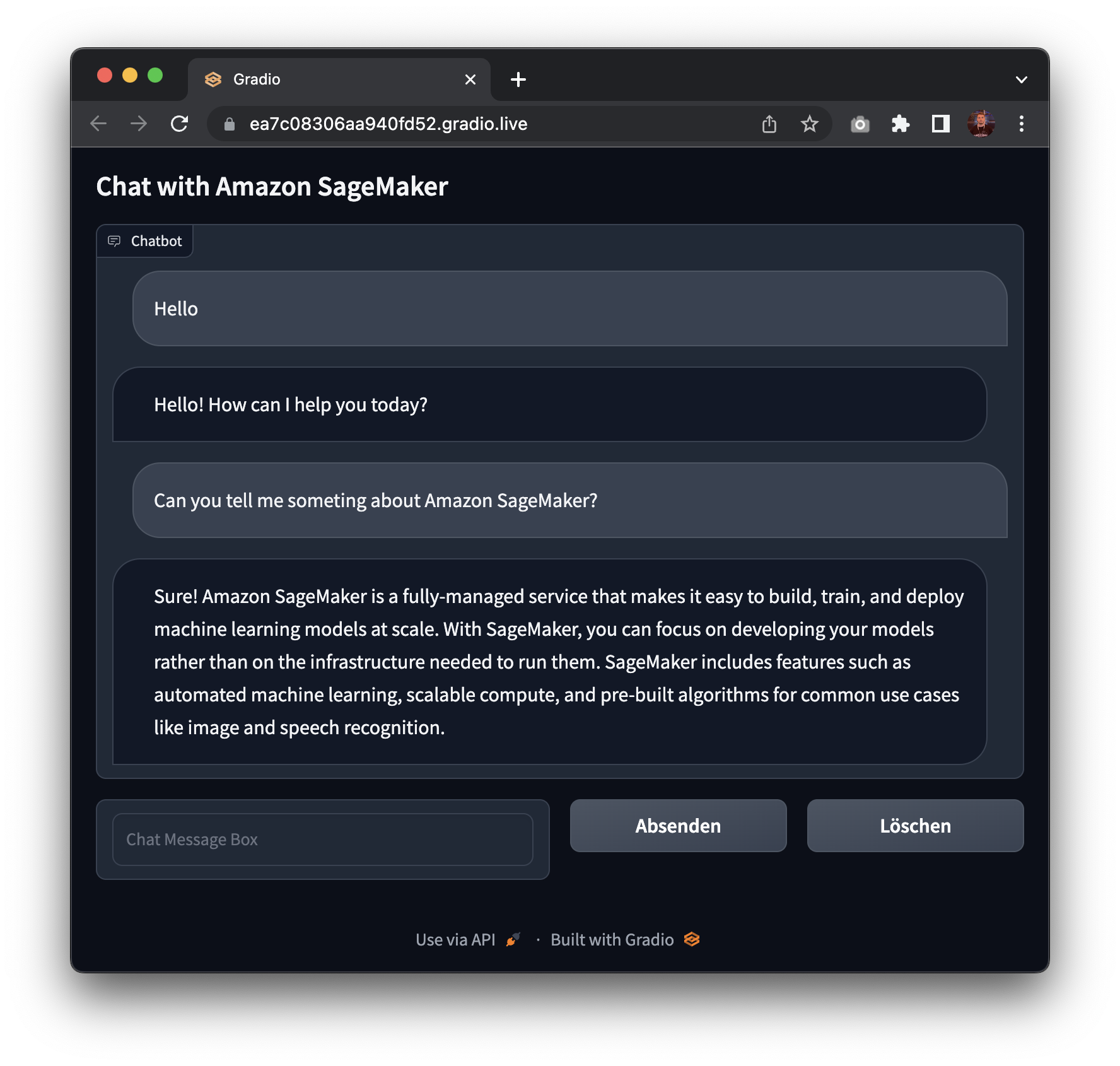
Awesome! 🚀 We have successfully deployed Open Assistant Model to Amazon SageMaker and run inference on it. Additionally, we have built a quick gradio application to chat with our model.
Now, it’s time for you to try it out yourself and build Generation AI applications with the new Hugging Face LLM DLC on Amazon SageMaker.
To clean up, we can delete the model and endpoint.
llm.delete_model()
llm.delete_endpoint()
Conclusion
The new Hugging Face LLM Inference DLC enables customers to easily and securely deploy open-source LLMs on Amazon SageMaker. The easy-to-use API and deployment process allows customers to build scalable AI chatbots and virtual assistants with state-of-the-art models like Open Assistant. Overall, this new DLC is going to empower developers and businesses to leverage the latest advances in natural language generation.
Thanks for reading! If you have any questions, feel free to contact me on Twitter or LinkedIn.
