

Turn one person’s process into your team’s process, get more done in the Quick web app, and get more complete answers from agents working together.
AWS Quick is the AI workspace built only for work. Today, we are releasing updates that help your team get more of its everyday work done:
- Build, see, and improve business processes, all through conversation. Describe a process in chat and Quick builds a flow to orchestrate agents, skills, and tools with access to structured data, knowledge, and apps. New deterministic steps help make your workflows consistent and verifiable, now with longer-running workflows and support for large data volumes.
- Triage your day and keep agents working in the Quick web app. The updated web app puts what needs your attention and a daily briefing on your home screen, adds the agents and skills you use on desktop, and keeps your work running after you close the tab.
- Complete work spanning multiple agents through a single prompt. With multi-agent orchestration, several specialized agents work on your request at the same time, and Quick combines what they find into one response.
- Bring more of your data into Quick. Connect to Meta ads and Amplitude, then ask in natural language and combine the answers with your other sources.
- Skills on web, security and governance improvements, and more languages: Turn the way you do a task into a skill Quick can reuse, now in the Quick web app. Set configurable content safety and sensitive-information controls for user prompts. Support for Japanese, German, Chinese (Simplified and Traditional), and Vietnamese.
AI assistants make individuals faster, but the gains often stay with one person. The way one analyst builds the monthly report rarely becomes the way the team builds it, and work waits until someone is back at their desk. This release helps your team turn what one person knows into a process everyone can rely on, and keeps work moving when you step away.
Turn one person’s process into your team’s process
AWS Quick Flows already helps teams automate and standardize business processes so people can focus on their most important work. Now you can build, run, and refine flows entirely in chat. And your flows can take on more of your tough work, whether you start it from the web, desktop, or mobile app.
For example, here is how flows could support a finance team. Maya is a financial planning and analysis manager at a retailer. Each month, she prepares a report for her VP of Finance that explains changes to costs and margins. For each region, she pulls last month’s results, compares them to the plan in a spreadsheet, writes commentary on the biggest changes, and sends the report. The process lives in her memory and a personal checklist. When she is out, a teammate has to rebuild the report from scratch, and it looks different every time.
With Quick, Maya can standardize the process, automate it, and make it available to her team. She describes her process in chat, the way she would explain it to a new employee. Quick builds the flow from her description and she tests and refines it in the same conversation. A diagram beside the chat shows each step, so she can confirm it matches how she works.
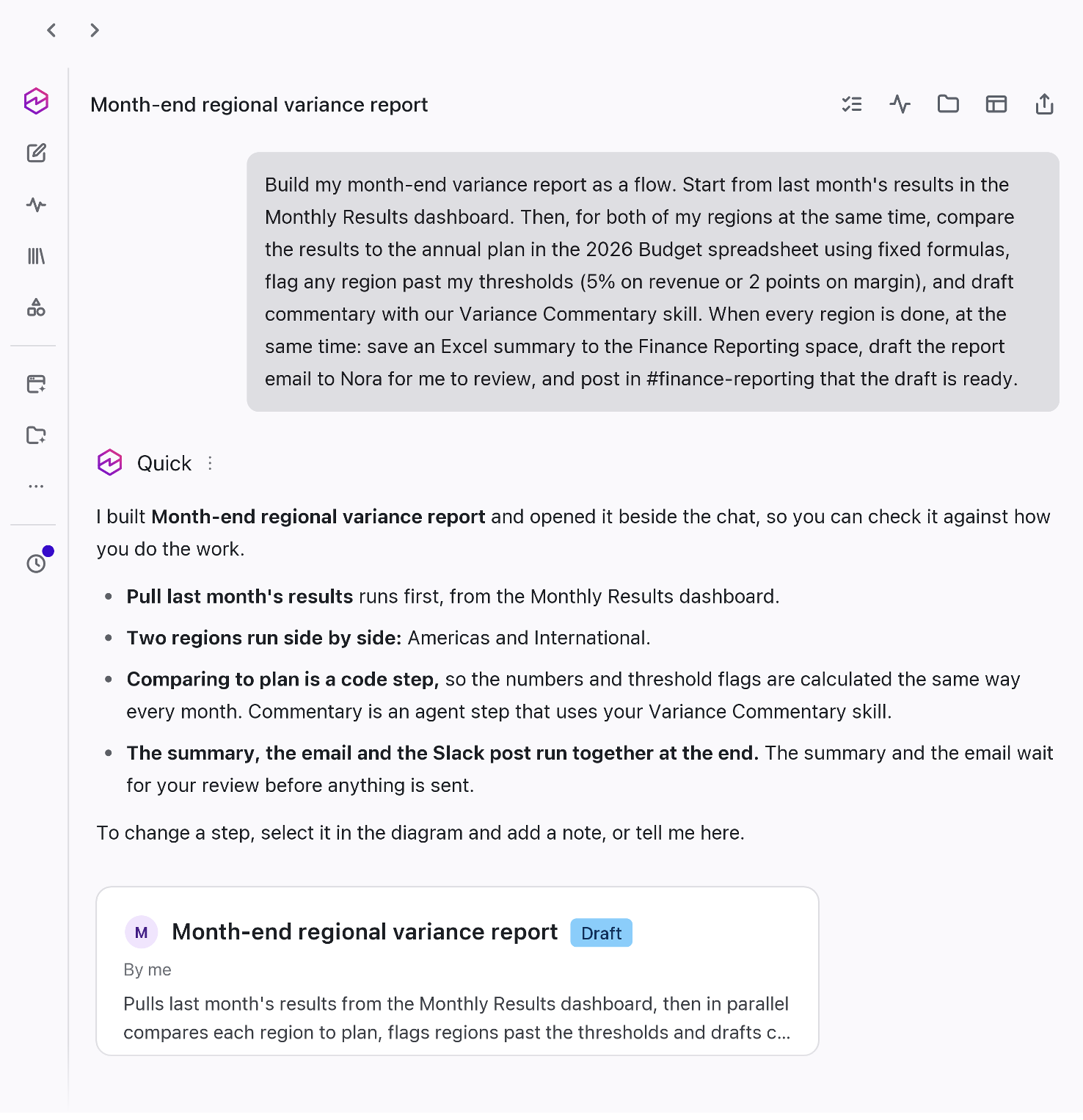
Figure 1: Maya describes her monthly report in chat, and Quick builds the flow with a diagram beside it. Both views, enlarged here for visibility, appear side by side in the same Quick window
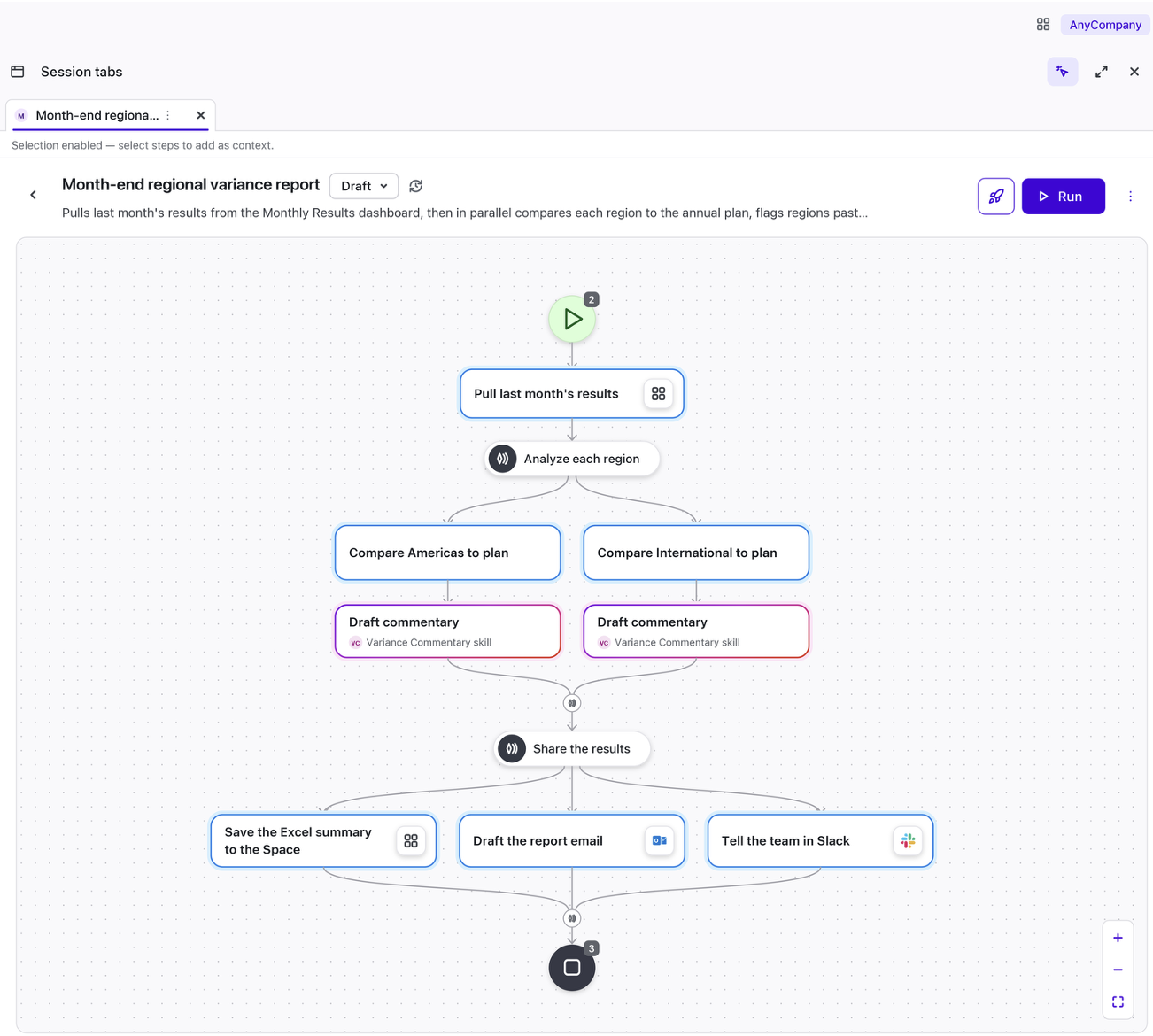
A flow can now bring together agents, skills, tools, and data, and handle longer processes with more data. Fixed calculations and checks keep the results consistent, agents draft and analyze, and Maya decides what goes in the final report. On each run, her flow:
- Pulls last month’s results from the team’s monthly results dashboard in Quick, so she starts from the numbers her team already reports on.
- Works through several regions at the same time, so the report is ready sooner, even as the company adds regions.
- Compares each region to the annual plan in the team’s budget spreadsheet, using set formulas so the numbers are calculated the same way each month.
- Flags regions that moved significantly from plan, based on thresholds Maya set, and drafts commentary on each using the team’s commentary skill.
- Drafts a Microsoft Excel summary to the team’s shared Space and report email for Maya to review, and tells the team in Slack that the draft is ready.
Maya publishes the flow for her team. At the next month-end, she is at a planning meeting, so Jordan, an analyst on her team, runs it from chat in the Quick desktop app. There, the flow can use a spreadsheet of regional adjustments saved on his computer. Before the report goes out, Jordan reviews the draft, including why each region was flagged, asks for a few changes in chat, and approves it for the VP of Finance. When Priya joins the team, she runs the same flow at her first month-end, and the report is built the same way.
While this is a fictional example, real customers tell us they’re automating complex business processes to make them more consistent and repeatable. This gives their people back valuable time to focus on more strategic work. Take Pomelo, a Latin American fintech provider powering card issuance, processing, and payment operations for customers:
“At Pomelo, AWS Quick changed who gets to build solutions. Before, every analysis or automation depended on the data team. Today, people across every area explore information, make decisions, and build their own agents and flows within a unified, governed environment. Without growing our team, nearly four times as many people now work with data each month, so our data team can focus on its most complex, high-impact work. A single use case already saves us 80 hours of work per month. But the real transformation isn’t the hours we save. Quick is transforming our data and innovation culture: we’ve gone from a few people building solutions for many to an organization where everyone can create, experiment, and change the way they work. And we’re just getting started.”
— Rodrigo Marini, Head of Data, Pomelo Fintech Services S.A.S.
Get more done in the updated Quick web app
If you already use Quick in your browser, the updated web app puts the items that need your attention on the home screen as soon as you sign in. A reorganized left navigation brings agents, flows, skills, knowledge, and connectors together under Customize. It includes the agents and skills you built on desktop and ones others have shared with you. Your existing dashboards, topics, and spaces work as before, and you do not need to turn anything on.
- See what needs your attention, then act on it. Your feed and a new daily briefing bring together the email and messages that need you, in priority order. Ask Quick about any item or have it draft replies for you to review and send.
- Keep agents working when you step away. Schedule a task or start a longer request before a meeting, and Quick keeps working after you close your browser. When you return, review the results and respond to any agents waiting on you in Mission Control.
- Find your work in one place. Library brings together your recent work, favorites, pinned items, and the documents and files you create in Quick. Your conversations, agents, and files sync across web, desktop, and mobile, so you can start in your browser and pick up on your phone or in the desktop app, where Quick can work with files on your computer.
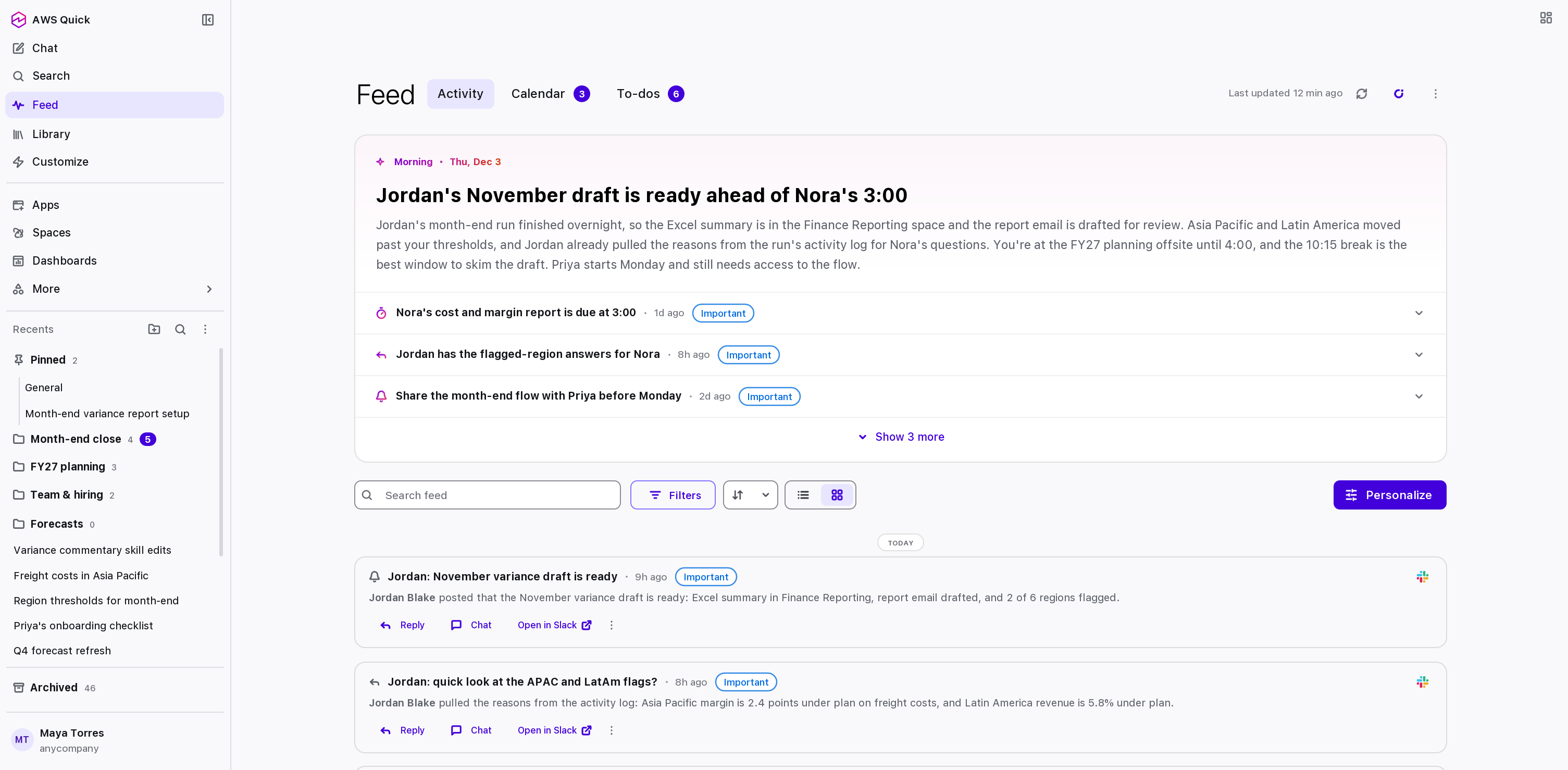
Figure 2: The feed brings the morning’s email and messages that need a reply into one view
Get more complete answers from agents working together
Some requests need the knowledge of more than one specialized agent. With multi-agent orchestration, the agent you ask can bring in several specialized agents at once, each working on the part it knows best. The agent then combines their work into one response. Each agent keeps its own instructions, knowledge, and context, so the people who know that work best can build and maintain it.
For example, you might ask why shipping costs rose in one region. Your agent can bring in a forecasting agent built on your team’s planning data and a procurement agent built on the procurement team’s vendor contracts. You get one response that shows what each agent contributed, and you decide what to do with it.
Work lives in many systems. This release adds new connectors so Quick can pull from the analytics and tools your team uses every day. Connect once, then ask in natural language.
Meta ads. Create, manage, and analyze Meta ad campaigns in natural language through a connector to Meta’s ads Model Context Protocol (MCP) server. Quick combines Meta ad data with your first-party and third-party sources, and asks for your permission before it creates a campaign, changes a budget, or takes any other write action in an ad account. Try Quick free for 3 months and invite up to 10 teammates at no cost.
Amplitude. Ask about product usage, customer behavior, and conversion in natural language. Quick connects to Amplitude through its MCP server, so product and marketing teams can pull behavioral insights into the dashboards, documents, and workflows they build in Quick.
Connectors respect your existing permissions. Quick only shows each person what they already have access to. Quick asks before it takes any write action. Administrators choose which connectors teams can add.
Also in this release
- Skills in the Quick web app. Skills are reusable instructions that teach Quick to do a task your way, such as reviewing a contract against your team’s checklist, or writing a project update in your company’s format. You can now browse, install, create, and manage skills in the web app, as on desktop.
- Guardrails for prompts (preview). Administrators can set policies that filter content, block denied topics and words, detect prompt attacks, and protect selected types of personal information in the prompts people send to Quick. They can test a policy in detect-only mode before enforcing it, then apply it to individual users, identity provider groups, or the whole account. This feature is available to all AWS Quick customers subscribed to Professional and Enterprise plans.
- Permissions and limits by group. Administrators can now assign custom permissions and limit profiles to groups from your identity provider, in addition to individual users, roles, and the whole account. For example, you can prevent your finance group from creating agents, or set how many agent hours each member of a group can use, without managing each person separately. This feature is available to all AWS Quick customers subscribed to Professional and Enterprise plans.
- Choose which data sources people can add. Administrators can now control which types of data sources people can create, update, or share. For example, you can let people connect Amazon Redshift while blocking file uploads, or stop people from sharing data sources from a specific connector. This feature is available to all AWS Quick customers subscribed to Professional and Enterprise plans.
- More languages. Use Quick in Japanese, German, Chinese (Simplified and Traditional), and Vietnamese.
Every decision stays yours
Whether you build a monthly report, run one your manager built, or set up Quick for your organization, Quick works the way you do. Your data stays in your environment and does not train anyone else’s models. You bring the judgment, and Quick gives your team the capacity to match its goals.
These features are available today in all Regions where AWS Quick is available.
To try what’s new, sign in to Quick or download Quick and get started in minutes. To learn about enterprise pricing plans, talk to your AWS account team.
About the author
