

RLHF / ChatGPT has been a popular research topic these days. In our quest to research more on RLHF, this blog post attempts to do a reproduction of OpenAI’s 2019 original RLHF codebase at openai/lm-human-preferences. Despite its “tensorflow-1.x-ness,” OpenAI’s original codebase is very well-evaluated and benchmarked, making it a good place to study RLHF implementation engineering details.
We aim to:
- reproduce OAI’s results in stylistic tasks and match the learning curves of openai/lm-human-preferences.
- present a checklist of implementation details, similar to the spirit of The 37 Implementation Details of Proximal Policy Optimization; Debugging RL, Without the Agonizing Pain.
- provide a simple-to-read and minimal reference implementation of RLHF;
This work is just for educational / learning purposes. For advanced users requiring more features, such as running larger models with PEFT, huggingface/trl would be a great choice.
- In Matching Learning Curves, we show our main contribution: creating a codebase that can reproduce OAI’s results in the stylistic tasks and matching learning curves very closely with openai/lm-human-preferences.
- We then take a technical deep dive into the implementation details that are relevant to reproducing OAI’s work. In General Implementation Details, we talk about basic details, such as how rewards/values are generated and how responses are generated. In Reward Model Implementation Details, we talk about details such as reward normalization. In Policy Training Implementation Details, we discuss details such as rejection sampling and reward “whitening”.
- Next, we examine the effect of training different base models (e.g., gpt2-xl, falcon-1b,) given that the reward labels are produced with
gpt2-large. - Finally, we conclude our work with limitations and discussions.
Here are the important links:
Matching Learning Curves
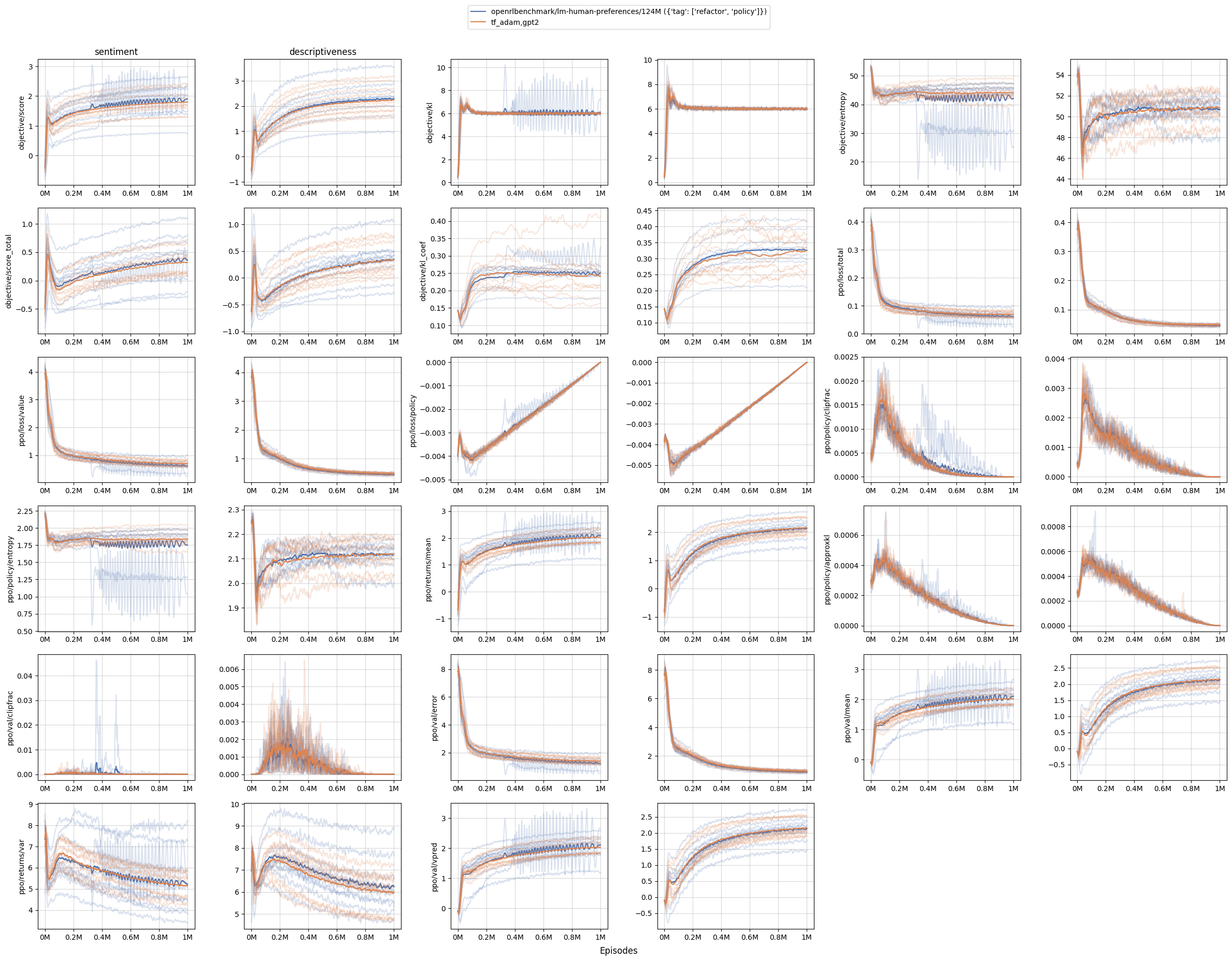
Our main contribution is to reproduce OAI’s results in stylistic tasks, such as sentiment and descriptiveness. As shown in the figure below, our codebase (orange curves) can produce nearly identical learning curves as OAI’s codebase (blue curves).
A note on running openai/lm-human-preferences
To make a direct comparison, we ran the original RLHF code at openai/lm-human-preferences, which will offer valuable metrics to help validate and diagnose our reproduction. We were able to set the original TensorFlow 1.x code up, but it requires a hyper-specific setup:
- OAI’s dataset was partially corrupted/lost (so we replaced them with similar HF datasets, which may or may not cause a performance difference)
- It can’t run on 1 V100 because it doesn’t implement gradient accumulation. Instead, it uses a large batch size and splits the batch across 8 GPUs, and will OOM on just 1 GPU.
- It can’t run on 8x A100 because it uses TensorFlow 1.x, which is incompatible with Cuda 8+
- It can’t run on 8x V100 (16GB) because it will OOM
- It can only run on 8x V100 (32GB), which is only offered by AWS as the
p3dn.24xlargeinstance.
General Implementation Details
We now take a technical deep dive into the implementation details that are relevant to reproducing OAI’s work. In this section, we talk about basic details, such as how rewards/values are generated and how responses are generated. Here are these details in no particular order:
-
The reward model and policy’s value head take input as the concatenation of
queryandresponse- The reward model and policy’s value head do not only look at the response. Instead, it concatenates the
queryandresponsetogether asquery_response(lm_human_preferences/rewards.py#L105-L107). - So, for example, if
query = "he was quiet for a minute, his eyes unreadable"., and theresponse = "He looked at his left hand, which held the arm that held his arm out in front of him.", then the reward model and policy’s value do a forward pass onquery_response = "he was quiet for a minute, his eyes unreadable. He looked at his left hand, which held the arm that held his arm out in front of him."and produced rewards and values of shape(B, T, 1), whereBis the batch size,Tis the sequence length, and1is the reward head dimension of 1 (lm_human_preferences/rewards.py#L105-L107, lm_human_preferences/policy.py#L111). - The
Tmeans that each token has a reward associated with it and its previous context. For example, theeyestoken would have a reward corresponding tohe was quiet for a minute, his eyes.
- The reward model and policy’s value head do not only look at the response. Instead, it concatenates the
-
Pad with a special padding token and truncate inputs.
-
OAI sets a fixed input length for query
query_length; it pads sequences that are too short withpad_token(lm_human_preferences/language/datasets.py#L66-L67) and truncates sequences that are too long (lm_human_preferences/language/datasets.py#L57). See here for a general introduction to the concept). When padding the inputs, OAI uses a token beyond the vocabulary (lm_human_preferences/language/encodings.py#L56).- Note on HF’s transformers — padding token. According to (transformers#2630#issuecomment-578159876), padding tokens were not used during the pre-training of GPT and GPT-2; therefore transformer’s gpt2 models have no official padding token associated with its tokenizer. A common practice is to set
tokenizer.pad_token = tokenizer.eos_token, but in this work, we shall distinguish these two special tokens to match OAI’s original setting, so we will usetokenizer.add_special_tokens({"pad_token": "[PAD]"}).
Note that having no padding token is a default setting for decoder models, since they train with “packing” during pretraining, which means that many sequences are concatenated and separated by the EOS token and chunks of this sequence that always have the max length are fed to the model during pretraining.
- Note on HF’s transformers — padding token. According to (transformers#2630#issuecomment-578159876), padding tokens were not used during the pre-training of GPT and GPT-2; therefore transformer’s gpt2 models have no official padding token associated with its tokenizer. A common practice is to set
-
When putting everything together, here is an example
import transformers tokenizer = transformers.AutoTokenizer.from_pretrained("gpt2", padding_side="right") tokenizer.add_special_tokens({"pad_token": "[PAD]"}) query_length = 5 texts = [ "usually, he would", "she thought about it", ] tokens = [] for text in texts: tokens.append(tokenizer.encode(text)[:query_length]) print("tokens", tokens) inputs = tokenizer.pad( {"input_ids": tokens}, padding="max_length", max_length=query_length, return_tensors="pt", return_attention_mask=True, ) print("inputs", inputs) """prints are tokens [[23073, 11, 339, 561], [7091, 1807, 546, 340]] inputs {'input_ids': tensor([[23073, 11, 339, 561, 50257], [ 7091, 1807, 546, 340, 50257]]), 'attention_mask': tensor([[1, 1, 1, 1, 0], [1, 1, 1, 1, 0]])} """ -
-
Adjust position indices correspondingly for padding tokens
-
When calculating the logits, OAI’s code works by masking out padding tokens properly. This is achieved by finding out the token indices corresponding to the padding tokens (lm_human_preferences/language/model.py#L296-L297), followed by adjusting their position indices correspondingly (lm_human_preferences/language/model.py#L320).
-
For example, if the
query=[23073, 50259, 50259]andresponse=[11, 339, 561], where (50259is OAI’s padding token), it then creates position indices as[[0 1 1 1 2 3]]and logits as follows. Note how the logits corresponding to the padding tokens remain the same as before! This is the effect we should be aiming for in our reproduction.all_logits [[[ -35.28693 -34.2875 -38.16074 ... -41.595802 -41.082108 -35.36577 ] [ -35.28693 -34.2875 -38.16074 ... -41.595802 -41.082108 -35.36577 ] [ -35.28693 -34.2875 -38.16074 ... -41.595802 -41.082108 -35.36577 ] [-111.303955 -110.94471 -112.90624 ... -113.13064 -113.7788 -109.17345 ] [-111.51512 -109.61077 -114.90231 ... -118.43514 -111.56671 -112.12478 ] [-122.69775 -121.84468 -128.27417 ... -132.28055 -130.39604 -125.707756]]] (1, 6, 50257) -
Note on HF’s transformers —
position_idsandpadding_side. We can replicate the exact logits using Hugging Face’s transformer with 1) left padding and 2) pass in the appropriateposition_ids:import torch import transformers tokenizer = transformers.AutoTokenizer.from_pretrained("gpt2", padding_side="right") tokenizer.add_special_tokens({"pad_token": "[PAD]"}) pad_id = tokenizer.pad_token_id query = torch.tensor([ [pad_id, pad_id, 23073], ]) response = torch.tensor([ [11, 339, 561], ]) temperature = 1.0 query = torch.tensor(query) response = torch.tensor(response).long() context_length = query.shape[1] query_response = torch.cat((query, response), 1) pretrained_model = transformers.AutoModelForCausalLM.from_pretrained("gpt2") def forward(policy, query_responses, tokenizer): attention_mask = query_responses != tokenizer.pad_token_id position_ids = attention_mask.cumsum(1) - attention_mask.long() input_ids = query_responses.clone() input_ids[~attention_mask] = 0 return policy( input_ids=input_ids, attention_mask=attention_mask, position_ids=position_ids, return_dict=True, output_hidden_states=True, ) output = forward(pretrained_model, query_response, tokenizer) logits = output.logits logits /= temperature print(logits) """ tensor([[[ -26.9395, -26.4709, -30.0456, ..., -33.2208, -33.2884, -27.4360], [ -27.1677, -26.7330, -30.2386, ..., -33.6813, -33.6931, -27.5928], [ -35.2869, -34.2875, -38.1608, ..., -41.5958, -41.0821, -35.3658], [-111.3040, -110.9447, -112.9062, ..., -113.1306, -113.7788, -109.1734], [-111.5152, -109.6108, -114.9024, ..., -118.4352, -111.5668, -112.1248], [-122.6978, -121.8447, -128.2742, ..., -132.2805, -130.3961, -125.7078]]], grad_fn=) """ -
Note on HF’s transformers —
position_idsduringgenerate: during generate we should not pass inposition_idsbecause theposition_idsare already adjusted intransformers(see huggingface/transformers#/7552.
Usually, we almost never pass
position_idsin transformers. All the masking and shifting logic are already implemented e.g. in thegeneratefunction (need permanent code link). -
-
Response generation samples a fixed-length response without padding.
-
During response generation, OAI uses
top_k=0, top_p=1.0and just do categorical samples across the vocabulary (lm_human_preferences/language/sample.py#L43) and the code would keep sampling until a fixed-length response is generated (lm_human_preferences/policy.py#L103). Notably, even if it encounters EOS (end-of-sequence) tokens, it will keep sampling. -
Note on HF’s transformers — sampling could stop at
eos_token: intransformers, the generation could stop ateos_token(src/transformers/generation/utils.py#L2248-L2256), which is not the same as OAI’s setting. To align the setting, we need to do setpretrained_model.generation_config.eos_token_id = None, pretrained_model.generation_config.pad_token_id = None. Note thattransformers.GenerationConfig(eos_token_id=None, pad_token_id=None, ...)does not work becausepretrained_model.generation_configwould override and set aeos_token.import torch import transformers tokenizer = transformers.AutoTokenizer.from_pretrained("gpt2", padding_side="right") tokenizer.add_special_tokens({"pad_token": "[PAD]"}) pad_id = tokenizer.pad_token_id query = torch.tensor([ [pad_id, pad_id, 23073], ]) response = torch.tensor([ [11, 339, 561], ]) response_length = 4 temperature = 0.7 pretrained_model = transformers.AutoModelForCausalLM.from_pretrained("gpt2") pretrained_model.generation_config.eos_token_id = None pretrained_model.generation_config.pad_token_id = None generation_config = transformers.GenerationConfig( max_new_tokens=response_length, min_new_tokens=response_length, temperature=temperature, top_k=0.0, top_p=1.0, do_sample=True, ) context_length = query.shape[1] attention_mask = query != tokenizer.pad_token_id input_ids = query.clone() input_ids[~attention_mask] = 0 output = pretrained_model.generate( input_ids=input_ids, attention_mask=attention_mask, generation_config=generation_config, return_dict_in_generate=True, ) print(output.sequences) """ tensor([[ 0, 0, 23073, 16851, 11, 475, 991]]) """ -
Note that in a more recent codebase https://github.com/openai/summarize-from-feedback, OAI does stop sampling when encountering EOS token (summarize_from_feedback/utils/experiment_helpers.py#L19). However in this work we aim to do a 1:1 replication, so we align the setting that could keep sampling even eos_token is encountered
-
-
Learning rate annealing for reward model and policy training.
- As Ziegler et al. (2019) suggested, the reward model is trained for a single epoch to avoid overfitting the limited amount of human annotation data (e.g., the
descriptivenesstask only had about 5000 labels). During this single epoch, the learning rate is annealed to zero (lm_human_preferences/train_reward.py#L249). - Similar to reward model training, the learning rate is annealed to zero (lm_human_preferences/train_policy.py#L172-L173).
- As Ziegler et al. (2019) suggested, the reward model is trained for a single epoch to avoid overfitting the limited amount of human annotation data (e.g., the
-
Use different seeds for different processes
- When spawning 8 GPU processes to do data parallelism, OAI sets a different random seed per process (lm_human_preferences/utils/core.py#L108-L111). Implementation-wise, this is done via
local_seed = args.seed + process_rank * 100003. The seed is going to make the model produce different responses and get different scores, for example.- Note: I believe the dataset shuffling has a bug — the dataset is shuffled using the same seed for some reason (lm_human_preferences/lm_tasks.py#L94-L97).
- When spawning 8 GPU processes to do data parallelism, OAI sets a different random seed per process (lm_human_preferences/utils/core.py#L108-L111). Implementation-wise, this is done via
Reward Model Implementation Details
In this section, we discuss reward-model-specific implementation details. We talk about details such as reward normalization and layer initialization. Here are these details in no particular order:
- The reward model only outputs the value at the last token.
- Notice that the rewards obtained after the forward pass on the concatenation of
queryandresponsewill have the shape(B, T, 1), whereBis the batch size,Tis the sequence length (which is always the same; it isquery_length + response_length = 64 + 24 = 88in OAI’s setting for stylistic tasks, see launch.py#L9-L11), and1is the reward head dimension of 1. For RLHF purposes, the original codebase extracts the reward of the last token (lm_human_preferences/rewards.py#L132), so that the rewards will only have shape(B, 1). - Note that in a more recent codebase openai/summarize-from-feedback, OAI stops sampling when encountering EOS token (summarize_from_feedback/utils/experiment_helpers.py#L19). When extracting rewards, it is going to identify the
last_response_index, the index before the EOS token (#L11-L13), and extract the reward at that index (summarize_from_feedback/reward_model.py#L59). However in this work we just stick with the original setting.
- Notice that the rewards obtained after the forward pass on the concatenation of
- Reward head layer initialization
- The weight of the reward head is initialized according to (lm_human_preferences/language/model.py#L368, lm_human_preferences/language/model.py#L251-L252). This aligns with the settings in Stiennon et al., 2020 (summarize_from_feedback/query_response_model.py#L106-L107) (P.S., Stiennon et al., 2020 had a typo on page 17 saying the distribution is without the square root)
- The bias of the reward head is set to 0 (lm_human_preferences/language/model.py#L254).
- Reward model normalization before and after
- In the paper, Ziegler el al. (2019) mentioned that “to keep the scale of the reward model consistent across training, we normalize it so that it has mean 0 and variance 1 for .” To perform the normalization process, the code first creates a
reward_gainandreward_bias, such that the reward can be calculated byreward = reward * reward_gain + reward_bias(lm_human_preferences/rewards.py#L50-L51). - When performing the normalization process, the code first sets
reward_gain=1, reward_bias=0(lm_human_preferences/train_reward.py#L211), followed by collecting sampled queries from the target dataset (e.g.,bookcorpus, tldr, cnndm), completed responses, and evaluated rewards. It then gets the empirical mean and std of the evaluated reward (lm_human_preferences/train_reward.py#L162-L167) and tries to compute what thereward_gainandreward_biasshould be. - Let us use to denote the empirical mean, the empirical std, the
reward_gain,reward_bias, target mean and target std. Then we have the following formula.
- The normalization process is then applied before and after reward model training (lm_human_preferences/train_reward.py#L232-L234, lm_human_preferences/train_reward.py#L252-L254).
- Note that responses we generated for the normalization purpose are from the pre-trained language model . The model is fixed as a reference and is not updated in reward learning (lm_human_preferences/train_reward.py#L286C1-L286C31).
- In the paper, Ziegler el al. (2019) mentioned that “to keep the scale of the reward model consistent across training, we normalize it so that it has mean 0 and variance 1 for .” To perform the normalization process, the code first creates a
Policy Training Implementation Details
In this section, we will delve into details, such as layer initialization, data post-processing, and dropout settings. We will also explore techniques, such as of rejection sampling and reward “whitening”, and adaptive KL. Here are these details in no particular order:
-
Scale the logits by sampling temperature.
- When calculating the log probability of responses, the model first outputs the logits of the tokens in the responses, followed by dividing the logits with the sampling temperature (lm_human_preferences/policy.py#L121). I.e.,
logits /= self.temperature - In an informal test, we found that without this scaling, the KL would rise faster than expected, and performance would deteriorate.
- When calculating the log probability of responses, the model first outputs the logits of the tokens in the responses, followed by dividing the logits with the sampling temperature (lm_human_preferences/policy.py#L121). I.e.,
-
Value head layer initialization
- The weight of the value head is initialized according to (lm_human_preferences/language/model.py#L368, lm_human_preferences/language/model.py#L251-L252). This is
- The bias of the reward head is set to 0 (lm_human_preferences/language/model.py#L254).
-
Select query texts that start and end with a period
- This is done as part of the data preprocessing;
- Tries to select text only after
start_text="."(lm_human_preferences/language/datasets.py#L51) - Tries select text just before
end_text="."(lm_human_preferences/language/datasets.py#L61) - Then pad the text (lm_human_preferences/language/datasets.py#L66-L67)
- Tries to select text only after
- When running
openai/lm-human-preferences, OAI’s datasets were partially corrupted/lost (openai/lm-human-preferences/issues/17#issuecomment-104405149), so we had to replace them with similar HF datasets, which may or may not cause a performance difference) - For the book dataset, we used https://huggingface.co/datasets/bookcorpus, which we find not necessary to extract sentences that start and end with periods because the dataset ) is already pre-processed this way (e.g.,
"usually , he would be tearing around the living room , playing with his toys .") To this end, we setstart_text=None, end_text=Nonefor thesentimentanddescriptivenesstasks.
- This is done as part of the data preprocessing;
-
Disable dropout
- Ziegler et al. (2019) suggested, “We do not use dropout for policy training.” This is also done in the code (lm_human_preferences/policy.py#L48).
-
Rejection sampling
- Ziegler et al. (2019) suggested, “We use rejection sampling to ensure there is a period between tokens 16 and 24 and then truncate at that period (This is a crude approximation for ‘end of sentence.’ We chose it because it is easy to integrate into the RL loop, and even a crude approximation is sufficient for the intended purpose of making the human evaluation task somewhat easier). During the RL finetuning, we penalize continuations that don’t have such a period by giving them a fixed reward of −1.”
- Specifically, this is achieved with the following steps:
-
Token truncation: We want to truncate at the first occurrence of
truncate_tokenthat appears at or after positiontruncate_afterin the responses (lm_human_preferences/train_policy.py#L378)- Code comment: “central example: replace all tokens after truncate_token with padding_token”
-
Run reward model on truncated response: After the response has been truncated by the token truncation process, the code then runs the reward model on the truncated response.
-
Rejection sampling: if there is not a period between tokens 16 and 24, then replace the score of the response with a fixed low value (such as -1)(lm_human_preferences/train_policy.py#L384, lm_human_preferences/train_policy.py#L384-L402)
- Code comment: “central example: ensure that the sample contains
truncate_token“ - Code comment: “only query humans on responses that pass that function“
- Code comment: “central example: ensure that the sample contains
-
To give some examples in
descriptiveness:. Notice the 1st and 3rd example has too many tokens after the period, so its score was replaced by -1.](https://huggingface.co/datasets/trl-internal-testing/example-images/resolve/main/rlhf_implementation_details/Untitled%201.png)
Samples extracted from our reproduction https://wandb.ai/openrlbenchmark/lm_human_preference_details/runs/djf8yymv/logs. Notice the 1st and 3rd example has too many tokens after the period, so its score was replaced by -1.
-
-
Discount factor = 1
- The discount parameter is set to 1 (lm_human_preferences/train_policy.py#L56), which means that future rewards are given the same weight as immediate rewards.
-
Terminology of the training loop: batches and minibatches in PPO
-
OAI uses the following training loop (lm_human_preferences/train_policy.py#L184-L192). Note: we additionally added the
micro_batch_sizeto help deal with the case in gradient accumulation. At each epoch, it shuffles the batch indices.import numpy as np batch_size = 8 nminibatches = 2 gradient_accumulation_steps = 2 mini_batch_size = batch_size // nminibatches micro_batch_size = mini_batch_size // gradient_accumulation_steps data = np.arange(batch_size).astype(np.float32) print("data:", data) print("batch_size:", batch_size) print("mini_batch_size:", mini_batch_size) print("micro_batch_size:", micro_batch_size) for epoch in range(4): batch_inds = np.random.permutation(batch_size) print("epoch:", epoch, "batch_inds:", batch_inds) for mini_batch_start in range(0, batch_size, mini_batch_size): mini_batch_end = mini_batch_start + mini_batch_size mini_batch_inds = batch_inds[mini_batch_start:mini_batch_end] for micro_batch_start in range(0, mini_batch_size, micro_batch_size): micro_batch_end = micro_batch_start + micro_batch_size micro_batch_inds = mini_batch_inds[micro_batch_start:micro_batch_end] print("____⏩ a forward pass on", data[micro_batch_inds]) print("⏪ a backward pass on", data[mini_batch_inds])
-
-
Per-token KL penalty
- The code adds a per-token KL penalty (lm_human_preferences/train_policy.py#L150-L153) to the rewards, in order to discourage the policy to be very different from the original policy.
- Using the
"usually, he would"as an example, it gets tokenized to[23073, 11, 339, 561]. Say we use[23073]as the query and[11, 339, 561]as the response. Then under the defaultgpt2parameters, the response tokens will have log probabilities of the reference policylogprobs=[-3.3213, -4.9980, -3.8690].- During the first PPO update epoch and minibatch update, so the active policy will have the same log probabilities
new_logprobs=[-3.3213, -4.9980, -3.8690]. , so the per-token KL penalty would bekl = new_logprobs - logprobs = [0., 0., 0.,] - However, after the first gradient backward pass, we could have
new_logprob=[-3.6528, -5.0406, -3.2339], so the per-token KL penalty becomeskl = new_logprobs - logprobs = [-0.3315, -0.0426, 0.6351] - Then the
non_score_reward = beta * kl, wherebetais the KL penalty coefficient , and it’s added to thescoreobtained from the reward model to create therewardsused for training. Thescoreis only given at the end of episode; it could look like[0.4,], and we haverewards = [beta * -0.3315, beta * -0.0426, beta * 0.6351 + 0.4].
- During the first PPO update epoch and minibatch update, so the active policy will have the same log probabilities
-
Per-minibatch reward and advantage whitening, with optional mean shifting
- OAI implements a
whitenfunction that looks like below, basically normalizing thevaluesby subtracting its mean followed by dividing by its standard deviation. Optionally,whitencan shift back the mean of the whitenedvalueswithshift_mean=True.
def whiten(values, shift_mean=True): mean, var = torch.mean(values), torch.var(values, unbiased=False) whitened = (values - mean) * torch.rsqrt(var + 1e-8) if not shift_mean: whitened += mean return whitened-
In each minibatch, OAI then whitens the reward
whiten(rewards, shift_mean=False)without shifting the mean (lm_human_preferences/train_policy.py#L325) and whitens the advantageswhiten(advantages)with the shifted mean (lm_human_preferences/train_policy.py#L338). -
Optimization note: if the number of minibatches is one (which is the case in this reproduction) we only need to whiten rewards, calculate and whiten advantages once since their values won’t change.
-
TensorFlow vs PyTorch note: Different behavior of
tf.momentsvstorch.var: The behavior of whitening is different in torch vs tf because the variance calculation is different:import numpy as np import tensorflow as tf import torch def whiten_tf(values, shift_mean=True): mean, var = tf.nn.moments(values, axes=list(range(values.shape.rank))) mean = tf.Print(mean, [mean], 'mean', summarize=100) var = tf.Print(var, [var], 'var', summarize=100) whitened = (values - mean) * tf.rsqrt(var + 1e-8) if not shift_mean: whitened += mean return whitened def whiten_pt(values, shift_mean=True, unbiased=True): mean, var = torch.mean(values), torch.var(values, unbiased=unbiased) print("mean", mean) print("var", var) whitened = (values - mean) * torch.rsqrt(var + 1e-8) if not shift_mean: whitened += mean return whitened rewards = np.array([ [1.2, 1.3, 1.4], [1.5, 1.6, 1.7], [1.8, 1.9, 2.0], ]) with tf.Session() as sess: print(sess.run(whiten_tf(tf.constant(rewards, dtype=tf.float32), shift_mean=False))) print(whiten_pt(torch.tensor(rewards), shift_mean=False, unbiased=True)) print(whiten_pt(torch.tensor(rewards), shift_mean=False, unbiased=False))mean[1.5999999] var[0.0666666627] [[0.05080712 0.4381051 0.8254035 ] [1.2127019 1.6000004 1.9872988 ] [2.3745968 2.7618952 3.1491938 ]] mean tensor(1.6000, dtype=torch.float64) var tensor(0.0750, dtype=torch.float64) tensor([[0.1394, 0.5046, 0.8697], [1.2349, 1.6000, 1.9651], [2.3303, 2.6954, 3.0606]], dtype=torch.float64) mean tensor(1.6000, dtype=torch.float64) var tensor(0.0667, dtype=torch.float64) tensor([[0.0508, 0.4381, 0.8254], [1.2127, 1.6000, 1.9873], [2.3746, 2.7619, 3.1492]], dtype=torch.float64)
- OAI implements a
-
Clipped value function
- As done in the original PPO (baselines/ppo2/model.py#L68-L75), the value function is clipped (lm_human_preferences/train_policy.py#L343-L348) in a similar fashion as the policy objective.
-
Adaptive KL
-
The KL divergence penalty coefficient is modified adaptively based on the KL divergence between the current policy and the previous policy. If the KL divergence is outside a predefined target range, the penalty coefficient is adjusted to bring it closer to the target range (lm_human_preferences/train_policy.py#L115-L124). It’s implemented as follows:
class AdaptiveKLController: def __init__(self, init_kl_coef, hparams): self.value = init_kl_coef self.hparams = hparams def update(self, current, n_steps): target = self.hparams.target proportional_error = np.clip(current / target - 1, -0.2, 0.2) mult = 1 + proportional_error * n_steps / self.hparams.horizon self.value *= mult -
For the
sentimentanddescriptivenesstasks examined in this work, we haveinit_kl_coef=0.15, hparams.target=6, hparams.horizon=10000.
-
PyTorch Adam optimizer numerical issues w.r.t RLHF
- This implementation detail is so interesting that it deserves a full section.
- PyTorch Adam optimizer (torch.optim.Adam.html) has a different implementation compared to TensorFlow’s Adam optimizer (TF1 Adam at tensorflow/v1.15.2/adam.py, TF2 Adam at keras/adam.py#L26-L220). In particular, PyTorch follows Algorithm 1 of the Kingma and Ba’s Adam paper (arxiv/1412.6980), but TensorFlow uses the formulation just before Section 2.1 of the paper and its
epsilonreferred to here isepsilon hatin the paper. In a pseudocode comparison, we have the following
bias_correction1 = 1 - beta1 ** step
bias_correction2 = 1 - beta2 ** step
step_size = lr / bias_correction1
bias_correction2_sqrt = _dispatch_sqrt(bias_correction2)
denom = (exp_avg_sq.sqrt() / bias_correction2_sqrt).add_(eps)
param.addcdiv_(exp_avg, denom, value=-step_size)


lr_t = lr * _dispatch_sqrt((1 - beta2 ** step)) / (1 - beta1 ** step)
denom = exp_avg_sq.sqrt().add_(eps)
param.addcdiv_(exp_avg, denom, value=-lr_t)
- Let’s compare the update equations of pytorch-style and tensorflow-style adam. Following the notation of the adam paper (Kingma and Ba, 2014), we have the gradient update rules for pytorch adam (Algorithm 1 of Kingma and Ba’s paper) and tensorflow-style adam (the formulation just before Section 2.1 of Kingma and Ba’s paper) as below:
-
The equations above highlight that the distinction between pytorch and tensorflow implementation is their normalization terms, and . The two versions are equivalent if we set . However, in the pytorch and tensorflow APIs, we can only set (pytorch) and (tensorflow) via the
epsargument, causing differences in their update equations. What if we set and to the same value, say, 1e-5? Then for tensorflow adam, the normalization term is just a constant. But for pytorch adam, the normalization term changes over time. Importantly, initially much smaller than 1e-5 when the timestep is small, the term gradually approaches to 1e-5 as timesteps increase. The plot below compares these two normalization terms over timesteps: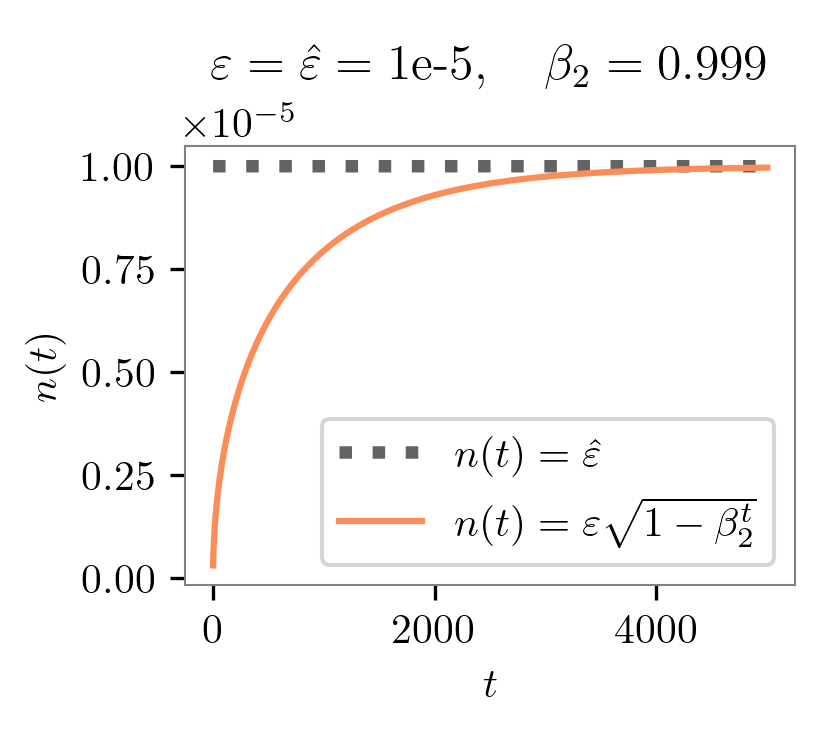
-
The above figure shows that, if we set the same
epsin pytorch adam and tensorflow adam, then pytorch-adam uses a much smaller normalization term than tensorflow-adam in the early phase of training. In other words, pytorch adam goes for more aggressive gradient updates early in the training. Our experiments support this finding, as we will demonstrate below. -
How does this impact reproducibility and performance? To align settings, we record the original query, response, and rewards from https://github.com/openai/lm-human-preferences and save them in https://huggingface.co/datasets/vwxyzjn/lm-human-preferences-debug/tree/main. I also record the metrics of the first two epochs of training with TF1’s
AdamOptimizeroptimizer as the ground truth. Below are some key metrics:OAI’s TF1 Adam PyTorch’s Adam Our custom Tensorflow-style Adam policy/approxkl 0.00037167023 0.0023672834504395723 0.000374998344341293 policy/clipfrac 0.0045572915 0.02018229104578495 0.0052083334885537624 ratio_mean 1.0051285 1.0105520486831665 1.0044583082199097 ratio_var 0.0007716546 0.005374275613576174 0.0007942612282931805 ratio_max 1.227216 1.8121057748794556 1.250215768814087 ratio_min 0.7400441 0.4011387825012207 0.7299948930740356 logprob_diff_mean 0.0047487603 0.008101251907646656 0.004073789343237877 logprob_diff_var 0.0007207897 0.004668936599045992 0.0007334011606872082 logprob_diff_max 0.20474821 0.594489574432373 0.22331619262695312 logprob_diff_min -0.30104542 -0.9134478569030762 -0.31471776962280273 -
PyTorch’s
Adamproduces a more aggressive update for some reason. Here are some evidence:- PyTorch’s
Adam‘slogprob_diff_varis 6x higher. Herelogprobs_diff = new_logprobs - logprobsis the difference between the log probability of tokens between the initial and current policy after two epochs of training. Having a largerlogprob_diff_varmeans the scale of the log probability changes is larger than that in OAI’s TF1 Adam. - PyTorch’s
Adampresents a more extreme ratio max and min. Hereratio = torch.exp(logprobs_diff). Having aratio_max=1.8121057748794556means that for some token, the probability of sampling that token is 1.8x more likely under the current policy, as opposed to only 1.2x with OAI’s TF1 Adam. - Larger
policy/approxklpolicy/clipfrac. Because of the aggressive update, the ratio gets clipped 4.4x more often, and the approximate KL divergence is 6x larger. - The aggressive update is likely gonna cause further issues. E.g.,
logprob_diff_meanis 1.7x larger in PyTorch’sAdam, which would correspond to 1.7x larger KL penalty in the next reward calculation; this could get compounded. In fact, this might be related to the famous KL divergence issue — KL penalty is much larger than it should be and the model could pay more attention and optimizes for it more instead, therefore causing negative KL divergence.
- PyTorch’s
-
Larger models get affected more. We conducted experiments comparing PyTorch’s
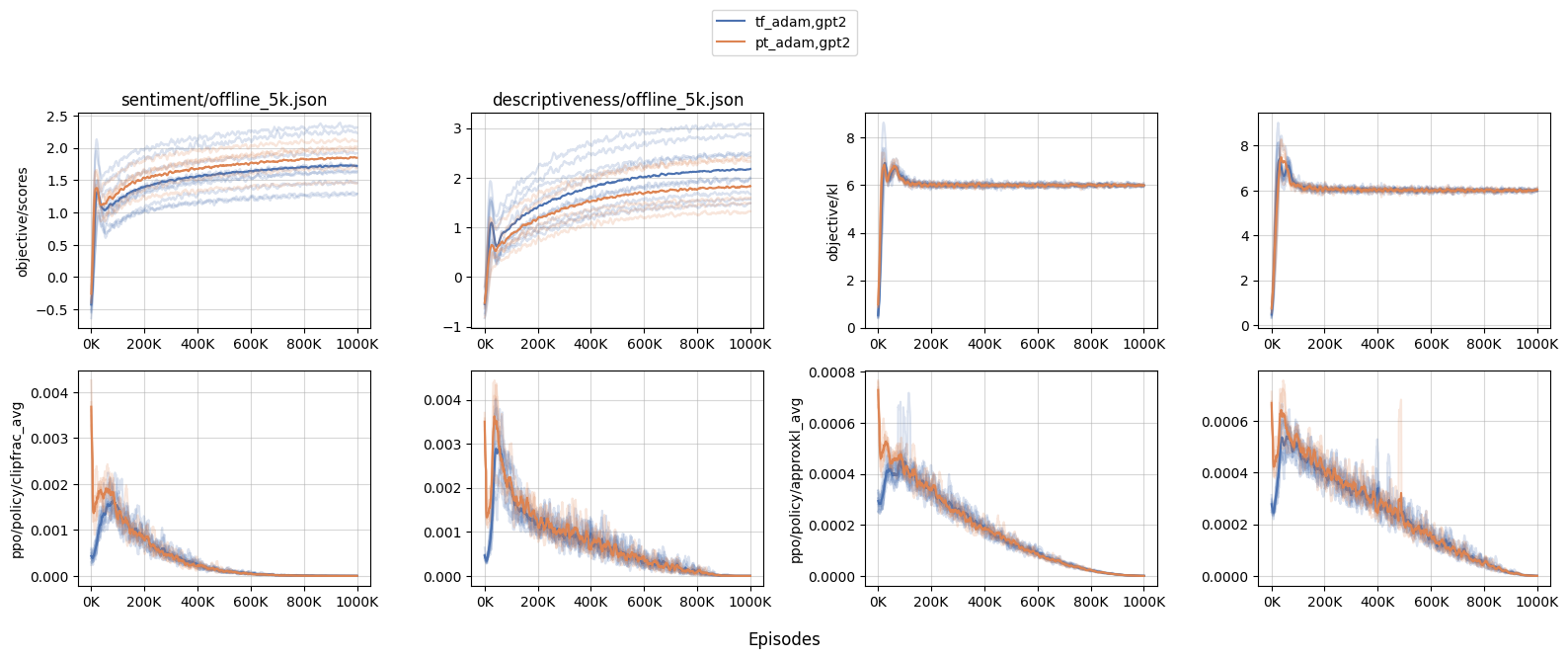
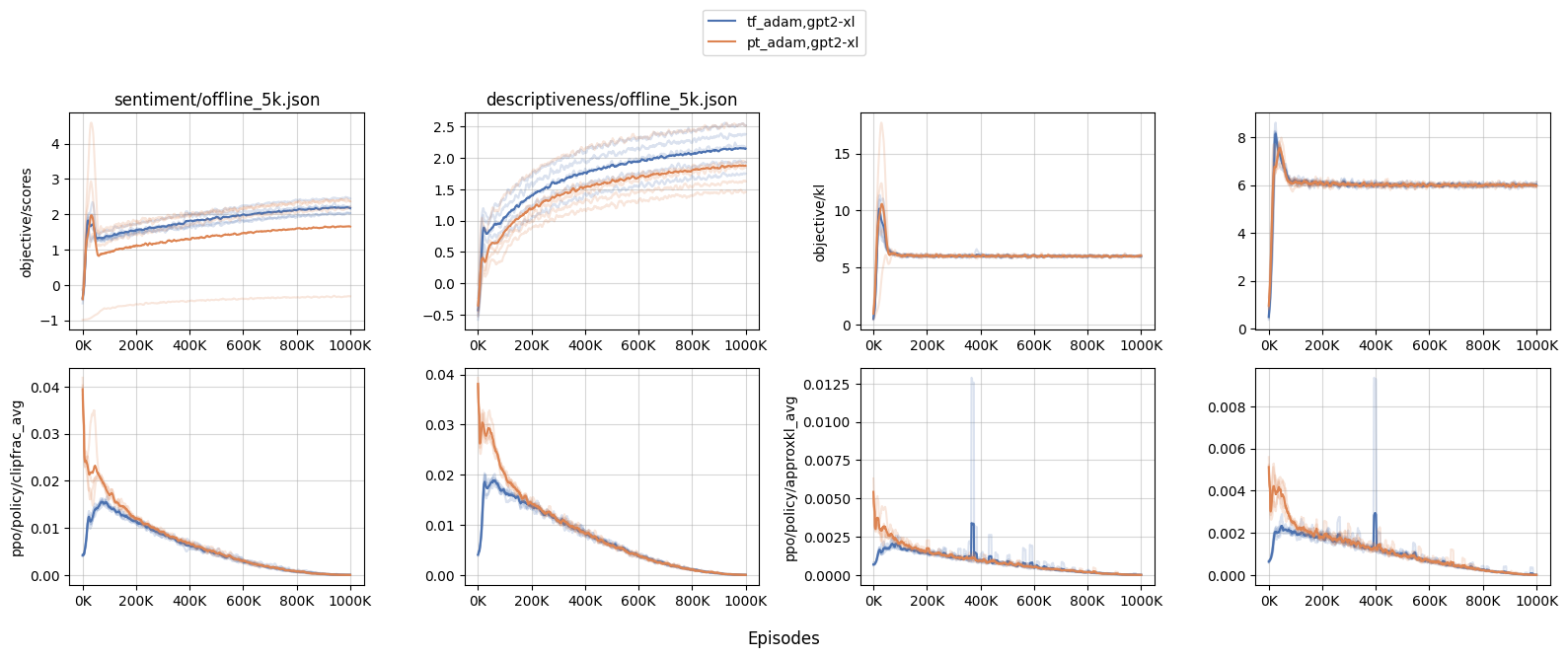
Adam(codenamept_adam) and our custom TensorFlow-style (codenametf_adam) withgpt2andgpt2-xl. We found that the performance are roughly similar undergpt2; however withgpt2-xl, we observed a more aggressive updates, meaning that larger models get affected by this issue more.- When the initial policy updates are more aggressive in
gpt2-xl, the training dynamics get affected. For example, we see a much largerobjective/klandobjective/scoresspikes withpt_adam, especially withsentiment— the biggest KL was as large as 17.5 in one of the random seeds, suggesting an undesirable over-optimization. - Furthermore, because of the larger KL, many other training metrics are affected as well. For example, we see a much larger
clipfrac(the fraction of time theratiogets clipped by PPO’s objective clip coefficient 0.2) andapproxkl.
- When the initial policy updates are more aggressive in
Limitations
Noticed this work does not try to reproduce the summarization work in CNN DM or TL;DR. This was because we found the training to be time-consuming and brittle.
The particular training run we had showed poor GPU utilization (around 30%), so it takes almost 4 days to perform a training run, which is highly expensive (only AWS sells p3dn.24xlarge, and it costs $31.212 per hour)
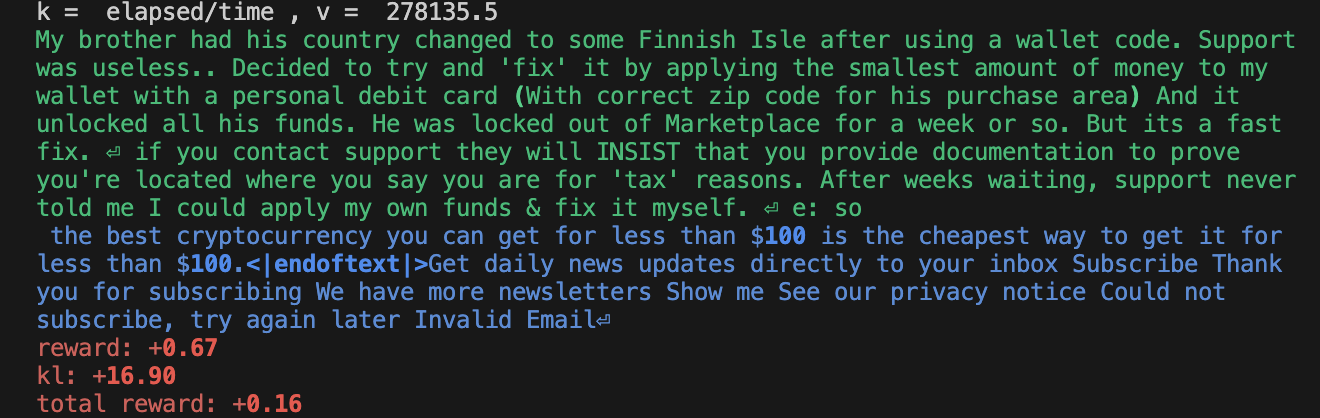
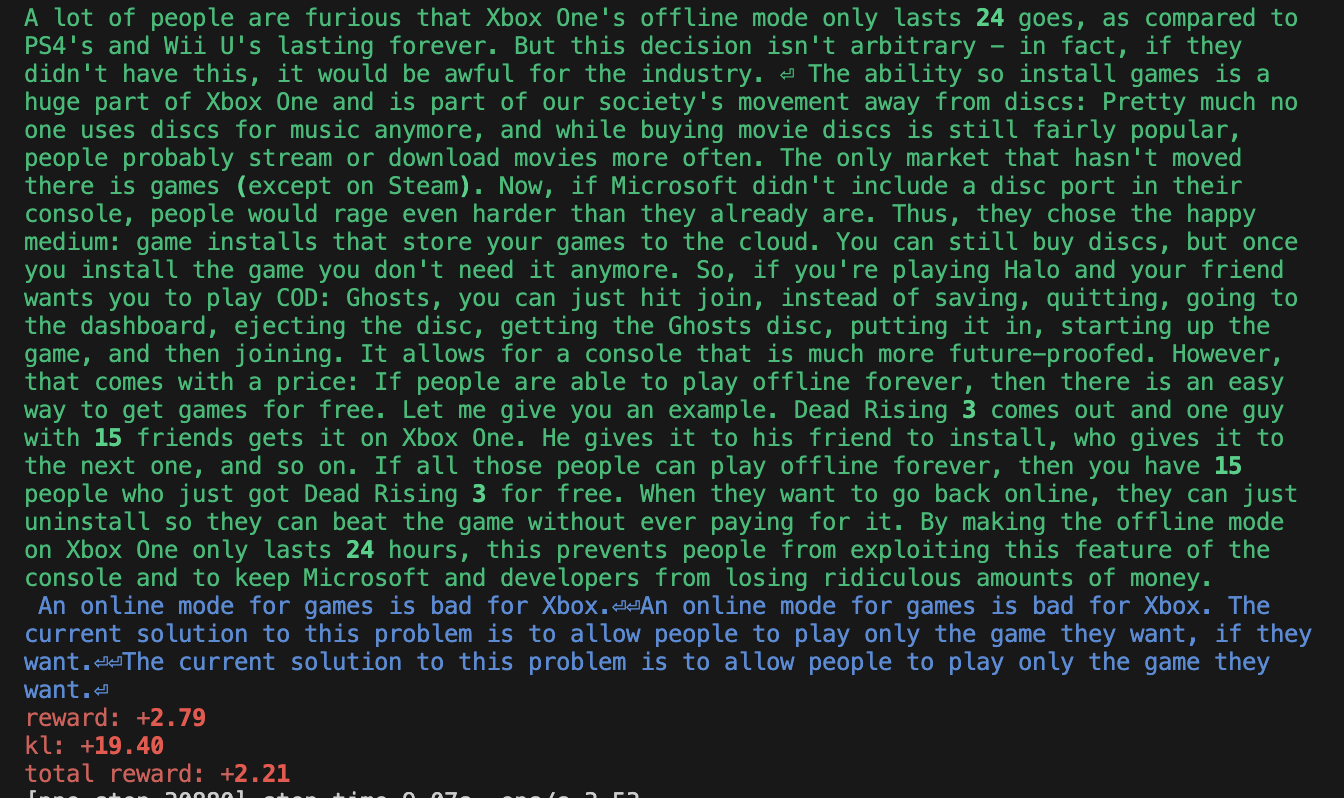
Additionally, training was brittle. While the reward goes up, we find it difficult to reproduce the “smart copier” behavior reported by Ziegler et al. (2019). Below are some sample outputs — clearly, the agent overfits somehow. See https://wandb.ai/openrlbenchmark/lm-human-preferences/runs/1ab47rqi/logs for more complete logs.
Conclusion
In this work, we took a deep dive into OAI’s original RLHF codebase and compiled a list of its implementation details. We also created a minimal base which reproduces the same learning curves as OAI’s original RLHF codebase, when the dataset and hyperparameters are controlled. Furthermore, we identify surprising implementation details such as the adam optimizer’s setting which causes aggressive updates in early RLHF training.
Acknowledgement
This work is supported by Hugging Face’s Big Science cluster 🤗. We also thank the helpful discussion with @lewtun and @natolambert.
Bibtex
@article{Huang2023implementation,
  author = {Huang, Shengyi and Liu, Tianlin and von Werra, Leandro},
  title = {The N Implementation Details of RLHF with PPO},
  journal = {Hugging Face Blog},
  year = {2023},
  note = {https://huggingface.co/blog/the_n_implementation_details_of_rlhf_with_ppo},
}
