

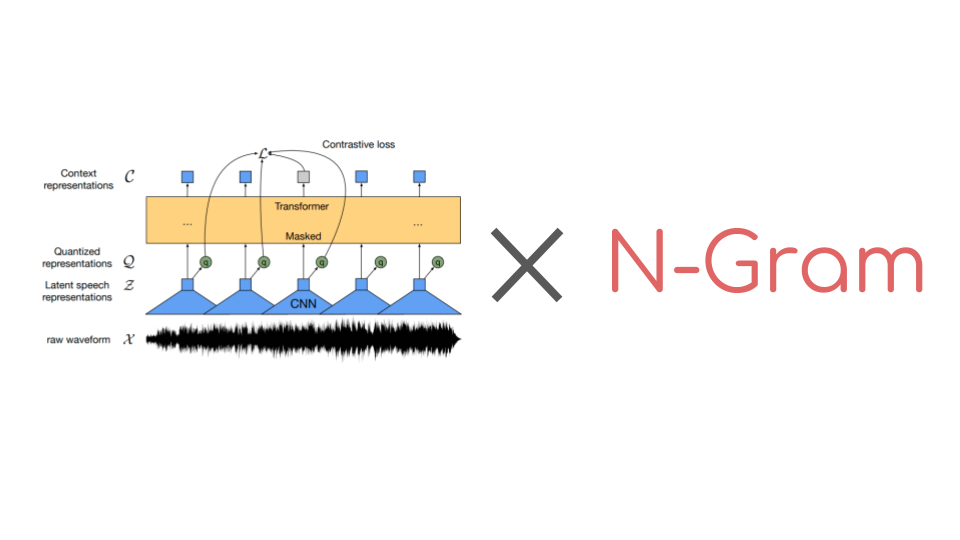

Wav2Vec2 is a popular pre-trained model for speech recognition.
Released in September 2020
by Meta AI Research, the novel architecture catalyzed progress in
self-supervised pretraining for speech recognition, e.g. G. Ng et
al., 2021, Chen et al,
2021, Hsu et al.,
2021 and Babu et al.,
2021. On the Hugging Face Hub,
Wav2Vec2’s most popular pre-trained checkpoint currently amounts to
over 250,000 monthly
downloads.
Using Connectionist Temporal Classification (CTC), pre-trained
Wav2Vec2-like checkpoints are extremely easy to fine-tune on downstream
speech recognition tasks. In a nutshell, fine-tuning pre-trained
Wav2Vec2 checkpoints works as follows:
A single randomly initialized linear layer is stacked on top of the
pre-trained checkpoint and trained to classify raw audio input to a
sequence of letters. It does so by:
- extracting audio representations from the raw audio (using CNN
layers), - processing the sequence of audio representations with a stack of
transformer layers, and, - classifying the processed audio representations into a sequence of
output letters.
Previously audio classification models required an additional language
model (LM) and a dictionary to transform the sequence of classified audio
frames to a coherent transcription. Wav2Vec2’s architecture is based on
transformer layers, thus giving each processed audio representation
context from all other audio representations. In addition, Wav2Vec2
leverages the CTC algorithm for
fine-tuning, which solves the problem of alignment between a varying
“input audio length”-to-“output text length” ratio.
Having contextualized audio classifications and no alignment problems,
Wav2Vec2 does not require an external language model or dictionary to
yield acceptable audio transcriptions.
As can be seen in Appendix C of the official
paper, Wav2Vec2 gives impressive
downstream performances on LibriSpeech without using a language model at
all. However, from the appendix, it also becomes clear that using Wav2Vec2
in combination with a language model can yield a significant
improvement, especially when the model was trained on only 10 minutes of
transcribed audio.
Until recently, the 🤗 Transformers library did not offer a simple user
interface to decode audio files with a fine-tuned Wav2Vec2 and a
language model. This has thankfully changed. 🤗 Transformers now offers
an easy-to-use integration with Kensho Technologies’ pyctcdecode
library. This blog
post is a step-by-step technical guide to explain how one can create
an n-gram language model and combine it with an existing fine-tuned
Wav2Vec2 checkpoint using 🤗 Datasets and 🤗 Transformers.
We start by:
- How does decoding audio with an LM differ from decoding audio
without an LM? - How to get suitable data for a language model?
- How to build an n-gram with KenLM?
- How to combine the n-gram with a fine-tuned Wav2Vec2 checkpoint?
For a deep dive into how Wav2Vec2 functions – which is not necessary for
this blog post – the reader is advised to consult the following
material:
1. Decoding audio data with Wav2Vec2 and a language model
As shown in 🤗 Transformers exemple docs of
Wav2Vec2,
audio can be transcribed as follows.
First, we install datasets and transformers.
pip install datasets transformers
Let’s load a small excerpt of the Librispeech
dataset to demonstrate
Wav2Vec2’s speech transcription capabilities.
from datasets import load_dataset

dataset = load_dataset("hf-internal-testing/librispeech_asr_demo", "clean", split="validation")
dataset
Output:
    Reusing dataset librispeech_asr (/root/.cache/huggingface/datasets/hf-internal-testing___librispeech_asr/clean/2.1.0/f2c70a4d03ab4410954901bde48c54b85ca1b7f9bf7d616e7e2a72b5ee6ddbfc)

    Dataset({
        features: ['file', 'audio', 'text', 'speaker_id', 'chapter_id', 'id'],
        num_rows: 73
    })
We can pick one of the 73 audio samples and listen to it.
audio_sample = dataset[2]
audio_sample["text"].lower()
Output:
he tells us that at this festive season of the year with christmas and roast beef looming before us similes drawn from eating and its results occur most readily to the mind
Having chosen a data sample, we now load the fine-tuned model and
processor.
from transformers import Wav2Vec2Processor, Wav2Vec2ForCTC

processor = Wav2Vec2Processor.from_pretrained("facebook/wav2vec2-base-100h")
model = Wav2Vec2ForCTC.from_pretrained("facebook/wav2vec2-base-100h")
Next, we process the data
inputs = processor(audio_sample["audio"]["array"], sampling_rate=audio_sample["audio"]["sampling_rate"], return_tensors="pt")
forward it to the model
import torch

with torch.no_grad():
  logits = model(**inputs).logits
and decode it
predicted_ids = torch.argmax(logits, dim=-1)
transcription = processor.batch_decode(predicted_ids)

transcription[0].lower()
Output:
'he tells us that at this festive season of the year with christmaus and rose beef looming before us simalyis drawn from eating and its results occur most readily to the mind'
Comparing the transcription to the target transcription above, we can
see that some words sound correct, but are not spelled correctly,
e.g.:
- christmaus vs. christmas
- rose vs. roast
- simalyis vs. similes
Let’s see whether combining Wav2Vec2 with an n-gram lnguage model
can help here.
First, we need to install pyctcdecode and kenlm.
pip install https://github.com/kpu/kenlm/archive/master.zip pyctcdecode
For demonstration purposes, we have prepared a new model repository
patrickvonplaten/wav2vec2-base-100h-with-lm
which contains the same Wav2Vec2 checkpoint but has an additional
4-gram language model for English.
Instead of using Wav2Vec2Processor, this time we use
Wav2Vec2ProcessorWithLM to load the 4-gram model in addition to
the feature extractor and tokenizer.
from transformers import Wav2Vec2ProcessorWithLM

processor = Wav2Vec2ProcessorWithLM.from_pretrained("patrickvonplaten/wav2vec2-base-100h-with-lm")
In constrast to decoding the audio without language model, the processor
now directly receives the model’s output logits instead of the
argmax(logits) (called predicted_ids) above. The reason is that when
decoding with a language model, at each time step, the processor takes
the probabilities of all possible output characters into account. Let’s
take a look at the dimension of the logits output.
logits.shape
Output:
torch.Size([1, 624, 32])
We can see that the logits correspond to a sequence of 624 vectors
each having 32 entries. Each of the 32 entries thereby stands for the
logit probability of one of the 32 possible output characters of the
model:
" ".join(sorted(processor.tokenizer.get_vocab()))
Output:
"' A B C D E F G H I J K L M N O P Q R S T U V W X Y Z |"
Intuitively, one can understand the decoding process of
Wav2Vec2ProcessorWithLM as applying beam search through a matrix of
size 624 $\times$ 32 probabilities while leveraging the probabilities of
the next letters as given by the n-gram language model.
OK, let’s run the decoding step again. pyctcdecode language model
decoder does not automatically convert torch tensors to numpy so
we’ll have to convert them ourselves before.
transcription = processor.batch_decode(logits.numpy()).text
transcription[0].lower()
Output:
'he tells us that at this festive season of the year with christmas and rose beef looming before us similes drawn from eating and its results occur most readily to the mind'
Cool! Recalling the words facebook/wav2vec2-base-100h without a
language model transcribed incorrectly previously, e.g.,
- christmaus vs. christmas
- rose vs. roast
- simalyis vs. similes
we can take another look at the transcription of
facebook/wav2vec2-base-100h with a 4-gram language model. 2 out of
3 errors are corrected; christmas and similes have been correctly
transcribed.
Interestingly, the incorrect transcription of rose persists. However,
this should not surprise us very much. Decoding audio without a language
model is much more prone to yield spelling mistakes, such as
christmaus or similes (those words don’t exist in the English
language as far as I know). This is because the speech recognition
system almost solely bases its prediction on the acoustic input it was
given and not really on the language modeling context of previous and
successive predicted letters . If on the other hand, we add a
language model, we can be fairly sure that the speech recognition
system will heavily reduce spelling errors since a well-trained n-gram
model will surely not predict a word that has spelling errors. But the
word rose is a valid English word and therefore the 4-gram will
predict this word with a probability that is not insignificant.
The language model on its own most likely does favor the correct word
roast since the word sequence roast beef is much more common in
English than rose beef. Because the final transcription is derived
from a weighted combination of facebook/wav2vec2-base-100h output
probabilities and those of the n-gram language model, it is quite
common to see incorrectly transcribed words such as rose.
For more information on how you can tweak different parameters when
decoding with Wav2Vec2ProcessorWithLM, please take a look at the
official documentation
here.
Some research shows that a model such as
facebook/wav2vec2-base-100h – when sufficiently large and trained on
enough data – can learn language modeling dependencies between
intermediate audio representations similar to a language model.
Great, now that you have seen the advantages adding an n-gram language
model can bring, let’s dive into how to create an n-gram and
Wav2Vec2ProcessorWithLM from scratch.
2. Getting data for your language model
A language model that is useful for a speech recognition system should
support the acoustic model, e.g. Wav2Vec2, in predicting the next word
(or token, letter) and therefore model the following distribution:
with being the next word
and being the sequence of all previous words since
the beginning of the utterance. Simply said, the language model should
be good at predicting the next word given all previously transcribed
words regardless of the audio input given to the speech recognition
system.
As always a language model is only as good as the data it is trained on.
In the case of speech recognition, we should therefore ask ourselves for
what kind of data, the speech recognition will be used for:
conversations, audiobooks, movies, speeches, , etc, …?
The language model should be good at modeling language that corresponds
to the target transcriptions of the speech recognition system. For
demonstration purposes, we assume here that we have fine-tuned a
pre-trained
facebook/wav2vec2-xls-r-300m
on Common Voice
7
in Swedish. The fine-tuned checkpoint can be found
here. Common Voice 7 is
a relatively crowd-sourced read-out audio dataset and we will evaluate
the model on its test data.
Let’s now look for suitable text data on the Hugging Face Hub. We
search all datasets for those that contain Swedish
data.
Browsing a bit through the datasets, we are looking for a dataset that
is similar to Common Voice’s read-out audio data. The obvious choices
of oscar and
mc4 might not be the most
suitable here because they:
- are generated from crawling the web, which might not be very
clean and correspond well to spoken language - require a lot of pre-processing
- are very large which is not ideal for demonstration purposes
here 😉
A dataset that seems sensible here and which is relatively clean and
easy to pre-process is
europarl_bilingual
as it’s a dataset that is based on discussions and talks of the
European parliament. It should therefore be relatively clean and
correspond well to read-out audio data. The dataset is originally designed
for machine translation and can therefore only be accessed in
translation pairs. We will only extract the text of the target
language, Swedish (sv), from the English-to-Swedish translations.
target_lang="sv"
Let’s download the data.
from datasets import load_dataset

dataset = load_dataset("europarl_bilingual", lang1="en", lang2=target_lang, split="train")
We see that the data is quite large – it has over a million
translations. Since it’s only text data, it should be relatively easy
to process though.
Next, let’s look at how the data was preprocessed when training the
fine-tuned XLS-R checkpoint in Swedish. Looking at the run.sh
file, we
can see that the following characters were removed from the official
transcriptions:
chars_to_ignore_regex = '[,?.!\-\;\:"“%‘”�—’…–]'
Let’s do the same here so that the alphabet of our language model
matches the one of the fine-tuned acoustic checkpoints.
We can write a single map function to extract the Swedish text and
process it right away.
import re

def extract_text(batch):
  text = batch["translation"][target_lang]
  batch["text"] = re.sub(chars_to_ignore_regex, "", text.lower())
  return batch
Let’s apply the .map() function. This should take roughly 5 minutes.
dataset = dataset.map(extract_text, remove_columns=dataset.column_names)
Great. Let’s upload it to the Hub so
that we can inspect and reuse it better.
You can log in by executing the following cell.
from huggingface_hub import notebook_login

notebook_login()
Output:
    Login successful
    Your token has been saved to /root/.huggingface/token
    Authenticated through git-credential store but this isn't the helper defined on your machine.
    You might have to re-authenticate when pushing to the Hugging Face Hub. Run the following command in your terminal in case you want to set this credential helper as the default

    git config --global credential.helper store
Next, we call 🤗 Hugging Face’s
push_to_hub
method to upload the dataset to the repo
"sv_corpora_parliament_processed".
dataset.push_to_hub(f"{target_lang}_corpora_parliament_processed", split="train")
That was easy! The dataset viewer is automatically enabled when
uploading a new dataset, which is very convenient. You can now directly
inspect the dataset online.
Feel free to look through our preprocessed dataset directly on
hf-test/sv_corpora_parliament_processed.
Even if we are not a native speaker in Swedish, we can see that the data
is well processed and seems clean.
Next, let’s use the data to build a language model.
3. Build an n-gram with KenLM
While large language models based on the Transformer architecture have become the standard in NLP, it is still very common to use an n-gram LM to boost speech recognition systems – as shown in Section 1.
Looking again at Table 9 of Appendix C of the official Wav2Vec2 paper, it can be noticed that using a Transformer-based LM for decoding clearly yields better results than using an n-gram model, but the difference between n-gram and Transformer-based LM is much less significant than the difference between n-gram and no LM.
E.g., for the large Wav2Vec2 checkpoint that was fine-tuned on 10min only, an n-gram reduces the word error rate (WER) compared to no LM by ca. 80% while a Transformer-based LM only reduces the WER by another 23% compared to the n-gram. This relative WER reduction becomes less, the more data the acoustic model has been trained on. E.g., for the large checkpoint a Transformer-based LM reduces the WER by merely 8% compared to an n-gram LM whereas the n-gram still yields a 21% WER reduction compared to no language model.
The reason why an n-gram is preferred over a Transformer-based LM is that n-grams come at a significantly smaller computational cost. For an n-gram, retrieving the probability of a word given previous words is almost only as computationally expensive as querying a look-up table or tree-like data storage – i.e. it’s very fast compared to modern Transformer-based language models that would require a full forward pass to retrieve the next word probabilities.
For more information on how n-grams function and why they are (still) so useful for speech recognition, the reader is advised to take a look at this excellent summary from Stanford.
Great, let’s see step-by-step how to build an n-gram. We will use the
popular KenLM library to do so. Let’s
start by installing the Ubuntu library prerequisites:
sudo apt install build-essential cmake libboost-system-dev libboost-thread-dev libboost-program-options-dev libboost-test-dev libeigen3-dev zlib1g-dev libbz2-dev liblzma-dev
before downloading and unpacking the KenLM repo.
wget -O - https://kheafield.com/code/kenlm.tar.gz | tar xz
KenLM is written in C++, so we’ll make use of cmake to build the
binaries.
mkdir kenlm/build && cd kenlm/build && cmake .. && make -j2
ls kenlm/build/bin
Great, as we can see, the executable functions have successfully
been built under kenlm/build/bin/.
KenLM by default computes an n-gram with Kneser-Ney
smooting.
All text data used to create the n-gram is expected to be stored in a
text file. We download our dataset and save it as a .txt file.
from datasets import load_dataset

username = "hf-test"

dataset = load_dataset(f"{username}/{target_lang}_corpora_parliament_processed", split="train")

with open("text.txt", "w") as file:
  file.write(" ".join(dataset["text"]))
Now, we just have to run KenLM’s lmplz command to build our n-gram,
called "5gram.arpa". As it’s relatively common in speech recognition,
we build a 5-gram by passing the -o 5 parameter.
For more information on the different n-gram LM that can be built
with KenLM, one can take a look at the official website of KenLM.
Executing the command below might take a minute or so.
kenlm/build/bin/lmplz -o 5 <"text.txt" > "5gram.arpa"
Output:
    === 1/5 Counting and sorting n-grams ===
    Reading /content/swedish_text.txt
    ----5---10---15---20---25---30---35---40---45---50---55---60---65---70---75---80---85---90---95--100
    tcmalloc: large alloc 1918697472 bytes == 0x55d40d0f0000 @  0x7fdccb1a91e7 0x55d40b2f17a2 0x55d40b28c51e 0x55d40b26b2eb 0x55d40b257066 0x7fdcc9342bf7 0x55d40b258baa
    tcmalloc: large alloc 8953896960 bytes == 0x55d47f6c0000 @  0x7fdccb1a91e7 0x55d40b2f17a2 0x55d40b2e07ca 0x55d40b2e1208 0x55d40b26b308 0x55d40b257066 0x7fdcc9342bf7 0x55d40b258baa
    ****************************************************************************************************
    Unigram tokens 42153890 types 360209
    === 2/5 Calculating and sorting adjusted counts ===
    Chain sizes: 1:4322508 2:1062772928 3:1992699264 4:3188318720 5:4649631744
    tcmalloc: large alloc 4649631744 bytes == 0x55d40d0f0000 @  0x7fdccb1a91e7 0x55d40b2f17a2 0x55d40b2e07ca 0x55d40b2e1208 0x55d40b26b8d7 0x55d40b257066 0x7fdcc9342bf7 0x55d40b258baa
    tcmalloc: large alloc 1992704000 bytes == 0x55d561ce0000 @  0x7fdccb1a91e7 0x55d40b2f17a2 0x55d40b2e07ca 0x55d40b2e1208 0x55d40b26bcdd 0x55d40b257066 0x7fdcc9342bf7 0x55d40b258baa
    tcmalloc: large alloc 3188326400 bytes == 0x55d695a86000 @  0x7fdccb1a91e7 0x55d40b2f17a2 0x55d40b2e07ca 0x55d40b2e1208 0x55d40b26bcdd 0x55d40b257066 0x7fdcc9342bf7 0x55d40b258baa
    Statistics:
    1 360208 D1=0.686222 D2=1.01595 D3+=1.33685
    2 5476741 D1=0.761523 D2=1.06735 D3+=1.32559
    3 18177681 D1=0.839918 D2=1.12061 D3+=1.33794
    4 30374983 D1=0.909146 D2=1.20496 D3+=1.37235
    5 37231651 D1=0.944104 D2=1.25164 D3+=1.344
    Memory estimate for binary LM:
    type      MB
    probing 1884 assuming -p 1.5
    probing 2195 assuming -r models -p 1.5
    trie     922 without quantization
    trie     518 assuming -q 8 -b 8 quantization
    trie     806 assuming -a 22 array pointer compression
    trie     401 assuming -a 22 -q 8 -b 8 array pointer compression and quantization
    === 3/5 Calculating and sorting initial probabilities ===
    Chain sizes: 1:4322496 2:87627856 3:363553620 4:728999592 5:1042486228
    ----5---10---15---20---25---30---35---40---45---50---55---60---65---70---75---80---85---90---95--100

    === 4/5 Calculating and writing order-interpolated probabilities ===
    Chain sizes: 1:4322496 2:87627856 3:363553620 4:728999592 5:1042486228
    ----5---10---15---20---25---30---35---40---45---50---55---60---65---70---75---80---85---90---95--100

    === 5/5 Writing ARPA model ===
    ----5---10---15---20---25---30---35---40---45---50---55---60---65---70---75---80---85---90---95--100
    ****************************************************************************************************
    Name:lmplz	VmPeak:14181536 kB	VmRSS:2199260 kB	RSSMax:4160328 kB	user:120.598	sys:26.6659	CPU:147.264	real:136.344
Great, we have built a 5-gram LM! Let’s inspect the first couple of
lines.
head -20 5gram.arpa
Output:
    \data\
    ngram 1=360208
    ngram 2=5476741
    ngram 3=18177681
    ngram 4=30374983
    ngram 5=37231651

    \1-grams:
    -6.770219		0
    0		-0.11831701
    -4.6095004	återupptagande	-1.2174699
    -2.2361007	av	-0.79668784
    -4.8163533	sessionen	-0.37327805
    -2.2251768	jag	-1.4205662
    -4.181505	förklarar	-0.56261665
    -3.5790775	europaparlamentets	-0.63611007
    -4.771945	session	-0.3647111
    -5.8043895	återupptagen	-0.3058712
    -2.8580177	efter	-0.7557702
    -5.199537	avbrottet	-0.43322718
There is a small problem that 🤗 Transformers will not be happy about
later on. The 5-gram correctly includes a “Unknown” or
well as a begin-of-sentence,
token. This sadly has to be corrected currently after the build.
We can simply add the end-of-sentence token by adding the line
0 -0.11831701 below the begin-of-sentence token and increasing
the ngram 1 count by 1. Because the file has roughly 100 million
lines, this command will take ca. 2 minutes.
with open("5gram.arpa", "r") as read_file, open("5gram_correct.arpa", "w") as write_file:
  has_added_eos = False
  for line in read_file:
    if not has_added_eos and "ngram 1=" in line:
      count=line.strip().split("=")[-1]
      write_file.write(line.replace(f"{count}", f"{int(count)+1}"))
    elif not has_added_eos and "" in line:
      write_file.write(line)
      write_file.write(line.replace("", ""))
      has_added_eos = True
    else:
      write_file.write(line)
Let’s now inspect the corrected 5-gram.
head -20 5gram_correct.arpa
Output:
    \data\
    ngram 1=360209
    ngram 2=5476741
    ngram 3=18177681
    ngram 4=30374983
    ngram 5=37231651

    \1-grams:
    -6.770219		0
    0		-0.11831701
    0		-0.11831701
    -4.6095004	återupptagande	-1.2174699
    -2.2361007	av	-0.79668784
    -4.8163533	sessionen	-0.37327805
    -2.2251768	jag	-1.4205662
    -4.181505	förklarar	-0.56261665
    -3.5790775	europaparlamentets	-0.63611007
    -4.771945	session	-0.3647111
    -5.8043895	återupptagen	-0.3058712
    -2.8580177	efter	-0.7557702
Great, this looks better! We’re done at this point and all that is left
to do is to correctly integrate the "ngram" with
pyctcdecode and
🤗 Transformers.
4. Combine an n-gram with Wav2Vec2
In a final step, we want to wrap the 5-gram into a
Wav2Vec2ProcessorWithLM object to make the 5-gram boosted decoding
as seamless as shown in Section 1. We start by downloading the currently
“LM-less” processor of
xls-r-300m-sv.
from transformers import AutoProcessor

processor = AutoProcessor.from_pretrained("hf-test/xls-r-300m-sv")
Next, we extract the vocabulary of its tokenizer as it represents the
"labels" of pyctcdecode‘s BeamSearchDecoder class.
vocab_dict = processor.tokenizer.get_vocab()
sorted_vocab_dict = {k.lower(): v for k, v in sorted(vocab_dict.items(), key=lambda item: item[1])}
The "labels" and the previously built 5gram_correct.arpa file is all
that’s needed to build the decoder.
from pyctcdecode import build_ctcdecoder

decoder = build_ctcdecoder(
    labels=list(sorted_vocab_dict.keys()),
    kenlm_model_path="5gram_correct.arpa",
)
Output:
    Found entries of length > 1 in alphabet. This is unusual unless style is BPE, but the alphabet was not recognized as BPE type. Is this correct?
    Unigrams and labels don't seem to agree.
We can safely ignore the warning and all that is left to do now is to
wrap the just created decoder, together with the processor’s
tokenizer and feature_extractor into a Wav2Vec2ProcessorWithLM
class.
from transformers import Wav2Vec2ProcessorWithLM

processor_with_lm = Wav2Vec2ProcessorWithLM(
    feature_extractor=processor.feature_extractor,
    tokenizer=processor.tokenizer,
    decoder=decoder
)
We want to directly upload the LM-boosted processor into the model
folder of
xls-r-300m-sv to have
all relevant files in one place.
Let’s clone the repo, add the new decoder files and upload them
afterward. First, we need to install git-lfs.
sudo apt-get install git-lfs tree
Cloning and uploading of modeling files can be done conveniently with
the huggingface_hub‘s Repository class.
More information on how to use the huggingface_hub to upload any
files, please take a look at the official
docs.
from huggingface_hub import Repository

repo = Repository(local_dir="xls-r-300m-sv", clone_from="hf-test/xls-r-300m-sv")
Output:
Cloning https://huggingface.co/hf-test/xls-r-300m-sv into local empty directory.
Having cloned xls-r-300m-sv, let’s save the new processor with LM
into it.
processor_with_lm.save_pretrained("xls-r-300m-sv")
Let’s inspect the local repository. The tree command conveniently can
also show the size of the different files.
tree -h xls-r-300m-sv/
Output:
    xls-r-300m-sv/
    ├── [  23]  added_tokens.json
    ├── [ 401]  all_results.json
    ├── [ 253]  alphabet.json
    ├── [2.0K]  config.json
    ├── [ 304]  emissions.csv
    ├── [ 226]  eval_results.json
    ├── [4.0K]  language_model
    │   ├── [4.1G]  5gram_correct.arpa
    │   ├── [  78]  attrs.json
    │   └── [4.9M]  unigrams.txt
    ├── [ 240]  preprocessor_config.json
    ├── [1.2G]  pytorch_model.bin
    ├── [3.5K]  README.md
    ├── [4.0K]  runs
    │   └── [4.0K]  Jan09_22-00-50_brutasse
    │       ├── [4.0K]  1641765760.8871996
    │       │   └── [4.6K]  events.out.tfevents.1641765760.brutasse.31164.1
    │       ├── [ 42K]  events.out.tfevents.1641765760.brutasse.31164.0
    │       └── [ 364]  events.out.tfevents.1641794162.brutasse.31164.2
    ├── [1.2K]  run.sh
    ├── [ 30K]  run_speech_recognition_ctc.py
    ├── [ 502]  special_tokens_map.json
    ├── [ 279]  tokenizer_config.json
    ├── [ 29K]  trainer_state.json
    ├── [2.9K]  training_args.bin
    ├── [ 196]  train_results.json
    ├── [ 319]  vocab.json
    └── [4.0K]  wandb
        ├── [  52]  debug-internal.log -> run-20220109_220240-1g372i3v/logs/debug-internal.log
        ├── [  43]  debug.log -> run-20220109_220240-1g372i3v/logs/debug.log
        ├── [  28]  latest-run -> run-20220109_220240-1g372i3v
        └── [4.0K]  run-20220109_220240-1g372i3v
            ├── [4.0K]  files
            │   ├── [8.8K]  conda-environment.yaml
            │   ├── [140K]  config.yaml
            │   ├── [4.7M]  output.log
            │   ├── [5.4K]  requirements.txt
            │   ├── [2.1K]  wandb-metadata.json
            │   └── [653K]  wandb-summary.json
            ├── [4.0K]  logs
            │   ├── [3.4M]  debug-internal.log
            │   └── [8.2K]  debug.log
            └── [113M]  run-1g372i3v.wandb

    9 directories, 34 files
As can be seen the 5-gram LM is quite large – it amounts to more than
4 GB. To reduce the size of the n-gram and make loading faster,
kenLM allows converting .arpa files to binary ones using the
build_binary executable.
Let’s make use of it here.
kenlm/build/bin/build_binary xls-r-300m-sv/language_model/5gram_correct.arpa xls-r-300m-sv/language_model/5gram.bin
Output:
    Reading xls-r-300m-sv/language_model/5gram_correct.arpa
    ----5---10---15---20---25---30---35---40---45---50---55---60---65---70---75---80---85---90---95--100
    ****************************************************************************************************
    SUCCESS
Great, it worked! Let’s remove the .arpa file and check the size of
the binary 5-gram LM.
rm xls-r-300m-sv/language_model/5gram_correct.arpa && tree -h xls-r-300m-sv/
Output:
    xls-r-300m-sv/
    ├── [  23]  added_tokens.json
    ├── [ 401]  all_results.json
    ├── [ 253]  alphabet.json
    ├── [2.0K]  config.json
    ├── [ 304]  emissions.csv
    ├── [ 226]  eval_results.json
    ├── [4.0K]  language_model
    │   ├── [1.8G]  5gram.bin
    │   ├── [  78]  attrs.json
    │   └── [4.9M]  unigrams.txt
    ├── [ 240]  preprocessor_config.json
    ├── [1.2G]  pytorch_model.bin
    ├── [3.5K]  README.md
    ├── [4.0K]  runs
    │   └── [4.0K]  Jan09_22-00-50_brutasse
    │       ├── [4.0K]  1641765760.8871996
    │       │   └── [4.6K]  events.out.tfevents.1641765760.brutasse.31164.1
    │       ├── [ 42K]  events.out.tfevents.1641765760.brutasse.31164.0
    │       └── [ 364]  events.out.tfevents.1641794162.brutasse.31164.2
    ├── [1.2K]  run.sh
    ├── [ 30K]  run_speech_recognition_ctc.py
    ├── [ 502]  special_tokens_map.json
    ├── [ 279]  tokenizer_config.json
    ├── [ 29K]  trainer_state.json
    ├── [2.9K]  training_args.bin
    ├── [ 196]  train_results.json
    ├── [ 319]  vocab.json
    └── [4.0K]  wandb
        ├── [  52]  debug-internal.log -> run-20220109_220240-1g372i3v/logs/debug-internal.log
        ├── [  43]  debug.log -> run-20220109_220240-1g372i3v/logs/debug.log
        ├── [  28]  latest-run -> run-20220109_220240-1g372i3v
        └── [4.0K]  run-20220109_220240-1g372i3v
            ├── [4.0K]  files
            │   ├── [8.8K]  conda-environment.yaml
            │   ├── [140K]  config.yaml
            │   ├── [4.7M]  output.log
            │   ├── [5.4K]  requirements.txt
            │   ├── [2.1K]  wandb-metadata.json
            │   └── [653K]  wandb-summary.json
            ├── [4.0K]  logs
            │   ├── [3.4M]  debug-internal.log
            │   └── [8.2K]  debug.log
            └── [113M]  run-1g372i3v.wandb

    9 directories, 34 files
Nice, we reduced the n-gram by more than half to less than 2GB now. In
the final step, let’s upload all files.
repo.push_to_hub(commit_message="Upload lm-boosted decoder")
Output:
    Git LFS: (1 of 1 files) 1.85 GB / 1.85 GB
    Counting objects: 9, done.
    Delta compression using up to 2 threads.
    Compressing objects: 100% (9/9), done.
    Writing objects: 100% (9/9), 1.23 MiB | 1.92 MiB/s, done.
    Total 9 (delta 3), reused 0 (delta 0)
    To https://huggingface.co/hf-test/xls-r-300m-sv
       27d0c57..5a191e2  main -> main
That’s it. Now you should be able to use the 5gram for LM-boosted
decoding as shown in Section 1.
As can be seen on xls-r-300m-sv‘s model
card
our 5gram LM-boosted decoder yields a WER of 18.85% on Common Voice’s 7
test set which is a relative performance of ca. 30% 🔥.
